
AURATON Libra U Wireless Digital Room Thermostat User Manual









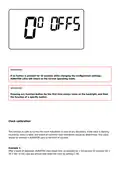



Option 1:
If, for some reason, you want to stop the current program at a given moment and extend the day or
night temperature, you can do it manually, but for not longer than 24 hours. To do this you should:
Hold the
r
button for 3 seconds. Then, using the knob, select the number of hours of manual
operation (24 hours at the most) and confirm the setting using the button.
AURATON Libra will wait until you choose one of the two temperatures which it should maintain (day
or night). The change is made by using the
button.
r
button or the knob. Confirm the selection using the
Option 2:
If you want to suspend the execution of a given program, e.g. due to a party lasting longer than
expected, but AURATON Libra has already started lowering the temperature for the night (the T
symbol has appeared on the display), you should:
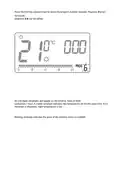
Press the
r
button, the display will show the symbols of a V and the S. The day temperature will
then be maintained until the next temperature change carried out by the program.
To withdraw the above-mentioned action press the button. The
display.
r
symbol will disappear from the
Similarly, if the program is using the day temperature but you want it to implement the night
temperature immediately, you should:
Press the
r
button. The display will show the symbols of a V and the T. The night temperature will
then be maintained until the next temperature change carried out by the program. To withdraw the
above-mentioned action press the button. The
r
symbol will disappear from the display.
Anti-freezing temperature
U
In the event of being away for a long time, it is possible to turn on the anti-freezing temperature
mode. It allows you to avoid the unpleasant consequences of water freezing in the heating system by
automatically setting the temperature to 7°C. To set the anti-freezing program, simply select
program 0 for the desired day of the week.

Resetting AURATON Libra
To perform a reset, remove the battery and wait until the data on the display disappears.
Master reset of AURATON Libra
MASTER RESET is performed by pressing and holding the button and at the same time installing
the batteries. This causes AURATON Libra to return to its factory settings.
IMPORTANT:
All user-defined programs will be removed!
Configuration settings
Configuration settings are set one after another:
heating mode/
air-conditioning mode
Changes
in hysteresis

| General | Details |
|---|---|
| Name | AURATON Libra U Wireless Digital Room Thermostat User Manual |
| Make | AURATON |
| Language | English |
| Filetype | PDF (Download) |
| File size | 0.3 MB |
 (1 votes, average: 5.00 out of 5)
 Loading...

AURATON Libra Room Thermostat User Manual

AURATON Cetus P Wired Thermostat User Manual

19810-102 Digital Room Thermostat Libra Auraton Weekly User Manual

AURATON Apus Set Wireless Thermostat with Electronic Radiator Head User Manual


ELKO ep TER-4 Double Thermostat Owner’s Manual

Zehnder ComfoControl Ease Installation Guide

autani 1000172-01 Wave Thermostat Installation Guide

Honeywell RTH6360 Series Programmable Thermostat Installation Guide

GENERAL LIFE SENNA 300 Wired Room Thermostat User Manual

Stiebel Eltron RTA-3000 S2 Thermostat Installation Guide

Dimplex X3D Wireless Programmable Thermostat Instruction Manual

Honeywell TH2320WF4011 FocusPRO Smart S200 Series Thermostat User Guide

WHITE-RODGERS 1F86-444 Non Programmable Electronic Digital Thermostat Instruction Manual

EBECO EB-Therm 500 Floor Heating Thermostat Instruction Manual