×
- 1. Auraton Libra (User Manual Ver. 20220222 → Weekly, Wired Thermostat → Independently Adjustable Temperatures → Independent Temperature Programs → Backlit Lcd Display)
- 2. Description Of The Auraton Libra (Weekly, Wired Thermostat → Lcd Display → Setting Knob With Integrated Button → Mode Selection Buttons → Selection Button → Date/time/day Of Week Setting Button → Temperature Setting Button)
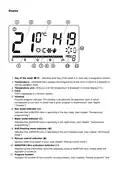
- 3. Day Of The Week (Temperature → Temperature Unit → Clock → Timeline → Day Mode Indicator → Night Mode Indicator)
- 4. Dead Batteries (Important → Choosing The Right Location For Auraton Libra)
- 5. Connecting Cables To Auraton Libra
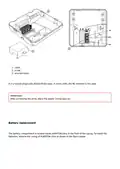
- 6. Cover (Screw → Wire Terminals → Important → Battery Replacement)
- 7. Important: (Aaa 1.5 V Battery Socket)
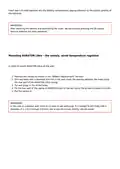
- 8. Important: (Mounting Auraton Libra The Weekly, Wired Temperature Regulator)
- 9. Putting The Casing Back On: Important
- 10. Front Casing (Rear Casing → Pins → The Socket Of The Pin Connector Or The Place Where The Pins Contact The Board → Important → Turning Auraton Libra On For The First Time)
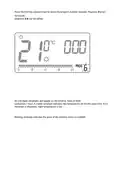
- 11. The Screen Means That The Device Is Currently In The Edit Mode. Turn The Knob To The Left Or Right To Set The Required Hour And Confirm Usin…
- 12. Flashing Symbol Of The Day Of The Week (Important → Setting The Clock And Day Of The Week)
- 13. Press The M Button (Setting The Hour → Setting The Minute)
- 14. A Flashing Symbol Of The Day Of The Week Appears In The Upper Left Corner. Turn The Knob To The Left Or Right To Set The Day And Confirm The…
- 15. Programming Day And Night Temperatures (Day Temperature → Night Temperature)
- 16. Introduction To Programming (Timeline)
- 17. Factory Programs (Program No. 0 Anti-freezing → Program No. 1 Weekly → Program No. 2 Weekend → Programs No. 3, 4,., 8 User-defined Programs → Programming → Weekly Programming)
- 18. Press The M Key As Many Times As Required To Set The Day Of The Week For The Program. Press The H Key Several Times And Select The Program N…
- 19. Modyfying User-defined Programs (To Set The Program:)
- 20. Press The M Key As Many Times As Required To Set The Day Of The Week For The Program.
- 21. Press The H Key Several Times To Select The Program Number Required. Programs 0-2 Are Factory Set, Programs 3-8 Can Be Edited. All (24) Blac…
- 22. Press The R Key To Select Day Or Night Temperature. Then, Select The Time Interval For The Temperature Selected With The Knob.
- 23. By Pressing The R Key And Selecting Time Interval The Entire Program Is Modified.
- 24. Option 1 (Option 2 → Anti-freezing Temperature)
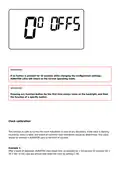
- 25. Changes In The Delay (Clock Calibration → Heating Mode/air-conditioning Mode → Changes In Hysteresis)
- 26. Hysteresis Change Mode (Changes In The Delay)
- 27. Delay Change Mode (Offset Change)
- 28. Important: (Clock Calibration)
- 29. Important: (Pwm Operating Mode)
- 30. Temperature (Time → Set Temperature → Room Temperature → Important → Additional Remarks)
- 31. Pressing Function Buttons (Using The Knob → Programming Functions → Auraton Libra Connection Schematics)
- 32. Heating Device (Electric Heating Device (max 230 V Ac, 16 A))
- 33. Cleaning And Maintenance (Technical Specifications → Disposing Of The Devices)
- 34. Contact And Address Of The Manufacturer (Compliance With Directive 2014/53/eu And 2011/65/eu → User Manual → Declaration Of Conformity)
×
AURATON Libra U Wireless Digital Room Thermostat User Manual
| General | Details |
|---|---|
| Name | AURATON Libra U Wireless Digital Room Thermostat User Manual |
| Make | AURATON |
| Language | English |
| Filetype | PDF (Download) |
| File size | 0.3 MB |

AURATON Libra Room Thermostat User Manual

AURATON Cetus P Wired Thermostat User Manual

19810-102 Digital Room Thermostat Libra Auraton Weekly User Manual

AURATON Apus Set Wireless Thermostat with Electronic Radiator Head User Manual


NEOMITIS PRG7 RF 7 Day Two Channel Programmer with RF Room Thermostat Instruction Manual

Sinum R-S3 Room Thermostat Owner’s Manual

EZAIoT 20230324 IPS Colorful LCD Screen Touch Smart Thermostat User Manual

IMIT TA5 Mechanical Thermostat User Manual

Honeywell RTH7500 7-Day Programmable Thermostat Installation Guide

Beca BAC-8000 Series Thermostat User Guide

ecobee M5A Smart Wi-Fi Thermostat User Guide

Vaillant VRT15 Room Thermostat User Guide

SALUS RT310i Smart Phone Controlled Programmable Thermostat Installation Guide

ENSTO ECO16BT-E Floor Heating Thermostat User Guide
Table of Contents
- 1. Auraton Libra - User Manual Ver. 20220222 →
- 2. Description Of The Auraton Libra - Weekly, Wired Thermostat →
- 3. Day Of The Week - Temperature →
- 4. Dead Batteries - Important →
- 5. Connecting Cables To Auraton Libra →
- 6. Cover - Screw →
- 7. Important: - Aaa 1.5 V Battery Socket →
- 8. Important: - Mounting Auraton Libra The Weekly, Wired Temper... →
- 9. Putting The Casing Back On: Important →
- 10. Front Casing - Rear Casing →
- 11. The Screen Means That The Device Is Currently In The Edit Mo... →
- 12. Flashing Symbol Of The Day Of The Week - Important →
- 13. Press The M Button - Setting The Hour →
- 14. A Flashing Symbol Of The Day Of The Week Appears In The Uppe... →
- 15. Programming Day And Night Temperatures - Day Temperature →
- 16. Introduction To Programming - Timeline →
- 17. Factory Programs - Program No. 0 Anti-freezing →
- 18. Press The M Key As Many Times As Required To Set The Day Of ... →
- 19. Modyfying User-defined Programs - To Set The Program: →
- 20. Press The M Key As Many Times As Required To Set The Day Of ... →
- 21. Press The H Key Several Times To Select The Program Number R... →
- 22. Press The R Key To Select Day Or Night Temperature. Then, Se... →
- 23. By Pressing The R Key And Selecting Time Interval The Entire... →
- 24. Option 1 - Option 2 →
- 25. Changes In The Delay - Clock Calibration →
- 26. Hysteresis Change Mode - Changes In The Delay →
- 27. Delay Change Mode - Offset Change →
- 28. Important: - Clock Calibration →
- 29. Important: - Pwm Operating Mode →
- 30. Temperature - Time →
- 31. Pressing Function Buttons - Using The Knob →
- 32. Heating Device - Electric Heating Device (max 230 V Ac, 16 A... →
- 33. Cleaning And Maintenance - Technical Specifications →
- 34. Contact And Address Of The Manufacturer - Compliance With Di... →