
AURATON Libra U Wireless Digital Room Thermostat User Manual


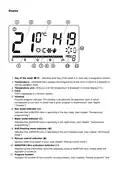











The delay change mode is signaled by a flashing 90:SE. By turning the knob left or right, we set the
delay.
90:SE – delay of 90 s (preset),
0:SE – no delay
Confirm your choice by pressing the button. AURATON Libra will proceed to change the next
parameter.
Offset change
Offset allows you to calibrate temperature indications with a tolerance of ± 3 °C. AURATON Libra may
for example show that the temperature in the room is 23 °C, while a regular room thermometer next
to it may show 24 °C. Changing the offset by +1 degree, will make AURATON Libra show the same
temperature as the room thermometer.
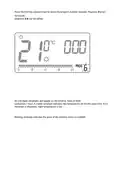
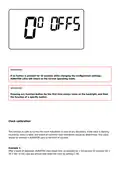
The offset change mode is signaled by a flashing OFFS. By turning the knob to the left or right, you
can set the desired value in the range from -3.0 to 3.0 (preset – 0.0). Confirm your choice by pressing
the button. AURATON Libra will return to the normal operating mode.

| General | Details |
|---|---|
| Name | AURATON Libra U Wireless Digital Room Thermostat User Manual |
| Make | AURATON |
| Language | English |
| Filetype | PDF (Download) |
| File size | 0.3 MB |
 (1 votes, average: 5.00 out of 5)
 Loading...

AURATON Libra Room Thermostat User Manual

AURATON Cetus P Wired Thermostat User Manual

19810-102 Digital Room Thermostat Libra Auraton Weekly User Manual

AURATON Apus Set Wireless Thermostat with Electronic Radiator Head User Manual


Schneider Electric TC900 Series Space Logic Thermostat Instruction Manual

GENERAL ARUNA FH25S Underfloor Heating Thermostat User Manual

INKBIRD C216T Plug In Timer Thermostat User Manual

TFC Group OP-WFSTAT Wi-Fi Programmable Thermostat User Guide

Moes WIFI 002 Series Wi-Fi Thermostat Instruction Manual

BEOK CONTROLS BOT-323W Series Boiler Thermostat Instruction Manual

Honeywell Lyric Thermostat THP2400A1019 Installation Guide

Honeywell TH8321WF02 Vision Pro WiFi Programmable Thermostat User Manual

Danfoss CET2000B-RF + RX1-S + CS2 Thermostat User Guide

Uponor T-247 BUS Smatrix Base Thermostat Installation Guide