
AURATON Libra U Wireless Digital Room Thermostat User Manual













| General | Details |
|---|---|
| Name | AURATON Libra U Wireless Digital Room Thermostat User Manual |
| Make | AURATON |
| Language | English |
| Filetype | PDF (Download) |
| File size | 0.3 MB |
 (1 votes, average: 5.00 out of 5)
 Loading...


Auraton Libra U Manual: Questions and Answers
Auraton Libra U specifications
| Power supply | 2 x AAA (2 x 1.5 V), alkaline |
| Differential | ±0,2 °C / ±0,4 °C / PWM |
| Operating temperature | 0 – 45 °C |
| Frost protection | 7 °C |
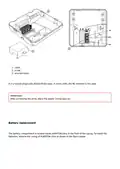
Where are the wire terminals on Auraton Libra U located?
On the back, underneath the plastic casing. User Manual, p. 5
Is the NC terminal typically used in this type of relay?
No, in most cases the NC terminal is not used. User Manual, p. 6
What's the difference between day and night temperature on Auraton Libra U?
Day temperature (S) applies during programmed intervals; night temperature (T) applies at all other times. Night temperature can't exceed day temperature. User Manual, p. 17
What do the black rectangles mean on Auraton Libra's display timeline?
Black rectangles above the timeline indicate hours when day temperature has been programmed instead of night temperature. User Manual, p. 16
How many user-defined programs does Auraton Libra U support?
Six user-defined programs, numbered 3 through 8. Factory programs 0, 1 and 2 cannot be modified. User Manual, p. 17
What do the four buttons on Auraton Libra control?
Mode selection buttons S and T switch between day and night modes. The selection button and date/time/day button navigate settings.
| Button | Function |
|---|---|
| S | Day mode (comfort) |
| T | Night mode (economic) |
| Selection button | Navigate options |
| Date/time/day button | Set date, time, day of week |
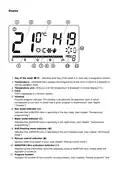
What do the icons on Auraton Libra U's display mean?
| Icon | Meaning |
|---|---|
| S | Day mode is active |
| T | Night mode is active |
| U | Anti-freezing mode is active |
| V | Manual control mode is active |
| Y | Thermostat is powered on |
| X | Battery voltage is low; replace batteries soon |
How do I know the thermostat powered on correctly?
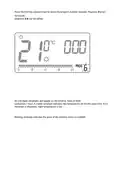
The LCD screen displays all segments for one second, then shows the software version number. User Manual, p. 10
Auraton Libra U compared with other room thermostats
| Specification | Auraton Libra U | EPH Controls CP4B | Seitron Wi-Time | EMOS P5604 |
|---|---|---|---|---|
| Power supply | 2 x AAA (2 x 1.5 V), alkaline | 2 x AA Alkaline Batteries | 85 .. 264 V~ 50 .. 60 Hz | 2× 1.5 V AAA batteries |
| Differential | ±0,2 °C / ±0,4 °C / PWM | 0.4˚C | 0,1°C ..5°C (Default0,2°C) | 0.2 °C |
| Operating temperature | 0 – 45 °C | 0 … 45˚C | 0°C .. +40°C | 0 °C to 40 °C |
More Auraton thermostat manuals


