
AURATON Libra U Wireless Digital Room Thermostat User Manual


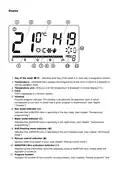







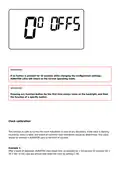




A flashing symbol of the day of the week appears in the upper left corner. Turn the knob to the left or
right to set the day and confirm the selection using the button.
IMPORTANT:
If no button is pressed for 60 seconds in the initial edit mode, 12:00 o’clock and Monday, as the
day of the week, will be set automatically.
IMPORTANT:
When programming any other functions, not pressing any button for 10 seconds is equivalent to
using the button.
Setting the clock and day of the week
To set the clock:

| General | Details |
|---|---|
| Name | AURATON Libra U Wireless Digital Room Thermostat User Manual |
| Make | AURATON |
| Language | English |
| Filetype | PDF (Download) |
| File size | 0.3 MB |
 (1 votes, average: 5.00 out of 5)
 Loading...

AURATON Libra Room Thermostat User Manual

AURATON Cetus P Wired Thermostat User Manual

19810-102 Digital Room Thermostat Libra Auraton Weekly User Manual

AURATON Apus Set Wireless Thermostat with Electronic Radiator Head User Manual


Haswill Electronics AL8010H Thermostat User Guide

4512673 Heatit ZM Thermostat 16A User Guide

Honeywell TH5220D Non-Programmable Digital Thermostat Installation Guide

Beca BHP-8000 C Room Thermostat User Guide

SALUS CONTROLS HTR-RF Smart Home Dial Thermostat User Guide

hager TX320 Room Thermostat User Manual

WHITE-RODGERS 1F95-1277 Universal Thermostat Owner’s Manual

Honeywell CM921 Wireless Programmable Room Thermostat User Guide

CLIMATE MC-LR-THERMOS Wireless Thermostat User Manual

DAIKIN DTST-ONE-ADA-A One Lite Connected Thermostat User Guide