
AURATON Libra U Wireless Digital Room Thermostat User Manual


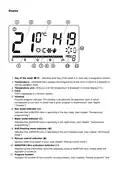











The delay change mode is signaled by a flashing 90:SE. By turning the knob left or right, we set the
delay.
90:SE – delay of 90 s (preset),
0:SE – no delay
Confirm your choice by pressing the button. AURATON Libra will proceed to change the next
parameter.
Offset change
Offset allows you to calibrate temperature indications with a tolerance of ± 3 °C. AURATON Libra may
for example show that the temperature in the room is 23 °C, while a regular room thermometer next
to it may show 24 °C. Changing the offset by +1 degree, will make AURATON Libra show the same
temperature as the room thermometer.
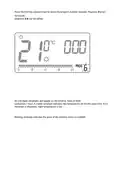
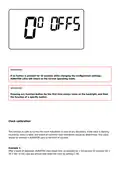
The offset change mode is signaled by a flashing OFFS. By turning the knob to the left or right, you
can set the desired value in the range from -3.0 to 3.0 (preset – 0.0). Confirm your choice by pressing
the button. AURATON Libra will return to the normal operating mode.

| General | Details |
|---|---|
| Name | AURATON Libra U Wireless Digital Room Thermostat User Manual |
| Make | AURATON |
| Language | English |
| Filetype | PDF (Download) |
| File size | 0.3 MB |
 (1 votes, average: 5.00 out of 5)
 Loading...

AURATON Libra Room Thermostat User Manual

AURATON Cetus P Wired Thermostat User Manual

19810-102 Digital Room Thermostat Libra Auraton Weekly User Manual

AURATON Apus Set Wireless Thermostat with Electronic Radiator Head User Manual


GENERAL LIFE MITRA 250 RF Digital Room Thermostat User Manual

GENERAL FH101S Underfloor Heating Thermostat User Manual

aube Electronic Thermostat TH131 Owner’s Manual

MI-HEAT MST1 Room Thermostat for Underfloor Heating User Manual

Wagner AL8010F Refrigeration or Heating Digital Thermostat User Manual

Vaillant senso Comfort Thermostat Instructions

WHITE RODGERS 1E30-373 Low Voltage Thermostat Instruction Manual

devolo 09507 HomeControl Room Thermostat User Guide

Danfoss RT 107 Series Thermostat Installation Guide

GENERAL LIFE Mitra 260S RF Wireless Room Thermostat User Manual