
AURATON Libra U Wireless Digital Room Thermostat User Manual


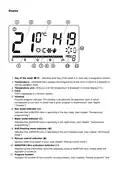





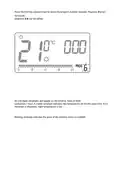


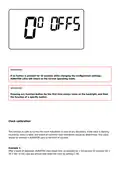




A flashing symbol of the day of the week appears in the upper left corner. Turn the knob to the
left or right to set the day and confirm the selection using the button.
IMPORTANT:
You can also switch by pressing the
m
button.
Default program setting
Monday – Friday:
The heating device maintains the day temperature (S) from 05:00 to 8:00 A.M. and from
3:00 to 11:00 P.M.
Saturday – Sunday:
The heating device maintains the day temperature (S) from 06:00 A.M. to 11:00 P.M.
default temperature settings:
S day temperature – 21,0°C

| General | Details |
|---|---|
| Name | AURATON Libra U Wireless Digital Room Thermostat User Manual |
| Make | AURATON |
| Language | English |
| Filetype | PDF (Download) |
| File size | 0.3 MB |
 (1 votes, average: 5.00 out of 5)
 Loading...

AURATON Libra Room Thermostat User Manual

AURATON Cetus P Wired Thermostat User Manual

19810-102 Digital Room Thermostat Libra Auraton Weekly User Manual

AURATON Apus Set Wireless Thermostat with Electronic Radiator Head User Manual


EPH CONTROLS RFC-RF RF Room Cylinder Thermostat Instruction Manual

hager TX320 Room Thermostat User Manual

PRO1 T771 Programmable Electronic Thermostat Instructions

tado ST02 Wired Smart Thermostat X Installation Guide

DEVI 330 Electronic Thermostat Installation Guide

OJ ELECTRONICS MWD5-1999-UAC3 Voice Control Wi-Fi Thermostat Instructions

GENERAL LIFE HT100S RF Wireless Room Thermostat User Manual

DEVI 316 Electronic Thermostat Installation Guide

LAE AC1-2W Digital Thermostat Instruction Manual

AVATTO TRV06 Wireless Smart Radiator Thermostat User Manual