Home > seitron > seitron Wi-Time Wall Wi-Fi Programmable Thermostat Instruction Manual

seitron Wi-Time Wall Wi-Fi Programmable Thermostat Instruction Manual

COMPLETE INSTRUCTION MANUAL  
wi-time wall  
Weekly Wi-Fi Programmable Thermostat  
GeneralDetails
Nameseitron Wi-Time Wall Wi-Fi Programmable Thermostat Instruction Manual
Makeseitron
LanguageEnglish
FiletypePDF (Download)
File size0.32 MB
Download PDF
1 Star2 Stars3 Stars4 Stars5 Stars (1 votes, average: 5.00 out of 5)
Loading...
seitron TAD022 Digital Room Thermostat for Heating Cooling System Instruction Manual
seitron TM 00-M Electro Mechanical Room Thermostat Instructions
seitron 039790 WiFi WiTime Wall Programmable Thermostat User Guide
seitron DR R02M Thermostat Wireless Kit Instruction Manual
seitron KTY003 Hygge Kit Class 5 WiFi Battery Powered Programmable Thermostat User Guide
seitron TR D02B Wireless Digital Thermostat User Manual

seitron Wi-Time Wall Wi-Fi Programmable Thermostat Instruction Manual
Get the free PDF manual for the seitron Wi-Time Wall Wi-Fi Programmable Thermostat Instruction Manual and access setup steps, usage instructions, and troubleshooting tips. 👉 View online or download now to keep your thermostat running smoothly!

seitron Wi-Time Wall Wi-Fi Programmable Thermostat Instruction Manual Overview
Summary of Contents

  • Page 1: Complete instruction manual for the Wi-time wall weekly Wi-Fi programmable thermostat.
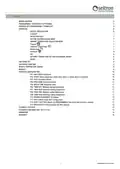
  • Page 2: Wiring diagram Programmable thermostat-app pairing Operation Display visualization Startup Operation logic Setting heating/cooling mode Ambient temperature regulation mode Advanced configuration Technical features
  • Page 3: Page 3
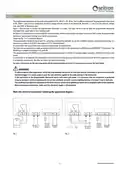
  • Page 4: Wiring diagram The programmable thermostat wi-time wall can be powered at 85..264 V, 50..60 Hz. The L and N terminals power the programmable thermostat at 85..264V and are to be connected to the mains voltage with the neutral on the terminal N. Terminals 1, 2 and 3 are the contacts, voltage free, type SPDT of the output relay. The boiler will be turned on when the programmable thermostat associated with output asks for heat. The programmable thermostat has an input for connecting a remote probe (optional). It is necessary to connect a 10 kΩ NTC-type probe at 25°C to terminals 6 and 7 if a remote probe is used. The device can be connected to a home automation control unit with which it will communicate via RS485 bus with MODBUS® RTU protocol. It is necessary to tie together the cable groups with cable ties separating the power and load wires from those of the bus. To adjust properly room temperature, install the programmable thermostat far from heat sources, airstreams or particularly cold walls. The installation and electrical connections of the device must be carried out by qualified personnel and in compliance with current standards.
  • Page 5: Programmable thermostat-app pairing allows for remote management through the Seitron Smart App after installation. The display will show an icon indicating successful connection to the App and Wi-Fi network. It may take a few minutes for the thermostat to appear on the App screen. Verify proper Wi-Fi connection by checking the symbol on the main screen of the thermostats. Unpaired thermostats can still be used without the App by skipping the pairing process. When unpaired, only manual and antifreeze modes are available for temperature control. The Program control mode will not adjust room temperature if the thermostat is unpaired. The wi-time wall has two display modes: minimal and complete. The minimal display shows detected ambient temperatures and operational symbols. The complete visualization mode displays the presence and intensity of the Wi-Fi connection.
  • Page 6: - The symbols indicate the status of Wi-Fi and cloud connections. - The detected ambient temperature and control modes are displayed. - The operation modes include Program, Manual Temporary, Manual Permanent, Antifreeze, and OFF. - To associate the programmable thermostat with the App, follow the instructions in the App pairing section. - The thermostat can be set to Heating (default) or Cooling mode. - In heating mode, the thermostat activates the boiler when the room temperature is below the set temperature. - In cooling mode, the thermostat activates the boiler when the room temperature is above the set temperature. - To change between heating and cooling modes, hold down specific buttons until the desired mode appears. - The thermostat can display the current operation mode and allows modification among four different modes. - The programmable thermostat regulates room temperature according to a weekly program set through the App.
  • Page 7: The wi-time wall programmable thermostat regulates room temperature according to the antifreeze temperature set in advanced parameters. The antifreeze mode is available only if the thermostat is set in heating mode and the antifreeze temperature is greater than 0.5°C. The display shows 'OFF' when the thermostat is turned off. Pressing the “+” or “-” keys brings the thermostat into Temporary Manual operation mode. The boost mode forces the heating or cooling system on for a selectable time regardless of the setpoint temperature. To turn off the programmable thermostat, select the “OFF” operating mode. The antifreeze function activates under specific conditions when the thermostat is in 'Program' mode and 'Heating' mode. A remote temperature sensor can be connected to the wi-time wall for accurate room temperature detection. The thermostat automatically recognizes a connected remote sensor and regulates temperature accordingly. The temperature displayed will be the one detected by the remote sensor.
  • Page 8: The wi-time wall can be connected to a home automation control unit via RS485 bus. It communicates using the MODBUS® RTU protocol. Relay output status and proportional status can be read for modulating control. For more information on the mode of operation and MODBUS® communication protocol, contact your local distributor.
  • Page 9: Advanced configuration To enter the advanced user parameter configuration of the wi-time wall programmable thermostat, hold down the keys for 10 seconds. P01: Anti frost allows setting a minimum temperature maintained in heating mode. The antifreeze temperature can be set between 0.5°C and 10.0°C. P02: Offset corrects the temperature detected by the internal or remote sensor by ±5°C. P03: Hyst defines the hysteresis in °C for ON/OFF regulation. The hysteresis can be set in the range of 0.1°C to 5.0°C. The device exits the factory with the antifreeze set to 6.0°C. The device leaves the factory with the Offset set to 0.0°C. The device leaves the factory with the hysteresis set to 0.2°C. Modifications to parameters must be carried out by qualified personnel to avoid malfunctions. To exit the programming of user parameters, wait 15 seconds without pressing any key.
  • Page 10: PROP BAND (Proportional band) allows adjustment in the range of 1.0°C to 8.0°C for proportional control. The default setting is 2°C. To set the proportional band, select the parameter and adjust with the keys; the setting is saved automatically. INTEGR TIME (Integrative time) can be chosen in the range of 0 to 180 minutes for proportional regulation. The default setting is 60 minutes. If set to 0, there will be no supplementary action, resulting in P type regulation; otherwise, it will be P + I type regulation. TMIN HEAT (Minimum heating temperature) adjusts the minimum temperature in heating mode, set between 5.0°C and 40.0°C. The factory setting is 5.0°C. To set the minimum temperature, select the parameter and adjust with the keys; the setting is saved automatically. TMAX HEAT (Maximum heating temperature) adjusts the maximum temperature in heating mode, set between 5.0°C and 40.0°C. The factory setting is 40.0°C. To set the maximum temperature, select the parameter and adjust with the keys; the setting is saved automatically. TMIN COOL (Minimum cooling temperature) adjusts the minimum temperature in cooling mode, set between 5.0°C and 40.0°C. The factory setting is 5.0°C. To set the minimum temperature, select the parameter and adjust with the keys; the setting is saved automatically.
  • Page 11: TMAX COOL adjusts the maximum temperature that can be set in cooling mode between 5.0 °C and 40.0 °C. The factory setting is 40.0 °C. MODBUS ID allows the MODBUS® address of the thermostat to be set, with a factory setting of 2. WI-FI CONFIG enables Wi-Fi network reconfiguration and allows a new user to be associated with the thermostat. To enable Wi-Fi configuration, press and hold the designated button for at least 10 seconds. The display will show “WI-FI CONFIG OK” and the thermostat will restart, entering pairing mode for 2 minutes. In case of power loss, the device will reconnect to the last stored Wi-Fi network. RESET FACT DEFS resets user parameters to factory settings. To reset, press and hold the designated key for at least 10 seconds until “RESET FACT DEFS OK” is displayed. The device will restart and enter pairing mode for 2 minutes after a reset. INFO SERVICE displays the MAC address, firmware version, and the type of sensor used for temperature control.
  • Page 12: Technical features include power supply specifications, power absorption, and contact rating. The communication port is MODBUS® RTU, and the frequency operates between 2.4 to 2.5 GHz. The internal temperature regulation range for comfort and economy is between 5°C to 40°C. The internal and remote sensor types are NTC 10 K Ohm with a precision of ±1°C. The resolution is set at 0.1°C, with a hysteresis of 0.1°C to 5°C. The protection grade is IP 30, and the overvoltage category is II. The operating temperature ranges from 0°C to +40°C, while the storage temperature ranges from -10°C to +50°C. The material of the case is ABS+PC V0 self-extinguishing, and the color is white.
  • Page 13: Dimensions Warranty The manufacturer reserves the right for changing technical data and features without prior notice. The consumer is guaranteed against any lack of conformity according to the European Directive 2019/771/UE. The full text of warranty is available on request from the seller.
  • Page 14: Page 14