
Beca BHT-8000 Heating Thermostat User Guide
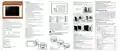
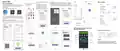


FEATURES
On Appearance
1. Negaꢀve black sceen will bring you to a secret world.
2. 4.8 inch Large colorful screen display area, creates your colorful life.
3. Touch buꢁons to make simple operaꢀon.
4. Amazing Silver Frame opens your modern life.
5. The visiable thickenss above the wall is only 15mm.
6. The snap connecꢀon allows you to easily install.
7. 86mm hidden box and European 60mm round box is suitable.
8. White, black or brushed stainless steel for your selecꢀon.
9. Wrap-around cooling holes help heat to escape quickly and avoid
affecꢀng temperature detecꢀon.
HOME SCREEN QUICK REFERENCE
INSTALLATION
5.Adjusꢀng/Seꢁng the Programmable Schedules
1
2
3
4
5
6
Press four ꢀmes in a row. (You can see
Press unꢀl the weekday schedule seꢂngs appear (1 2 3 4 5 will show
along the right the screen)
Use the arrows to adjdust the on ꢀme.
Press the icon and use the arrows to
Press the icon and use the arrows to set the temp..
and
)
BHT-8000 Heating Thermostat
User Guide
Step 1. Keep power off. See Fig 1.
/
/
/
7
Repeat this process for periods 3 4 and 5 6.
Press the icon once more to enter the Saturday schedule seꢂngs (6 will
show along the top of the screen).
Repeat the above process to set the period and temp. and Sunday
schedule.
Press once more to confirm and exit.
Fig 1
Fig 2
20
19
8
9
18
17
21
10
WEEKDAY (MONDAY – FRIDAY)
WEEKEND (SATURDAY)
WEEKEND (SATURDAY)
On Funcꢀonality
Time display
(1 2 3 4 5 shows on screen)
(6 shows on screen)
(7 shows on screen)
1. Powerful funcꢀons are available such as WIFI etc,.
2. 1℃acuracy keeps temperature within the level you set.
3.℃ or ℉ can be customized.
4. Data memory when power is off.
5. 5+1+1 six periods programmable maximize comfort and economy.
6. Temporary programmable.
7. All seꢂng languages sunchronize your ꢀme zone, address and
language.
8. No limit to add thermostats in App and support Smart Scene..
9. Create thermostat group to Centralized control.
10. Integrate with Amazon Echo, Google Home, Tmall Genie.
11. Support device sharing.
TIME
TIME
TEMPERATURE
。
TIME
TEMPERATURE
。
TEMPERATURE
。
Step 3. Connect power supply, load into the appropriate terminals.
(see “Wiring your thermostat” for details and Fig 3).
06:00
20 C
。
Period 1
Period 2
20 C
。
06:00
08:00
11:30
06:00
08:00
11:30
13:30
20 C
。
20 C
。
08:00
11:30
15 C
。
20 C
。
16
15
14
13
12
11
20 C
。
Period 3
Period 4
Period 5
15 C
。
20 C
。
13:30
17:00
20 C
。
Fig 3
Fig 4
15 C
。
13:30
17:00
20 C
。
Mode
Power
Time
15
16
17
18
19
20
21
8
9
External sensor
Ultraviolet intensity
1
2
20 C
Wifi(AP mode)
22 C
20 C
17:00
22:00
。
。
。
Period 6
22:00
15 C
Wifi(EZ mode)
15 C
15 C
22:00
WIFI TYPE
10 The humidity outdoor
11 Down Button
3
4
5
6
7
Heating on
Wind speed
Weather
A separate schedule may be set for weekdays (Mon – Fri) and for
weekends (Sat or Sun).
6.Checking the Temperature of Floor Sensor
Press and hold the arrow for 5 seconds to display the temp.
of floor sensor.
7.Seꢁng the Funcꢀons and Opꢀons
for 5 sec. in the order to reach system funcꢀon. Then
to scroll through the available funcꢀons,and use the
arrows to change the available opꢀons. All seꢂngs are confirmed
automaꢀcally.
Set temp.
Menu
Welcome
Thank you for your purchase.
12
13
14
Up Button
Clock
Room Temp.
Lock
Periods
Your new thermostat will provide uniform and comfortable
temperature control throughout every room in your property. We
bring together technology, craſtsmanship and the highest quality
materials to provide you with a safe, reliable product combined with
sleek, contemporary design.
Monday to Sunday
12. Weather, UV index, humidity display help you decide what to wear
today.
Advanced options
Press and hold
press
1. The displayed humidity, weather, and ultraviolet are outdoor data;
2. The data of the weather staꢀon is pushed 3-4 minutes aſter being
connected to the Internet, and updated every half an hour;
/
TECHNICAL DATA
Power Supply: 95 ~ 240 VAC, 50 ~ 60HZ
Fig 5
Fig 6
Current Load:
BEFORE WIRING AND INSTALLING
1. Read these instrucꢀons carefully. Failure to follow them could damage
the product or cause a hazardous condiꢀon.
2. Check the rathings given in the instrucꢀons and on the product to make
sure the product is suitable for your applicaꢀon.
3. Installer must be a trained, experienced service technician.
4. Aſter installaꢀon is complete, check out product operaꢀon as provided
in these instrucꢀons.
5
Water/Gas Boiler 5A
please read this installaꢀon/programming manual for comprehensive
instrucꢀons on installing and operaꢀng your thermostat. Please also
ensure a suitably qualified person installs your thermostat and
complies with all local regulaꢀons.
Code
Function
Setting and options
Default
Sensor: NTC3950, 10K
Accuracy: ±1°C
Temperature
compensaꢀon
1
-3
-9 to 9 ℃
Set Temp. Range: 5 -35°C
Dispaly Temp. Range: 5 ~ 99
Ambient Temp.: 0 ~ 45°C
Ambient Humidity: 5 ~ 95 % RH (Non Condensing)
Storage Temp.: -5 ~ 45°C
2
3
01
01
Deadzone Temp
1-5℃
In the box you will find
Time Display
00:12h 01:24h
2pc
1pc
1pc
1pc
Screws
Floor Sensor (2.5m) 1pc
(Floor Sensor is Opꢀonal)
Thermostat
User Guide
QC Passed
CAUTION
00:All buꢁons are locked except
power buꢁon
OPERATION
During Power On
01
Buꢁon Locking
4
Electrical Shock or Equipment Damage Hazard. Can shock
individuals or short equipment circuitry.
Timing Error: < 1%
Shell Material: PC +ABS ( Fireproof)
01:All buꢁons are locked
ABOUT YOUR THERMOSTATS
1.Power On/off: Press
2. Manual & Programmable
to turn the thermostat on/off.
In:Internal Sensor(to control the temp.)
Ou:External Sensor(to control the temp.)
AL:Internal/External Sensor (Internal sensor
to control the temp., external sensor to
limit the temp.)
Wire Terminals: Wire 2 x 1.5 mm2 or 1 x 2.5 mm2
20
i
The BHT-8000 range has been developed to control electric
underfloor ,water heaꢀng or water/gas boiler systms.These units
are designed for use in commercial, industrial,civil and domesꢀc
properꢀes
WIRING
Press
to set the Permanent Hold, Temporary Hold, Using Schedule,
AL
5
Sensor types
These funcꢀons will appear on the screen.
Permanent Hold - Manual. In this mode, Press
Temporary Hold. During Using Schedule or in this mode, Touch
/
to set temperature.
to
DIMENSION
/
40.5
5
6
7
Min.Set Temp
5-15℃
set the temporary temp.. It will be valid ꢀll the start ꢀme of the next
scheduled period.
Using Schedule. 7 days a week, 6 periods programmable daily.
3.Adjusꢀng/Seꢁng the Clock
14.0
MODEL DEFINITION
130.0
103.8
35
Max.Set Temp
5-45℃
5
Standby
Brightness
4
8
9
3-99
80.0±2mm
60.0±2mm
50.3
GC: Water/Gas Boiler, 5A
L: Backlight
P: Weekly Programmable
Press
Touch the icon
Then press
ꢀll the min of ꢀme will flashes;
/ to set your minute.
, the hour of ꢀme will flash; Touch the icon
P N T 1
P N T 0
Energy
00:Energy saving Mode 01:Non-energy
saving Mode
00
saving Mode
Energy saving
Temp
/
to
to
set your hour.
Then press
set your week.
A
0-30℃
20
45
W: Wifi
S2: Both internal sensor and floor external sensor
For example: BHT-8000 GCLW
, the week of ꢀme will flash; Touch the icon
/
High temperature
protecꢀon seꢂng
B
25-70℃
4.Locking your Thermostat
Press and hold the and
or 5 seconds to lock/unlock your thermostat
f
Low temperature
protecꢀon seꢂng
C
0-10℃
0
lock or half lock.


| General | Details |
|---|---|
| Name | Beca BHT-8000 Heating Thermostat User Guide |
| Make | BECA |
| Language | English |
| Filetype | PDF (Download) |
| File size | 1.31 MB |
 (1 votes, average: 5.00 out of 5)
 Loading...

Beca BHT-9000 Thermostat User Guide

beca BAC-005 Series Thermostat User Guide

Beca BHT-6000 Series Round Thermostat User Guide

Beca BAC-1000 Series WiFi Thermostat User Guide

Beca BHT-002 Electric Heating Wifi Thermostat User Guide

Beca BHT-008 Heating Thermostat User Guide

Beca BHT-7000 Smart Knob Thermostat User Manual

Beca BAC-006 Zigbee Thermostat User Guide

Beca BHT-006 Series Thermostat User Manual

Beca BHP-8000 C Room Thermostat User Guide

BECA BHT-8000 Manual: Questions and Answers
BECA BHT-8000 specifications
| Setpoint range | 5 -35°C |
| Sensor | NTC3950, 10K |
| Operating temperature | 0 ~ 45°C |
| Storage temperature | -5 ~ 45°C |
| Humidity | 5 ~ 95 % RH (Non Condensing) |
What do the icons on the BECA BHT-8000 display mean?
The screen shows time, room temperature, set temperature, weather, UV intensity, humidity, heating status, and sensor type active. User Guide, p. 1
What's the difference between Permanent Hold and Temporary Hold on the BECA BHT-8000?
Permanent Hold sets temperature manually with no schedule. Temporary Hold overrides the schedule until the next scheduled period starts. User Guide, p. 1
What do the up and down buttons do on the BECA BHT-8000?
The up and down buttons adjust settings like temperature, time, and options when navigating menus. User Guide, p. 1
BECA BHT-8000 compared with other BECA thermostats
| Specification | BECA BHT-8000 | BECA BAC-2000-ML Modulating Button | BECA BAC-7000 | BECA BHP-8000 |
|---|---|---|---|---|
| Setpoint range | 5 -35°C | 5 -35℃ | 5 -35 ℃ | 42-122℉(5~50℃) |
| Sensor | NTC3950, 10K | NTC3950, 10K | NTC3950, 10K | NTC3950, 10K |
| Operating temperature | 0 ~ 45°C | 0 ~ 45 ℃ | 0~45 ℃ | 32~113℉(0~45℃) |
| Storage temperature | -5 ~ 45°C | -5 ~ 45 ℃ | 0~ 45℃ | 23~113℉ (-5~45℃) |
| Humidity | 5 ~ 95 % RH (Non Condensing) | 5 ~ 95 % RH (Non Condensing) | 5 ~ 95 % RH (Non Condensing) | 5~95%RH(Non Condensing) |
More BECA thermostat manuals

EpheyFIF WITH3 Wireless Gas Boiler Thermostat User Guide

EMERSON Thermostat Common Wire Kit SA11 Instruction Manual

HELTUN Fan Coil Thermostat HE-FT01 User Manual

ENGO CONTROLS EFAN-230W WIFI 230V Fan Coil Thermostat User Guide

BEOK TDS23 Wi-Fi Fan Coil Thermostat Instruction Manual

Micro-Air EasyTouch RV 353 Thermostat Instruction Manual

tuya MTS700N Wireless Thermostat User Manual

EPH CONTROLS RDT Recessed Room Thermostat Installation Guide

Danfoss GreenCon RC-T2/T4 Room Thermostat Installation Guide

BAXI uSense 2 Wired Smart Thermostat Gateway Installation Guide