
beca BAC-2000-ML Modulating Touch Button Thermostats User Guide
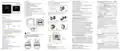
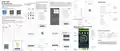


INSTALLATION
Setting and options
Code
Function
Temperature
Default
FEATURES
On Appearance
1. 86mm hidden box and european 60mm round box is suitable.
2. White, black or gold housing creates your colorful life.
3. White backlight protect your eyes
In the mode of manual, press
to set temperature.
will
。
1
-7 to 7 C
-1
BAC-2000ML Series WiFi Thermostat
User Guide
00:When room temp. reaches the set point,the
fan will turn off
01:When room temp. reaches the set point,the
fan will turn to low speed
4. Locking Your Thermostat
Press and hold the
Step 1. Keep the electricity off. See Fig 1.
Fan control
Heat/cool
2
0
for 5 seconds to lock/unlock your thermostat.
01
01
05
3
4
5
5. Amazing Silver Frame opens your modern life.
5
00:Cool only
。
01:Heat/Cool
Min. Set Temp. 5 to 15 C
。
Press M to change the system mode HEATING, COOLING and VENTILATION.
fan runs.
TILATION, the valve is off but the
In the mode of VEN
/
2. 0.5°C Accuracy keeps temperature within the level you set.
Data memory when power is off.
Max. Set Temp. 15 to 35 C
35
01
6
7
12/24 hours
00:12h
01:24h
6
Press
3.
00:Display both set temp. and room temp.
01: Display set temp. only
Display Mode
00
to select the fan speed AUTO, HIGH, MED, LOW.
8
4. 5+2 six periods programmable maximize comfort and economy.
5. Create thermostat group to centrally control.
6. Integrated with Amazon Echo, Google Home, Tmall Genie, IFTTT.
7. Support Device Sharing.
7. Restore Manufacturer Defaults
Press the Restore Manufacturer Defaults ,you can reset thermostat.
Steps: Open your app - go into your room - click menu on the top
9
invalid
Step 3. Connect power supply, load into the appropriate terminals.
(see “Wiring your thermostat” for details and Fig 3).
A
P value
1 -10
02
B
C
D
I value
1S-60S
40
1
right corner - move to the end - Press Restore Manufacturer Defaults.
。
1 to 5 C
Deadband Temp.
9. No limit to add room.
10. Support Smart Scene.
the box. See Fig 4.
8
C
Standby Bightness
of backlight
3-99 bigger value,more brightness
4
For Fan Coil Unit
will flash.Press M to set minute,hour and
Press and hold M,
weekday (1 = Monday, 2 = Tuesday etc.) by using the
DIMENSION
Unit: mm
Welcome
Thank you for your purchase.
86.0
65.9
50.0
ambient temperature for the output to go from 0 to 100%. It
can be adjust from 1~10. Factory default is 2.
9
Press M to do the adjustment of weekly programmable.
Then press M to change the different items. Press
programming manual for comprehensive
thermostat. Please also
ensure a suitably qualified person installs your thermostat and
The P value is bigger, the change of valve output will be bigger;
The P value is smaller, the change of valve output will be smaller.
For example, when P=2, the temperature difference between
ambient temperature and setpoint is 5 ℃,the valve will open
about 10%; when P=4, the temperature difference between
ambient temperature and setpoint is 5 ℃, the valve will open 20%.
Heat mode (P-band: 2 )
or
to set
See Fig 5
day – three Comfort periods - 1, 3 & 5 (the temperature required when
room is occupied) and three Economy periods – 2, 4 & 6 (the temperature
See Fig 6
In the box you will find
2pc
1pc
1pc
1pc
1pc
Screws
Wall plate
Thermostat
User Guide
schedules can only be carried out when in program mode;Touch M
(mode) to change between manual mode
When the ambient temperature is below the set point the output
is somewhere between 0~100%.
QC Passed
% of Output
0-10V
100%
the screen.Touch the icon
M
ABOUT YOUR THERMOSTATS
P=2
30%
20%
10%
0%
2
thermostats are designed
HOME SCREEN QUICK REFERENCE
period Press the icon M and use the and arrows to set the temp.
for the 1st period. Repeat this process for periods 2 – 6. Press the icon M
or 4-pipe
49.6
Set
Temp.
Fan
Room
Temp.
Valve
This thermostat provides
CAUTION
Speed
Set point
On/off
the top of the screen). Repeat the above process to set the weekend
schedule. .Press Monce more to confirm and exit.
control.
-20 -15
-5
+5
+10 +15 +20
-10
Electrical Shock or Equipment Damage Hazard. Can shock
individuals or short equipment circuitry.
Cool mode(P-band: 2 )
When the ambient temperature is above the set point the output
is somewhere between 0~100%.
TECHNICAL DATA
Power Supply: 95 ~ 240 VAC, 50 ~ 60HZ
Energysaving
Network
Period
WEEKDAY (MONDAY – FRIDAY)
WEEKEND (SATURDAY)
WEEKEND (SUNDAY)
Time display
(1 2 3 4 5 shows on screen)
(6 shows on screen)
(7 shows on screen)
% of Output
0-10V
TIME
TEMPERATURE
。
TIME
TEMPERATURE
。
TIME
TEMPERATURE
。
100%
WIRING
Manual
Auto Fan
Timing On/Off
Sensor: NTC3950, 10K
Accuracy: ±0.5℃
Set Temp. Range: 5 -35℃
06:00
20 C
。
P=2
Period 1
Period 2
20 C
。
06:00
08:00
11:30
06:00
08:00
11:30
13:30
20 C
。
0-10V
Valve
0-10V
Valve
30%
20%
10%
Lock
Cooling
AC95-240V 50~60Hz
L
AC95-240V 50~60Hz
20 C
。
08:00
11:30
15 C
。
20 C
。
L
-
+
-
+
Clock
20 C
。
Period 3
Period 4
Period 5
15 C
。
20 C
。
0-10V
Valve
Fan
Fan
13:30
17:00
20 C
。
20 C
。
Dispaly Temp. Range: 5 ~ 99
13:30
17:00
15 C
。
℃
-
+
22 C
20 C
20 C
17:00
Ambient Temp.: 0 ~ 45 ℃
Ambient Humidity: 5 ~ 95 % RH (Non Condensing)
Storage Temp.: -5 ~ 45 ℃
0%
Sleeping
。
。
。
Period 6
22:00
15 C
15 C
22:00
15 C
22:00
Set point
-20 -15
-5
+5
+10 +15 +20
-10
Power
On/off
not be adjusted.
Fan
Down
Mode
Up
During Power Off
OPERATION
During Power On
Timing Error: < 1%
Shell Material: PC +ABS ( Fireproof)
When power is off, press and hold M
Press
2. Manual & Programmable
to turn the thermostat on/off.
1. Power On/off:
Wire Terminals: Wire 2 x 1.5 mm2 or 1 x 2.5 mm2
IP20
Then press M to change the different items.
Press to select manual and press
Press and hold M, will flash.
loop will become sluggish. It can be adjust from 1S-60S. Factory Default
is 40S.
Two Pipe
Four Pipe
to select weekly programmable.


| General | Details |
|---|---|
| Name | beca BAC-2000-ML Modulating Touch Button Thermostats User Guide |
| Make | BECA |
| Language | English |
| Filetype | PDF (Download) |
| File size | 2.08 MB |
 (1 votes, average: 5.00 out of 5)
 Loading...

Beca BHT-9000 Thermostat User Guide

beca BAC-005 Series Thermostat User Guide

Beca BHT-6000 Series Round Thermostat User Guide

Beca BAC-1000 Series WiFi Thermostat User Guide

Beca BHT-002 Electric Heating Wifi Thermostat User Guide

Beca BHT-008 Heating Thermostat User Guide

Beca BHT-7000 Smart Knob Thermostat User Manual

Beca BAC-006 Zigbee Thermostat User Guide

Beca BHT-006 Series Thermostat User Manual

Beca BHP-8000 C Room Thermostat User Guide

BECA BAC-2000-ML Modulating Button Manual: Questions and Answers
BECA BAC-2000-ML Modulating Button specifications
| Setpoint range | 5 -35℃ |
| Accuracy | ±0.5℃ |
| Sensor | NTC3950, 10K |
| Operating temperature | 0 ~ 45 ℃ |
| Storage temperature | -5 ~ 45 ℃ |
| Humidity | 5 ~ 95 % RH (Non Condensing) |
Can the BECA BAC-2000-ML Modulating Button be used with a four-pipe fan coil system?
Yes. The thermostat supports both two-pipe and four-pipe fan coil units. User Guide, p. 1
What is the difference between manual and programmable modes on the BECA BAC-2000-ML Modulating Button?
Manual mode lets you set temperature directly. Programmable mode runs 5+2 six-period schedules for weekdays and weekends. User Guide, p. 1
What does the P value setting mean on the BECA BAC-2000-ML?
P value adjusts how much the valve output changes as temperature varies from setpoint. Range is 1 to 10, factory default is 2. Higher P causes larger valve output changes; lower P causes smaller changes. User Guide, p. 1
BECA BAC-2000-ML Modulating Button compared with other BECA thermostats
| Specification | BECA BAC-2000-ML Modulating Button | BECA BAC-7000 | BECA BHP-8000 | BECA BHT-6000 |
|---|---|---|---|---|
| Setpoint range | 5 -35℃ | 5 -35 ℃ | 42-122℉(5~50℃) | 5 -35℃ |
| Accuracy | ±0.5℃ | ±0.5 ℃ | ±1℉ | ±0.5℃ or ±1℉ |
| Sensor | NTC3950, 10K | NTC3950, 10K | NTC3950, 10K | NTC3950, 10K |
| Operating temperature | 0 ~ 45 ℃ | 0~45 ℃ | 32~113℉(0~45℃) | 0 ~ 45 ℃ |
| Storage temperature | -5 ~ 45 ℃ | 0~ 45℃ | 23~113℉ (-5~45℃) | -5 ~ 45 ℃ |
| Humidity | 5 ~ 95 % RH (Non Condensing) | 5 ~ 95 % RH (Non Condensing) | 5~95%RH(Non Condensing) | 5 ~ 95 % RH (Non Condensing) |
More BECA thermostat manuals

ENGO Controls EONE230W Internet Controlled Thermostat User Guide

aube technologies TH110A-DP-P Thermostat User Manual

TPECO Control Systems 375EM Raintight Weather Resistant Single Stage Thermostat Instruction Manual

KETOTEK KTF0155 Smart Thermostat User Manual

BOSCH Smart Home Room Thermostat Instruction Manual

Goodman GTST Connected Thermostat User Guide

heatit WiFi TRM3 Intelligent Smart Home Thermostat User Guide

Danfoss 014G0251 Eco Radiator Thermostat User Guide

TROTEC BN35 Radio Thermostat Instruction Manual

Micro Air ETRV EasyTouch RV Thermostat Instruction Manual