
Home > WHITE RODGERS > WHITE RODGERS 1F80-51 Programmable Electronic Digital Thermostat Instruction Manual
WHITE RODGERS 1F80-51 Programmable Electronic Digital Thermostat Instruction Manual
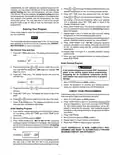


• TEMPERATURE DISPLAY ADJUSTMENT — Your new
thermostathasbeenaccuratelysetinourfactory.However,
if you wish, you may adjust your new thermostat tempera-
ture display to match your old thermostat. This can be
accomplished (within a ±4° range) as follows:
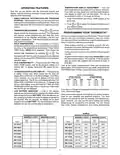
OPERATING FEATURES
Now that you are familiar with the thermostat buttons and
display, read the following information to learn about the many
features of the thermostat.
• SIMULTANEOUS HEATING/COOLING PROGRAM
STORAGE—Whenprogramming,youcanenterbothyour
heating and cooling programs at the same time. There is no
need to reprogram the thermostat at the beginning of each
season.
1. Press VIEW PRGM and HOLD TEMP buttons at the
same time.
2. Press
or
to adjust the displayed temperature to
your desired setting.
3. PressRUNPRGMtoresumenormalprogramoperation.
• TEMPERATURE OVERRIDE — Press
or
until the
PROGRAMMING YOUR THERMOSTAT
display shows the temperature you want. The thermostat
will override current programming and keep the room
temperature at the selected temperature until the next
program period begins. Then the thermostat will automati-
cally revert to the program.
Now you are ready to program your thermostat. This section will
help you plan your thermostat’s program to meet your needs.
For maximum comfort and efficiency, keep the following guide-
lines in mind when planning your program.
• HOLD TEMPERATURE — The thermostat can hold any
temperaturewithinitsrangeforanindefiniteperiod, without
reverting to the programmed temperature. Press HOLD
TEMP button. HOLD will be displayed. Then choose the
• When heating (cooling) your building, program the tem-
peratures to be cooler (warmer) when the building is vacant
or during periods of low activity.
• During early morning hours, the need for cooling is usually
minimal.
desired hold temperature by pressing
or
. The
thermostat will hold the room temperature at the selected
setting until you press RUN PRGM button to start program
operation again.
• Programthethermostattoallowabout 30minutestoreach
the desired temperature. (For example, if the first person
gets up at 6:00 AM, program the first period to begin at
5:30 AM.)
• °F/°C CONVERTIBILITY — Press and hold SET TIME and
HOLD TEMP buttons until the temperature display is in
Celsius (°C). To display Fahrenheit (°F), repeat the pro-
cess.
Look at the factory preprogrammed times and temperatures
shown below. If this program will suit your needs, simply press the
RUN PRGM button to begin running the factory preset program.
• 12-HOUR/24-HOUR CLOCK DISPLAY — The clock is set
to display 12-hour time, which means that the clock will
display AM and PM time (12:00 AM is midnight; 12:00 PM is
noon). However, you may want to display a 24-hour clock
(military-style time). The 24-hour clock display will show 1:00
PM as 13:00, 2:00 PM as 14:00, and so on. To change to the
24-hour clock display, press and hold SET TIME and RUN
PRGM buttons at the same time. In the 24-hour clock mode,
AM and PM are not displayed.
FACTORY PREPROGRAMMING
Cooling Program for
ALL Days of the Week:
Heating Program for
ALL days of the Week:
TEMP
PERIOD
TIME
TEMP
PERIOD
1st
2nd
TIME
68°F
68°F
68°F
64°F
1st
2nd
3rd
4th
6:00 AM
8:00 AM
5:00 PM
10:00 PM
6:00 AM
8:00 AM
5:00 PM
10:00 PM
78°F
82°F
78°F
78°F
3rd
4th
If you want to change the preprogrammed times and tempera-
tures, follow these steps.
• LOW BATTERY INDICATOR — If the 3 “AA” alkaline
batteries are low and should be replaced, the display will be
blank except for the word BATTERY. When the batteries are
low, pressing any button will cause the display to operate for
ten seconds. After ten seconds, the display will be blank
exceptforthewordBATTERY. Youcannotprogramwithlow
batteries, but you can override setpoint temperature.
Determine the time periods and heating and cooling tempera-
tures for your weekday and weekend programs. You must
program four periods for both the weekday and weekend pro-
gram. However, you may use the same heating and cooling
temperatures for consecutive time periods. You can choose
start times, heating temperatures, and cooling temperatures
SAMPLE
Heating/Cooling Schedule Plan
Heating/Cooling Schedule Plan
WEEKDAY (5 DAY)
WEEKEND (2 DAY)
WEEKEND (2 DAY)
WEEKDAY (5 DAY)
Start
Time*
Start
Time*
Start
Time*
Start
Time*
Period
Temperature
Temperature
Period
Temperature
Temperature
1ST HEAT
1ST HEAT
5:30 AM
68°F
7:00 AM
68°F
2ND HEAT
3RD HEAT
4TH HEAT
1ST COOL
2ND COOL
3RD COOL
4TH COOL
2ND HEAT 8:00 AM
3RD HEAT 5:00 PM
4TH HEAT 10:30 PM
1ST COOL 6:30 AM
2ND COOL 2:00 PM
3RD COOL 5:00 PM
4TH COOL 10:30 PM
65°F
70°F
65°F
76°F
78°F
72°F
78°F
11:00 AM
6:00 PM
11:30 PM
7:00 AM
12:30 PM
6:00 PM
11:30 PM
70°F
70°F
65°F
76°F
74°F
72°F
78°F
5

| General | Details |
|---|---|
| Name | WHITE RODGERS 1F80-51 Programmable Electronic Digital Thermostat Instruction Manual |
| Make | WHITE RODGERS |
| Language | English |
| Filetype | PDF (Download) |
| File size | 0.12 MB |
 (1 votes, average: 5.00 out of 5)
 Loading...

White-Rodgers 1E78 Non Programmable Heat Only Thermostat User Manual

White-Rodgers 1F97-1277 Big Blue Single Stage Thermostat User Manual

White-Rodgers 1F56N-444 Thermostat User Manual

White-Rodgers 1F83-277 Heating & Air Conditioning Auto Changeover Heat Pump Thermostat User Manual

White-Rodgers M30 Thermostat Instruction Manual

WHITE-RODGERS 1F51N-619 Low Voltage Evaporative Cooler Thermostat Instruction Manual

White Rodgers 1F78-151 Non Programmable Thermostat Instructions

WHITE-RODGERS 1F86-0471 Blue Single 1 1 Stage Thermostat Instruction Manual

WHITE-RODGERS 1F90-71 5-Day 2-Day Electronic Digital Thermostat Instruction Manual

WHITE-RODGERS 1F95-1277 Universal Thermostat Owner’s Manual


tuya Mi-750 WiFi Smart Thermostat Instruction Manual

GENERAL LIFE FH104 Underfloor Heating Thermostat User Manual

Eurotronic Technology sprit Z-Wave Smart Radiator Thermostat Installation Guide

PRO T755 Universal Thermostat Installation Guide

Danfoss RET Series Electronic Thermostat Instruction Manual

nVent RAYCHEM RAYSTAT-EX-02 Mechanical Thermostat Installation Guide

Danfoss RET1000 Floor Heating Room Thermostat Installation Guide

Honeywell Home DT92E Wireless Room Thermostat User Manual

Milesight WT201 Smart Thermostat User Guide

GENERAL LIFE HT220 Digital Room Thermostat User Manual