
Home > CLIMATE MASTER > CLIMATE MASTER CXM2 Communicating Awc Thermostat Installation Guide
CLIMATE MASTER CXM2 Communicating Awc Thermostat Installation Guide


iGATE 2 COMMUNICATING (AWC) THERMOSTAT – IOM
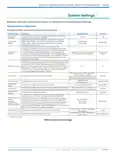
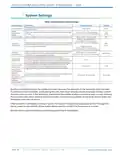
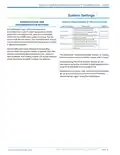
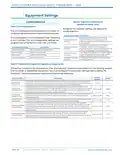
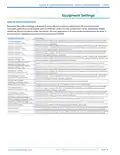
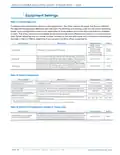
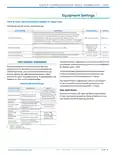
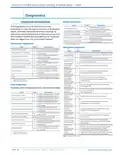
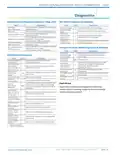
Thermostat Settings
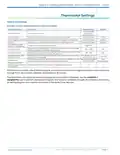
Table 2: User Settings
Available remotely (web/mobile) and at thermostat display:
Thermostat Setting
Thermostat Name
Touch Volume
Description
Range/Options
Default
Configures the
thermostat's
displayed name
16 character text input
Configure the sound made when touching the thermostat.
Off, Click, Beep
Disabled, Enabled
Disabled, Enabled
Click
Auto Daylight Savings Time Configures automatic Daylight-Saving Time change in the thermostat.
Enabled
Disabled
Security
Restricts access requiring the user to enter a 4-digit security PIN.
4-digit security PIN for restricting access.
Security PIN (requires
Security to be enabled)
0000–9999
10% – 100%
0% – 25%
--
75%
Adjusts the backlight intensity when the thermostat is in an active state
(being accessed or viewed by the end user).
Adjusts the backlight intensity when the thermostat is in a dormant state
(not being accessed or viewed by the end user).
Active Backlight
Standby Backlight
25%
Active to Standby Timer
(Screen Timeout)
Maximum amount of time the backlight stays active when no activity is
sensed at the thermostat.
5 to 30 seconds, in 5
second intervals
15 seconds
Programming feature to set the time, heat setting, cool setting, and fan Non-programmable,
Non-
Programmable
Programming
operation for each program schedule event of the day.
Programmable
2, 4
# Program Day Parts
(requires Programming to Configures the number of program schedule event each day.
4
be enabled)
With Security enabled, after 5 failed attempts, a notification is sent to the registered owner of the thermostat
through Wi-Fi. More unlock attempts are blocked for 15 minutes.
The thermostat only allows for viewing the program and vacation schedules. Use the myUplink or
myUplink Pro app to perform permanent program and vacation schedule changes. Find detailed instructions
for setting program and vacation schedules in the iGate 2 User Manual.
Part#: 97B0132N01 | Revised: Februar y 06, 2025
PAG E : 7
w w w. c l i m a te m a s te r. c o m

| General | Details |
|---|---|
| Name | CLIMATE MASTER CXM2 Communicating Awc Thermostat Installation Guide |
| Make | CLIMATE MASTER |
| Language | English |
| Filetype | PDF (Download) |
| File size | 1.03 MB |
 (1 votes, average: 5.00 out of 5)
 Loading...


ADVENT AIR ACTH12 Digital LCD Thermostat Instruction Manual

BEOK CONTROLS TDS75 Series Thermostat User Guide

Honeywell TH4110U Thermostat Installation Guide

GENERAL LIFE HT330S Digital Room Thermostat User Manual

EMERSON 1F87U-42WF Sensi Smart Thermostat User Guide

KINGHOME WK-010WD1 Smart Thermostat Owner’s Manual

Schneider SpaceLogic Thermostat Installation Guide

HYSEN HY511 WiFi Heating Thermostat Owner’s Manual

ENSTO ECO16TOUCH Combination Thermostat Instruction Manual

SALUS RT510 Thermostat Instruction Manual