
Home > CLIMATE MASTER > CLIMATE MASTER CXM2 Communicating Awc Thermostat Installation Guide
CLIMATE MASTER CXM2 Communicating Awc Thermostat Installation Guide



iGATE 2 COMMUNICATING (AWC) THERMOSTAT – IOM
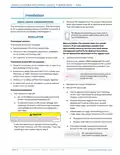
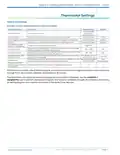
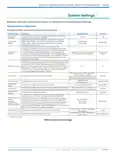
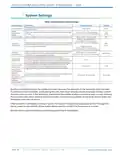
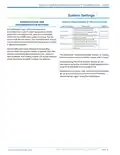
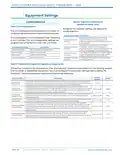
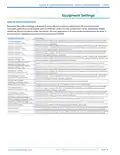
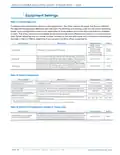
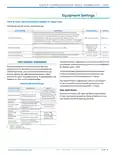
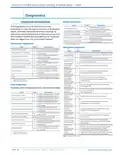
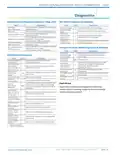
System Settings
Table continued from previous page.
System Setting
Description
Range/Options
Default
Configures the operational timers within the thermostat to ensure
timing accuracy.
Line Frequency
50 Hz, 60 Hz
60 Hz
Indoor
Temperature
Offset
Allows for calibration of the temperature sensor by the selected
amount.
–10°F to +10°F in 1°F increments
(–2.7°C to +2.7°C in 0.5°C increments)
0°F
(0°C)
Humidity Offset
Allows for calibration of the humidity sensor by the selected amount.
–9% to +9% in 1% increments
0%
Water-to-Air Applications:
45°F to 88°F in 1°F increments
Maximum heating setpoint available on the Heat Setpoint Wheel (7.0°C to 31°C in 0.5°C increments)
and the maximum heating setpoint that can be used during the
Maximum
Heat Setpoint
88°F
(31°C)
occupied program schedule.
Water-to-Water:
45°F to 130°F in 1°F increments
(7.0°C to 54.5°C in 0.5°C increments)
Minimum cooling setpoint that is available on the Cool Setpoint
Wheel and the minimum cooling setpoint that can be used
during the occupied program schedule.
Minimum
Cool Setpoint
47°F to 90°F in 1°F increments
(8.5°C to 32°C in 0.5°C increments)
65°F (18.5°C)
Configures the sensitivity of the thermostat to the space
temperature. A lower setting will cause the unit to respond more
rapidly to changes in space temperature. A higher setting will cause
the unit to respond more slowly to changes in space temperature.
Configures the amount of space temperature delta from set
point allowed from the heating setpoint at maximum unit
capacity before allowing auxiliary heat for space heating.
Compressor
Anticipator1
1 to 10
5
Auxiliary Heat
Deadband1
0.0 to 5.0°F
1.0°F
Occupancy
Input (requires
Remote
Sensor set to
Occupancy and
Programming
enabled)
Configures the interpretation of a short detected on the Remote
Sensor input (for the duration of 2 to 5 seconds).
Occupied, Unoccupied
Occupied
--
Serial Number
Thermostat Serial Number
--
1. Applies to Tranquility.
Starting a temporary hold in the middle of a smart recovery, the setpoints of the temporary hold are used.
If a temporary hold is already active during the time that smart recovery would have been started, a smart
recovery does not start. If the temporary hold ends in the middle of what would have been a smart recovery,
the smart recovery starts where it would have been in the linear progression at the same time as when the
temporary hold was not active.
If Remote Sensor configured to None or Space, the outdoor temperature is acquired by Wi-Fi through the
server, based on the location of the mobile device used to connect the thermostat to a router.
Remote Sensor option Occupancy requires programming to be enabled.
PAG E : 1 0
Part#: 97B0132N01 | Revised: Februar y 06, 2025
w w w. c l i m a te m a s te r. c o m

| General | Details |
|---|---|
| Name | CLIMATE MASTER CXM2 Communicating Awc Thermostat Installation Guide |
| Make | CLIMATE MASTER |
| Language | English |
| Filetype | PDF (Download) |
| File size | 1.03 MB |
 (1 votes, average: 5.00 out of 5)
 Loading...


TIME O STAT 2 Channel 3 Wired HMO Thermostat Installation Guide

Somgoms TP528 WiFi Heating Room Thermostat User Guide

Roth Minishunt Room Thermostat Installation Guide

Livn 147 Thermostat User Guide

emos P5684 Capillary Sensor Thermostat User Manual

ENGO CONTROLS EFAN-230W WIFI 230V Fan Coil Thermostat User Guide

GENERAL LIFE SENNA 300S RF Wireless Room Thermostat User Manual

ROLBIT C124W Under Floor Thermostat Instructions

nVent RAYCHEM GM-TA Thermostat Instruction Manual

BEOK TGR85-EP Mirror Touch Screen Underfloor Heating Thermostat User Guide