
Home > CLIMATE MASTER > CLIMATE MASTER CXM2 Communicating Awc Thermostat Installation Guide
CLIMATE MASTER CXM2 Communicating Awc Thermostat Installation Guide


iGATE 2 COMMUNICATING (AWC) THERMOSTAT – IOM
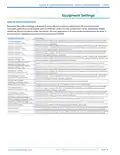
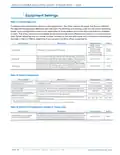
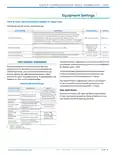
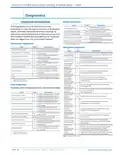
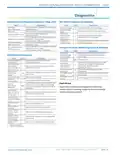
Equipment Settings
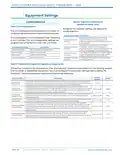
Table 8: Capacity Configuration
(applies to Trilogy units)
CONFIGURATION
Table 7: Unit Configuration
Range for the capacity settings will depend on
model selection:
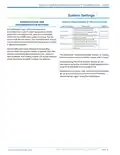
The Unit Configuration settings allow the installer to
configure the thermostat to the installed equipment.
Configuration Setting Description
Unit Configuration is only necessary when replacing
a unit controller. The Unit Configuration settings are
programmed at the factory when the unit is built.
Configures the minimum unit heating
Minimum Heating
Capacity
capacity. When the space requires a
heating capacity below this setting the unit
will cycle off.
Configures the maximum unit heating
capacity. When the space requires a
heating capacity above this setting the unit
will call for auxiliary heat (if applicable).
Configures the minimum unit cooling capacity.
When the space requires a cooling capacity
below this setting the unit will cycle off.
Configures the maximum operational unit
cooling capacity.
Maximum Heating
Capacity
Configuration Setting
Heat Pump Family
Heat Pump Size
Description
Select the family of heat pump.
Select the unit model.
Minimum Cooling
Capacity
Blower Type
Select the blower type.
Select vFlow® type.
Loop Configuration
Maximum Cooling
Capacity
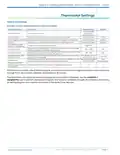
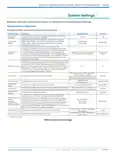
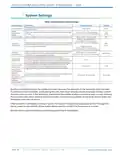
Table 9: Threshold Configuration (applies to Trilogy units)
This section configures the temperature, time, and capacity thresholds associated with the heating, cooling,
and hot water (if applicable) equipment. You must configure the Equipment settings before setting the
thresholds. Only the applicable threshold settings will be displayed.
Range/
Options
System Setting
Description
Default
Configures the sensitivity of the thermostat to the space temperature. A lower setting will
cause the unit to respond more rapidly to changes in space temperature. A higher setting
will cause the unit to respond more slowly to changes in space temperature.
Determines the point at which the space cooling demand outpaces the ability of the
potable water heating mode to accept the heat of rejection from the cooling mode when
both are active at the same time. At this setting and above the heat of rejection from the
cooling mode will be sent to the source (ground loop).
Compressor
Anticipator
1 to 10
5
Cooling Hot
Water Cut Out
70% to 100%
100%
Potable water heating normally takes priority over space heating. This setting determines
the point at which the space heating demand will take priority over the potable water
heating demand.
Configures the amount of space temperature droop allowed from the heating setpoint at
maximum unit capacity before allowing auxiliary heat for space heating.
This setting establishes the maximum acceptable space temperature rise during the
cooling mode while the heat from the space is being rejected into the potable hot water.
If the space temperature rises more than this amount, the potable water heating mode
will be terminated and the cooling mode will reject the heat from the space to the source
(ground loop).
Heating Hot
Water Cut Out
70% to 100%
0.0°F to 5.0°F
90%
Auxiliary Heat
Dead-Band
1.0°F
Cooling Hot Water
Cut Out Offset
0.5°F to 1.5°F
0.5°F to 1.5°F
0.5°F
1.0°F
This setting establishes the maximum acceptable space temperature drop during the
Heating Hot Water potable hot water mode before the unit switches to the space heating mode. If the
Cut Out Offset
space temperature drops more than this amount, the potable water heating mode will be
terminated and the space heating mode will be activated.
PAG E : 1 2
Part#: 97B0132N01 | Revised: Februar y 06, 2025
w w w. c l i m a te m a s te r. c o m

| General | Details |
|---|---|
| Name | CLIMATE MASTER CXM2 Communicating Awc Thermostat Installation Guide |
| Make | CLIMATE MASTER |
| Language | English |
| Filetype | PDF (Download) |
| File size | 1.03 MB |
 (1 votes, average: 5.00 out of 5)
 Loading...


BEOK TCB38WIFI Color TFT-LCD Heating Thermostat User Manual

Braeburn TH-BR22 Programmable Thermostat Instructions

Aprilaire S86WMUPR Programmable Wi-Fi Multi Stage Universal Thermostat Installation Guide

CENTER EHE0200322 RF Wireless 7 Day Programmable Thermostat Installation Guide

ENGO CONTROLS EONEBATW Internet Controlled Thermostat User Guide

GENERAL LIFE FH100 Underfloor Heating Thermostat User Manual

KINGHOME WK-010WD1 Smart Thermostat Owner’s Manual

industrie technik TF Frost Protection Thermostat Instruction Manual

Honeywell CT50A Standard low volt Thermostat Instruction Manual

PREMTOOL BHT-009 GA ThermaHeat Smart Dial Wi-Fi Thermostat User Guide