
CENTER EHE0200322 RF Wireless 7 Day Programmable Thermostat Installation Guide



Installation Guide
340022 (EHE0200322)
RF Wireless 7 Day Programmable Thermostat
IMPORTANT: Please read these instructions fully prior to use as
they contain information that will help get the best from your
wireless thermostat, ensuring it is operating correctly and safely.
If during the installation or set up you experience any issues
please call 0344 292 7060 for assistance.
Must be installed by a competent person. To ensure your
safety make sure the mains power is switched OFF before
accessing wiring.
To prevent a short circuit from a loose wire:
•
Multi-core cables: Only remove enough outer insulation
to allow secure fixing of the cores into the terminal block.
Single core cables: Secure them together with a cable tie
as close as possible to the terminal block.
Contents
•
Thermostat Receiver Box Table Stand Wall Mount Accessories 2 x AA LR6
The Thermostat and Receiver Box within this pack are
Pre-bound
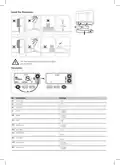
Install the Receiver Box
1
2
3
= M3.5
= N°6
a.
1.5-2.5mm²
6mm max.
4
5
1
ON
2
Wiring
On/off boiler (230V)
Combi boiler
2-Port Zone Valve
Receiver Box
Receiver Box
Receiver Box
5(3)A
5(3)A
5(3)A
T1 T2
Permanent Live
not required
Combi-
Boiler
V4043
Zone Valve
Basic Boiler


| General | Details |
|---|---|
| Name | CENTER EHE0200322 RF Wireless 7 Day Programmable Thermostat Installation Guide |
| Make | CENTER |
| Language | English |
| Filetype | PDF (Download) |
| File size | 0.18 MB |
 (1 votes, average: 5.00 out of 5)
 Loading...

CENTER EHE0200123 Wired 7 Day Programmable Thermostat Installation Guide

CENTER EHE0200322 RF Wireless 7 Day Programmable Thermostat Installation Guide Overview
Summary of Contents
- Page 1: Installation guide for the RF wireless 7 day programmable thermostat is provided. It is important to read the instructions fully prior to use for optimal operation and safety. Installation must be performed by a competent person. Ensure mains power is switched off before accessing wiring for safety. To prevent short circuits from loose wires, specific guidelines for multi-core and single core cables are provided. Contents include the thermostat receiver box, table stand, wall mount accessories, and batteries. The thermostat and receiver box are pre-bound. Instructions for installing the receiver box are included. Wiring instructions for various boiler types are outlined. Specifications for wiring connections and requirements are provided.
- Page 2: Install the thermostat. The thermostat and receiver box in this pack are pre-bound. Parameters include settings for minimum on time, lower limit, upper limit, and fail safe. Min. on time ranges from 1 to 5 minutes. Lower limit is set between 5 to 21 °C. Upper limit is set between 21 to 35 °C. Backlight and clock settings can be enabled or disabled. Daylight saving settings can also be enabled or disabled. Temperature offset ranges from -3 to +3 °C. Options for resetting the schedule and factory reset are available.
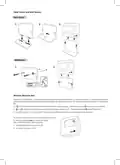
- Page 3: Table stand and wall mount options are available. The wireless thermostat communicates wirelessly to the receiver box, which is wired to the boiler. If the thermostat loses wireless communication, the boiler can be switched on or off manually using the button on the receiver box. A solid green LED indicates the receiver box is connected, while a flashing red LED indicates a lost signal. If communication is lost, moving the thermostat to another location may restore the connection. To manually override the boiler using the receiver box, press the button once to switch the boiler on or off. The button LED will be solid green when the boiler is on and off when the boiler is off.
- Page 4: Binding / Rebinding The binding operation is required if any of the system components are replaced or if the Receiver Box has incorrect or no binding data stored. During the binding procedure, keep approximately 1m distance between the Wireless Thermostat and the Receiver Box. Press and hold the Receiver Box push button for 15 seconds to reset any previously stored data. After 15 seconds, the red LED will change to flashing 0.1sec on/0.9sec off. Press and hold the Receiver Box push button for 5 seconds to enter the binding mode. On the Wireless Thermostat, press and hold MENU with parameter 14A flashing for 3 seconds to enter the binding screen. To bind to a new Receiver Box, press to enter the binding sub menu. If successful, the red LED on the Receiver Box is switched off to confirm successful binding operation. Dispose of the packaging and product at a corresponding recycling centre at the end of the product life. Wolseley UK Limited declares that this product is in compliance with Directive 2014/53/EU.

Honeywell RLV450 Programmable Thermostat User Guide

SOGEDIS 1001 MODEL UP Refrigerator Thermostat Instruction Manual

Honeywell RTH6300B Programmable Thermostat Installation Guide

Honeywell TL6120 5-2 Electric Heating Programmable Thermostat User Guide

Braeburn TH-BR22 Programmable Thermostat Instructions

Google G953-01573-01-A Nest 4th Gen Smart Wi-Fi Thermostat Owner’s Manual

KETOTEK LL0269 WiFi Digital Heating Thermostat User Manual

Danfoss Icon2 24V RT Room Thermostat Installation Guide

hama 00176592 Smart Radiator Thermostat Instruction Manual

STELPRO ST302P Programmable Electronic Thermostat Owner’s Manual