
Home > ENGO CONTROLS > ENGO CONTROLS EFAN-230W WIFI 230V Fan Coil Thermostat User Guide
ENGO CONTROLS EFAN-230W WIFI 230V Fan Coil Thermostat User Guide


FAN
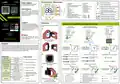
LCD icons Description + Button Description
Change the parameter value up
Product Compiliance
This product complies with the following EU
Directives: 2014/53/EU i 2011/65/EU.
1. Humidity display
15. Power OFF icon
2. Room temp
16. Key lock
3. Fan icon (it is animating when fan is running) 17. Parameters icon
1
2
3
4
5
Fan Coil thermostat, WIFI, 230V
Change the parameter value down
6
Manual/Schedule mode - short button press (online mode)
Enther the installer parameters- hold 3 seconds
Turn OFF/ON thermostat - hold 5 seconds
AUTO
4. Fan Speed (LO, ME, HI, AUTO, OFF)
5. Clock
6. Celcius unit
7. Heating mode icon
8. Cooling icon
9. AUTO Heat/Cool active
10. Schedule icon
11. Manual or temporary override mode
12. Pipe sensor (2-PIPE) or external temp sensor
13. Temp value of the additional sensor
14. Occupancy sensor -conencted to S2-COM
18. Setting icon (set value icon)
19. Frost mode icon
20. Underfloor heating icon
21. ECO mode icon
22. WiFi connection
23. Cloud connection
1
23
22
7
8
9
Safety information:
A
21
20
19
18
Use in accordance with national and EU
regulations. Use the device only as intended,
keeping it in a dry condition. The product is for
indoor use only. Please read the entire manual,
before installation or use.
2
Enter the pairing mode - hold until the PA message
appears
10
11
12
SET
+
3
Factory reset - hold until the FA message appears
Lock/Unlock thermostat keys - hold 3 seconds
Heating/Cooling mode change - hold 3seconds
EFAN-230W
EFAN-230B
Quick Guide
1. “UP”button
2. “OK”button
3. “DOWN”button
+
+
17
13
15
14
16
Installation
Works with
Powered By
Ver. 1.0
Release date: IX 2024
Soft:
Main module: v2.0.2
MCU: v0.2.8
Wall mounting
Installation must be performed by a qualified
person with appropriate electrical qualifications,
in accordance with the standards and regulations
in force in a given country and in the EU. The
manufacturer is not responsible for non-
compliance with the instructions.
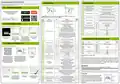
Connection description and EFAN thermostat configuration instructions
To properly install the controller, follow the steps
below:
GET IT ON
2-pipe fan coil
(heating and/or cooling)
4-pipe fan coil (heating and cooling
or underfloor heating and fan coil for cooling)
Underfloor heating
Available on the
Floor temperature sensor
S2
(optional)
1
T2
T1
S1
S2
Modbus
RS-485
T2
T1
S1
S2
S2 COM S1
T2
T1
B-
Modbus
RS-485
S2 COM S1
A+
Modbus
RS-485
B-
EFAN-230
S2 COM S1
Producer:
Engo Controls sp. z o.o. sp. k.
Rolna 4 St.
B-
A+
EFAN-230
F3 F2 F1 V2 V1
N
L
A+
EFAN-230
F3 F2 F1 V2 V1
N
L
43-262 Kobielice
Poland
WARNING:
N
L
F3 F2 F1 V2 V1
N
L
For the entire installation, there may be
additional protection requirements, which the
installer is responsible for.
V1
SL..
V1
ECB8-230
Underfloor
wiring centre
Grab the top part and the bottom
part to disconnect
V2
AC 230V
L
AC 230V
L
N
N
Introduction
1
1
1
Controller for fan coil units or trench heaters with fan, ideal for both 2-pipe and 4-pipe systems. It offers flexible
control of 3-speed 230V fans, automatically adjusting the fan speed as required. Frost protection mode and
overheat protection functions guarantee safety, while the built-in ECO mode saves energy, resulting in lower
energy bills. With support for mixed systems (fan coil and underfloor heating), the EFAN230 is a complete
solution for anyone who wants to ensure thermal comfort in their home or office.
1
2
1
2
1
2
Use the or button
select 2-pipe system. Then
confirm with button.
Use the or button
select 4-pipe system. Then
confirm with button.
or button
Use the
select 2-pipe system. Then
confirm with button.
SET
SET
SET
2
2
Press or button to select operating mode:
2
2
Press or button to select operating mode:
Press or button to select operating mode:
AUTO
a)
b)
Fan coil heating in a 2-pipe system
Technical data
Power supply
Products features
AUTO
Fan coil heating and cooling
in a 4-pipe system
a)
b)
a)
Underfloor heating
AUTO
230V AC 50 Hz
5,0°C to 45,0°C
0,1 or 0,5°C
Fan coil cooling in a 2-pipe system
Wi-Fi 2.4 GHz communication standard
Setpoint temp. range
Display temp. accuracy
AUTO
Underfloor heating
and fan coil cooling
AUTO
Fan coil heating and cooling
in a 2-pipe system
Confirm your selection with button.
c)
Modbus RS-485 communication
Control of 2 or 4 pipe fan coil units
Support for fans 3-speed 230V
Combined system control
Connect the wires, and then screw back parts to
the mounting box.
Confirm your selection with button.
Confirm your selection with button.
Control algorithm Delta FAN, Histeresis ( 0,1.. 2°C)
NTC
3
3
3
Communication
Input A+/B-
Wi-Fi 2,4GHz
AUTO
AUTO
AUTO
3
Modbus RS-485
The controller is configured
for a 2-pipe system.
The controller is configured
for a 4-pipe system.
The controller is configured
for underfloor heating.
S1/COM, S2/COM - temp. sensor
or volt-free contact
Inputs
Compatibility with the ENGO Smart
application (in Tuya Cloud technology)
Valve control outputs
Fan control outputs
V1, V2 - 230V AC, 5(2)A
Controller connection terminals:
2-pipe: control output 230V AC - heating and/or cooling valve
4-pipe: control output 230V AC - heating valve
Legend for diagrams:
V1
V2
S1
Measurement of humidity and
temperature
F1, F2, F3 - 230V AC, 5(2)A
Power supply 230V AC
L, N
F1
Fuse
External contact
2-pipe: not active
4-pipe: control output 230V AC - coolingvalve
Output 230V AC - I low fan speed
Output 230V AC - II medium fan speed
Output 230V AC - III high fan speed
Modbus RS-485 terminals
90 x 90 x 44 mm (13 mm after
mounting in a box with
a diameter of 60)
Volt-free input of a switch or temperature sensor EFS300 on the
pipe (change of heating/cooling mode)
ECO mode
F2
V
T
Dimmension
Valve actuator
3-speed fan 230V AC
Temperature sensor
Slide the front of the controller over the back part.
Turn on the power supply.
The controller is ready for operation.
F3
Volt-free switch input (for occupancy sensor - hotel card) or
external temperature sensor (EFS300)
S2
Easy installation and configuration
A+ / B-
GND for the sensor/contact
COM


| General | Details |
|---|---|
| Name | ENGO CONTROLS EFAN-230W WIFI 230V Fan Coil Thermostat User Guide |
| Make | ENGO CONTROLS |
| Language | English |
| Filetype | PDF (Download) |
| File size | 0.42 MB |
 (1 votes, average: 5.00 out of 5)
 Loading...

ENGO Controls EONE230W Internet Controlled Thermostat User Guide

ENGO CONTROLS EFAN-230W Fan Coil Thermostat User Guide

ENGO CONTROLS FAN-24W 24V Fan Coil Thermostat User Guide

ENGO CONTROLS EASY230W Non-Programmable Wired Thermostat User Guide

ENGO CONTROLS EONE230 Internet Controlled Thermostat User Guide

ENGO CONTROLS EONEBATW, EONEBATB Internet Controlled Thermostat User Manual

ENGO Controls E901WIFI Internet Wireless Thermostat User Guide

ENGO CONTROLS EONE-BATW, EONE-BATB Internet Controlled Thermostat User Guide

ENGO CONTROLS EFAN-24W Fan Coil Thermostat User Guide

ENGO CONTROLS E10-MBUSW, E10-MBUSB Wi-Fi MODBUS Thermostat User Guide

ENGO Controls EFAN-230W Manual: Questions and Answers
ENGO Controls EFAN-230W specifications
| Power supply | 230V AC 50 Hz |
| Floor temperature limit | 5°C - 45°C |
| Setpoint range | 5,0°C to 45,0°C |
Can ENGO Controls work with both 2-pipe and 4-pipe fan coil systems?
Yes. The thermostat supports 2-pipe systems with heating and/or cooling, and 4-pipe systems with separate heating and cooling valves. User Guide, p. 1
How do I switch ENGO Controls EFAN-230W between heating and cooling mode?
Hold the DOWN button for three seconds to change between heating and cooling modes. User Guide, p. 1
Other ENGO Controls EFAN-230W manuals
More ENGO Controls thermostat manuals

degrii THP Remote Thermostat User Guide

REPTIZOO TC04 Timing Thermostat Instruction Manual

homematic IP TRV-E-A Monday Radiator Thermostat Instruction Manual

Danfoss Next Plus Electronic Intelligent Timer Thermostat Installation Guide

Smart Temp SMT-850 Halo Thermostat User Guide

ELEKTROBOCK PT02 Electronic Pipe Thermostat Instruction Manual

Beca BAC-9000 Smart Knob Thermostat User Guide

EMOS P56201UF Floor Heating Thermostat Instruction Manual

SunTouch 500950-SB CommandPlus Touchscreen Programmable Smart Thermostat Instruction Manual

MYSAir Roma Monochrome Backlit Touch Thermostat User Manual