
Home > WHITE RODGERS > White-Rodgers 1F97-1277 Big Blue Single Stage Thermostat User Manual
White-Rodgers 1F97-1277 Big Blue Single Stage Thermostat User Manual
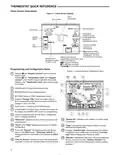
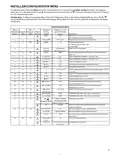
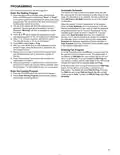
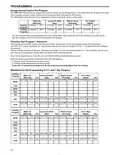
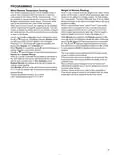
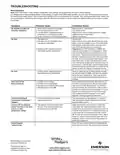


INSTALLER/CONFIGURATION MENU
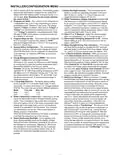
1) GAS or Electric (ELE) fan operation. If the heating system
requires the thermostat to energize the fan, select ELE.
Select GAS if the heating system energizes the fan on a
call for heat. Note: Resetting the thermostat switches
the option to ELE.
2) Programs per week – This control can be configured for
7 independent day or 5/1/1 day programming or nonpro-
grammable modes. Default is 7-day mode. The display
indicates "7 Days" as default. Other options "5 Days" or
10)Select Backlight Intensity – This thermostat has the
ability to provide two selectable intensities of the back-
light: HI and LO. Using
or
touch keys you can
toggle the selection between HI and LO.
11) Select Temperature Display Adjustment 4 LO to 4 HI
This allows you to adjust the room temperature display
by an amount in the range of -4°F to +4°F in 1° steps by
using the
or
touch keys. Your thermostat was ac-
curately calibrated at the factory, however you have the
option to change the display temperature value to match
your previous thermostat, if you so prefer.
"0 Days" can be selected by pressing touch keys,
or
. If "0 Days" is selected for non-programmable mode,
the step for EMR will be skipped, as this feature will not
be available in this mode.
12) Select °F or °C Readout – Select the desired temper-
ature unit by pressing
or . Factory default is °F.
3) Program Steps per day – This control can be configured
for 4 or 2 program steps per day. Default is "4 PS"
and can be toggled between 4 PS and 2 PS by pressing
13) Select Audio Prompting (Beeper) On or Off – Factory
default setting is on (b, On). If you wish to turn off the
beeper select OFF.
the
or
touch keys.
14) Select Daylight Saving Time Calculation – This feature
will allow the thermostat to calculate the DST automati-
cally and apply it to the Real Time Clock display. Default
4) System Switch Configuration – This thermostat is con-
figured for Heat and Cool with Auto changeover default
(Cool-Off-Heat-Auto). Can be configured as Heat & Cool
(Cool-Off-Heat), or Heat Only (Off-Heat), or Cool Only
(Cool-Off).
On. Use
or
touch keys to select the feature, OFF.
15 & 16)Select Automatic Schedule – With just one touch
of the Auto Schedule key this feature allows you to pro-
gram a desired comfort temperature into all the program
periods along with a 6° set back for night periods of both
Heat and Cool programs. Factory default is "On" for both.
When Heat AS On and Cool AS On are activated while
in Heat or Cool mode, select desired setpoint tempera-
ture and press Auto Schedule. Auto Schedule will flash,
press it again to copy. This value will be copied into all
the morning, day and evening program periods. The night
program periods will be with a 6°F set back.
17) Select Cool Savings™: With Cool Savings™ enabled,
the thermostat will make small adjustments to the sensed
temperature during periods of high demand to reduce AC
system running time and save energy. When the cooling
system has been running for more than 20 minutes,
humidity in the home will be lower and a higher tempera-
ture will feel comfortable. After 20 minutes of run time, the
thermostat will start decreasing the sensed temperature
in steps of less than one degree as the system contin-
ues to run. These adjustments will eventually cause the
system to satisfy the thermostat to turn the system off
and reduce the energy consumption. When the Cool
Savings™ feature is active and making adjustments,
the display will flash “CoolSavings”. The amount of the
adjustments to the sensed temperature is dependent on
the Cool Savings™ value that is set, 1 being the least
adjustment and 6 being the most adjustment. With this
feature set to OFF, no change will occur when the AC
system is continuously running during the periods of high
demand. Periods of high demand will normally occur
during the late afternoon and early evening on the hottest
days of the summer. As demand lessens the adjustments
to sensed temperature are reversed until sensed tem-
perature returns to normal and “CoolSavings” no longer
flashes.
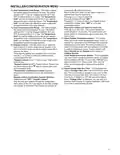
5) Energy Management Recovery (EMR) – (this step is
skipped if configured as non-programmable).
When set to "On" causes the thermostat to start heating
or cooling early to make the building temperature reach
the program setpoint at the time you specify.
Example: Let us say, the heating program is 65°F at
night and 70° at 7 AM. If the building temperature is 65°F,
the difference is 5°F. Allowing 5 minutes per °F rise, the
thermostat setpoint will change to 70° at 6:35 AM. Cool-
ing allows more time per °F, because it takes longer to
reach temperature.
6 & 7) Cycle Rate Selection – The factory default setting
is fast cycle (FA Cr) in all modes (Heat, Cool). To slow
cycling (SL, Cr), press touch keys
FA & SL. The cycle rates are as below different selections:
Mode
Heat
Cool
or
toggle between
Fast rate
0.6°F
1.2°F
Slow rate
1.2°F
1.7°F
8) Select Compressor Lockout (CL) – Selecting CL On will
cause the thermostat to wait 5 minutes between cooling
cycles. This is intended to help protect the compressor
from short cycling. Some of the newer compressors have
already got a time delay built in and do not require this
feature to be activated in the thermostat. Your compres-
sor manufacturer can tell you if this lockout feature is
already present in their system.
When the thermostat compressor time delay is activated,
it will flash the setpoint for up to five minutes.
9) Select Continuous Backlight – In low lighting condi-
tions, display backlight improves the display contrast.
When C terminal is connected, selecting dL On will turn
the backlight on continuously. Selecting dL Off will turn
the backlight on momentarily after any key is pressed.
When C terminal is not powered (battery only), dL On
enables the momentary backlight whenever a key is
pressed.
6

| General | Details |
|---|---|
| Name | White-Rodgers 1F97-1277 Big Blue Single Stage Thermostat User Manual |
| Make | WHITE RODGERS |
| Language | English |
| Filetype | PDF (Download) |
| File size | 0.49 MB |
 (1 votes, average: 5.00 out of 5)
 Loading...

White-Rodgers 1E78 Non Programmable Heat Only Thermostat User Manual

White-Rodgers 1F56N-444 Thermostat User Manual

White-Rodgers 1F83-277 Heating & Air Conditioning Auto Changeover Heat Pump Thermostat User Manual

White-Rodgers M30 Thermostat Instruction Manual

WHITE-RODGERS 1F51N-619 Low Voltage Evaporative Cooler Thermostat Instruction Manual

White Rodgers 1F78-151 Non Programmable Thermostat Instructions

WHITE RODGERS 1F80-51 Programmable Electronic Digital Thermostat Instruction Manual

WHITE-RODGERS 1F86-0471 Blue Single 1 1 Stage Thermostat Instruction Manual

WHITE-RODGERS 1F90-71 5-Day 2-Day Electronic Digital Thermostat Instruction Manual

WHITE-RODGERS 1F95-1277 Universal Thermostat Owner’s Manual


GENERAL LIFE NORA 270S RF Digital Room Thermostat User Manual

Danfoss 088U0210 CF-RS Standard Room Thermostat Instruction Manual

BOSCH RT20 RF Room Thermostat User Manual

GENERAL LIFE ARUNA HT300S Digital Room Thermostat User Manual

Robertshaw RTC500 WIFI Thermostat Instruction Manual

HERSCHEL iQ T2 Wireless Thermostat Instruction Manual

Honeywell RLV4305 Programmable Thermostat Owner’s Manual

WATTS BT-A03 RF Electronic Room Thermostat Installation Guide

heatmiser neoStat Touch-e Touchscreen Electric Floor Heating Thermostat Owner’s Manual

ESi ESRTP4RFW RF Programmable Room Thermostat User Manual