
Home > WHITE RODGERS > White-Rodgers 1F97-1277 Big Blue Single Stage Thermostat User Manual
White-Rodgers 1F97-1277 Big Blue Single Stage Thermostat User Manual


TROUBLESHOOTING
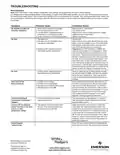
Reset Operation
Note: When thermostat is reset, installer configuration menu settings and programming will reset to factory settings.
If a voltage spike or static discharge blanks out the display or causes erratic thermostat operation, you can reset the thermostat by removing
the wires from terminals R and C (do not short them together) and removing batteries for 2 minutes. After resetting the thermostat, replace the
wires and batteries. If the thermostat has been reset and still does not function correctly contact your heating/cooling service person or place
of purchase.
Symptom
Possible Cause
Corrective Action
No Heat/No Cool/No Fan
(common problems)
1. Blown fuse or tripped circuit breaker.
2. Furnace power switch to OFF.
Replace fuse or reset breaker.
Turn switch to ON.
3. Furnace blower compartment door or
panel loose or not properly installed.
4. Loose connection to thermostat or system.
Replace door panel in proper position to engage
safety interlock or door switch.
Tighten connections.
No Heat
1. Pilot light not lit.
Re-light pilot.
2. Furnace Lock-Out Condition. Heat
may also be intermittent.
Many furnaces have safety devices that shut down
when a lock-out condition occurs. If the heat works
intermittently contact the furnace manufacturer or
local HVAC service person for assistance.
3. Heating system requires service or
thermostat requires replacement.
Diagnostic: Set SYSTEM Switch to HEAT and
raise the setpoint above room temperature. Within
a few seconds the thermostat should make a soft
click sound. This sound usually indicates the ther-
mostat is operating properly. If the thermostat does
not click, try the reset operation listed above. If the
thermostat does not click after being reset contact
your heating and cooling service person or place of
purchase for a replacement. If the thermostat clicks,
contact the furnace manufacturer or a HVAC service
person to verify the heating is operating correctly.
No Cool
1. Cooling system requires service or
thermostat requires replacement.
Same as diagnostic for No Heat condition except
set the thermostat to COOL and lower the setpoint
below the room temperature. There may be up to
a five minute delay before the thermostat clicks in
Cooling.
Heat, Cool or Fan
Runs Constantly
1. Possible short in wiring.
Check each wire connection to verify they are not
shorted or touching together. No bare wire should
stick out from under terminal block. Try resetting
the thermostat as described above. If the condition
persists the manufacturer of your system or service
person can instruct you on how to test the Heat/
Cool system for correct operation. If the system
operates correctly, replace the thermostat.
2. Possible short in thermostat.
3. Possible short in heat/cool/fan system.
4. FAN Switch set to Fan ON.
Thermostat Setting &
Thermostat Thermometer
Disagree
1. Thermostat thermometer setting
requires adjustment.
The thermometer can be adjusted +/- 4 degrees.
See Temperature Display Adjustment in the Con-
figuration Menu section.
Furnace (Air Conditioner)
Cycles Too Fast or Too Slow
(narrow or wide
1. The location of the thermostat and/or
the size of the Heating System may
be influencing the cycle rate.
Digital thermostats provide precise control and
cycle faster than older mechanical models. The
system turns on and off more frequently but runs for
a shorter time so there is no increase in energy use.
If you would like an increased cycle time, choose
SL for slow cycle in the Configuration menu, step 6
(heat) or 7 (cool). If an acceptable cycle rate is not
achieved, contact a local HVAC service person for
additional suggestions.
temperature swing)
Forgot Keypad
Lockout Code
Press the menu button (button will disappear) and
hold in for 20 seconds. This unlocks the thermostat.
White-Rodgers is a business
of Emerson Electric Co.
The Emerson logo is a
trademark and service mark
of Emerson Electric Co.

| General | Details |
|---|---|
| Name | White-Rodgers 1F97-1277 Big Blue Single Stage Thermostat User Manual |
| Make | WHITE RODGERS |
| Language | English |
| Filetype | PDF (Download) |
| File size | 0.49 MB |
 (1 votes, average: 5.00 out of 5)
 Loading...

White-Rodgers 1E78 Non Programmable Heat Only Thermostat User Manual

White-Rodgers 1F56N-444 Thermostat User Manual

White-Rodgers 1F83-277 Heating & Air Conditioning Auto Changeover Heat Pump Thermostat User Manual

White-Rodgers M30 Thermostat Instruction Manual

WHITE-RODGERS 1F51N-619 Low Voltage Evaporative Cooler Thermostat Instruction Manual

White Rodgers 1F78-151 Non Programmable Thermostat Instructions

WHITE RODGERS 1F80-51 Programmable Electronic Digital Thermostat Instruction Manual

WHITE-RODGERS 1F86-0471 Blue Single 1 1 Stage Thermostat Instruction Manual

WHITE-RODGERS 1F90-71 5-Day 2-Day Electronic Digital Thermostat Instruction Manual

WHITE-RODGERS 1F95-1277 Universal Thermostat Owner’s Manual


VIMAR 30810.x-02973 Smart Home View Wireless Connected Dial Thermostat Instruction Manual

SIEMENS 194-2042 Pnuematic Room Thermostat User Guide

MYSON Unisenza Dial Thermostat User Manual

Meross MTS960 Smart Wi-Fi Socket Thermostat Instruction Manual

GENERAL LIFE 300S Wired Room Thermostat User Manual

Google Nest Learning Thermostat (4th gen) Installation Guide

Doit 474053 Low Voltage Thermostat Installation Guide

TPECO Control Systems 375EM Raintight Weather Resistant Single Stage Thermostat Instruction Manual

Danfoss BD271136569160en-010102 Electronic Radiator Thermostat Owner’s Manual

ESi ESRTP4RFW RF Programmable Room Thermostat User Manual