
Home > WHITE RODGERS > White-Rodgers 1F97-1277 Big Blue Single Stage Thermostat User Manual
White-Rodgers 1F97-1277 Big Blue Single Stage Thermostat User Manual


OPERATING YOUR THERMOSTAT
IMPORTANT!
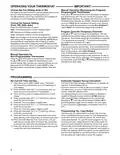
Manual Operation (Bypassing the Program)
Programmable Thermostats
Choose the Fan Setting (Auto or On)
Fan Auto is the most commonly selected setting and runs the
fan only when the heating or cooling system is on.
Fan On selection runs the fan continuously for increased air
circulation or to allow additional air cleaning.
Press
or
and the HOLD button and adjust the tempera-
ture wherever you like. This will override the program. The
HOLD feature bypasses the program and allows you to adjust
the temperature manually, as needed. Whatever temperature
you set in HOLD will be maintained 24 hours a day, until you
manually change the temperature or press Run Schedule to
cancel HOLD and resume the programmed schedule.
Choose the System Setting
(Cool, Off, Heat, Auto)
Press the SYSTEM button to select:
Heat: Thermostat controls only the heating system.
Program Override (Temporary Override)
Off: Heating and Cooling systems are off.
Press
or
buttons to adjust the temperature. This will
Cool: Thermostat controls only the cooling system.
override the temperature setting for a (default) four hour over-
ride period. The override period can be shortened by pressing
or lengthened by pressing . Program Override period
can range from 15 minutes to 7 days.
Example: If you turn up the heat during the morning program,
it will be automatically lowered later, when the temporary hold
period ends. To cancel the temporary setting at any time and
return to the program, press Run Schedule.
Auto: Auto Changeover is used in areas where both heating
and cooling may be required on the same day. AUTO allows
the thermostat to automatically select heating or cooling
depending on the indoor temperature and the selected heat
and cool temperatures. When using AUTO, be sure to set the
Cooling temperatures more than 1° Fahrenheit higher than
the heating temperature.
If the SYSTEM button is pressed to select AUTO the
thermostat will change to Heat or Cool, whichever ran last. If
it switches to heat but you want cool, or it changes to cool but
Manual Operation for
Non-Programmable Thermostats
Press the SYSTEM button to select Heat or Cool and use
you want heat, press both
change to the other mode.
or
buttons simultaneously to
the
or
buttons to adjust the temperature to your
desired setting. After selecting your desired settings you can
also press the SYSTEM button to select AUTO to allow
the thermostat to automatically change between Heat and
Cool.
PROGRAMMING
Set Current Time and Day
Automatic Daylight Saving Calculation
The Real Time Clock will adjust automatically for daylight sav-
ings time, in the following manner:
Increment one hour at 2 AM on the second Sunday of March
and decrement one hour at 2 AM on the first Sunday of No-
vember. (New DST effective 2007).
The daylight saving feature can be enabled or disabled in
installer configuration mode. Default is dS ON (enabled).
After entering installer configuration mode, momentarily
1) Press Menu key to enter installer menu. Then press
Set Time once to indicate hour & A or P designation in
clock display.
2) Press and hold either the
or
touch key until you
reach the correct hour and A or P designation.
3) Press Set Time again to display minutes only in clock
display.
4) Press and hold either the
reach the correct minutes.
or
touch keys until you
press
actual temperature digits) and on (default – in clock digits).
and keys will toggle display and operation from on to
OFF.
or
touch key until the display indicates dS (in
5) Press Set Time once again to display year.
6) Press and hold either the
reach the correct year.
or
touch key until you
7) Press Set Time once again to display month.
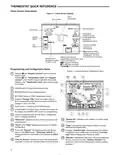
Programming Tip: Copy Button
8) Press and hold either the
reach the correct month.
9) Press Set Time once again to display date of the month
along with day of the week at top row (which is automatic).
or
touch key until you
You may copy any daily program to another day or group
of days by pressing the Copy button. In 7 day programming
mode when the Copy button is pressed, the other 6 days
of the week will flash. To copy the current program into the
remaining six days, simply press the Copy button again. To
copy the current program to another day of the week, press
Advance Day to select the day and press Copy to paste the
program. In 5/1/1 day programming mode the copy function is
similar. The weekday (Mon-Fri) program can be copied to Sat
and Sun (both flashing) or use Advance Day to choose Sat or
Sun and press the Copy button to paste the program.
10) Press and hold either the
or
touch key until you
reach the correct day of the month and day of the week
is automatically calculated and displayed at the top row.
11) Press Run Schedule once; now the display will show the
correct time and room temperature.
8

| General | Details |
|---|---|
| Name | White-Rodgers 1F97-1277 Big Blue Single Stage Thermostat User Manual |
| Make | WHITE RODGERS |
| Language | English |
| Filetype | PDF (Download) |
| File size | 0.49 MB |
 (1 votes, average: 5.00 out of 5)
 Loading...

White-Rodgers 1F56N-444 Thermostat User Manual

White-Rodgers 1F83-277 Heating & Air Conditioning Auto Changeover Heat Pump Thermostat User Manual

White-Rodgers 1E78 Non Programmable Heat Only Thermostat User Manual

White-Rodgers M30 Thermostat Instruction Manual

WHITE-RODGERS 1F51N-619 Low Voltage Evaporative Cooler Thermostat Instruction Manual

White Rodgers 1F78-151 Non Programmable Thermostat Instructions

WHITE RODGERS 1F80-51 Programmable Electronic Digital Thermostat Instruction Manual

WHITE-RODGERS 1F86-0471 Blue Single 1 1 Stage Thermostat Instruction Manual

WHITE-RODGERS 1F90-71 5-Day 2-Day Electronic Digital Thermostat Instruction Manual

WHITE-RODGERS 1F95-1277 Universal Thermostat Owner’s Manual


White Rodgers Big Blue Universal Thermostat 1F95-1277 Installation Guide
ring Homeowner’s Pro Smart Thermostat User Manual

BEOK CONTROLS TDR89 Thermostat User Guide

SIEMENS TH193 HC Heating-Cooling Room Thermostat Instruction Manual

DEVI 330 Electronic Thermostat Installation Guide

CIELO BM101WA Breez Max Smart Thermostat Installation Guide

Pfannenberg DTS 3041 Thermostat Instructions

Danfoss RET230 Electronic Heat Cool Thermostat Instruction Manual

Danfoss ECtemp Smart Intelligent Electronic Timer Thermostat Installation Guide

GLOBAL HY06RF-BW/WW/WE Thermostat User Manual