
Home > Homematic IP > homematic IP HmIP-eTRV-F Radiator Thermostat Instruction Manual
homematic IP HmIP-eTRV-F Radiator Thermostat Instruction Manual






Start-up
You can pair the Homematic IP
tem/Menu/Boost button (E).
• Press and hold the System button
of the device you want to pair (e.g.
the Homematic IP Window / Door
Contact with Magnet) for at least
4 seconds to activate the pairing
mode. The device LED starts to
flash orange. For further informa-
tion, please refer to the operating
manual of the corresponding de-
vice.
Radiator Thermostat – flex
(HmIP-eTRV-F) with the
Homematic IP Window / Door
Contact with Magnet (HmIP-
SWDM-2) and/or the
Homematic IP Wall Thermostat
(HmIP-WTH-B-2).
Please make sure you maintain a
distance of at least 50 cm be-
tween the devices during pairing.
You can cancel the pairing pro-
cess in the menu. This will be
indicated by the device LED (E)
lighting up red.
MODE
OFFSET
PROFILE
DATE&TIME
PAIRING
DISPLAY
OPERATING LOCK
4 s
-
OK
+
To connect the device with anoth-
er Homematic IP device, the pairing
mode of both devices must be ena-
bled. To do this, proceed as follows:
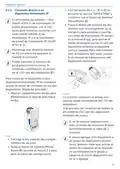
• Open the battery compartment (F)
by pulling the cover of the battery
compartment upwards.
Figure 4
The device LED lights up green to indi-
cate that pairing has been successful.
If pairing has failed, the device LED
lights up red. Please try again.
If no pairing operations are per-
formed, pairing mode is exited
automatically after 3 minutes.
If you would like to add another
device to an existing device group,
first enable the pairing mode of
the existing device in the group
and afterwards the pairing mode
of the new device.
Figure 3
• Remove the insulation strip from
the battery compartment.
• Press and hold the System/Menu/
Boost button (E) for approx. 2 sec-
onds to open the configuration
menu.
If you would like to add a wall
thermostat to an existing device
group including a radiator ther-
• Select menu item “DATE&TIME”
using the plus and minus buttons
(C + D) and confirm with the Sys-
31

| General | Details |
|---|---|
| Name | homematic IP HmIP-eTRV-F Radiator Thermostat Instruction Manual |
| Make | Homematic IP |
| Language | English |
| Filetype | PDF (Download) |
| File size | 14.49 MB |
 (1 votes, average: 5.00 out of 5)
 Loading...

homematic IP HmIP-eTRV-2 Radiator Thermostat Instruction Manual

homematic IP HmIP-BWTH-A Wall Thermostat Installation Guide

homematic IP HmIP-WTH-B-2 Wall Thermostat Installation Guide

homematic IP TRV-E-A Monday Radiator Thermostat Instruction Manual

homematic IP HAP Radiator Thermostat Instruction Manual

Homematic IP HmIP-WTH-B Wireless Wall Thermostat Instruction Manual

homematic IP HmIP-eTRV-E Series Radiator Thermostat Evo Installation Guide

Homematic IP BMOAONSUT Radiator Thermostat User Manual

homematic IP C-2 Radiator Thermostat Instruction Manual

homematic IP IP HmIP-eTRV-CL Radiator Thermostat Instruction Manual


OH-1202H Universal Humidity Touchscreen Thermostat Instruction Manual

MechDoc QD-HVAC10 Programmable Thermostat Instruction Manual

CYDATA DAISY Wi-Fi Enabled Thermostat Installation Guide

sinope TH1124NP Non Programmable Thermostat for Electric Heating Owner’s Manual

Ebeco EB-Therm 55 Thermostat User Manual

HEATIT Z-Temp3 is a Battery Operated Thermostat Instruction Manual

GENERAL LIFE FH100 Underfloor Heating Thermostat User Manual

Honeywell evohome Smart Thermostat User Guide

White Rodgers 1F72 5 2 Day Programmable Thermostat Instructions

namron 16A 2.0 Zigbee Touch Thermostat Instruction Manual