
Home > Homematic IP > homematic IP HmIP-eTRV-F Radiator Thermostat Instruction Manual
homematic IP HmIP-eTRV-F Radiator Thermostat Instruction Manual


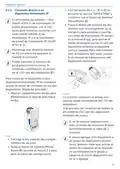




Configuration menu
ceed as follows:
• Press and hold the System/Menu/
Boost button (E) for approx. 2 sec-
onds to open the configuration
menu.
• Press and hold the System/Menu/
Boost button (E) for approx. 2 sec-
onds to open the configuration
menu.
• Select “RES” using the plus and
minus buttons (C + D) and confirm
with the System/Menu/Boost but-
ton (E).
• Select menu item “DATE&TIME”
using the plus and minus buttons
(C + D) and confirm with the Sys-
tem/Menu/Boost button (E).
• Select the year using the plus and
minus buttons and confirm with
the System/Menu/Boost button (E).
• Select the month using the plus
and minus buttons and confirm
with the System/Menu/Boost but-
ton (E).
• Pairing mode is started and the
System/Menu/Boost button (E)
flashes orange.
7.8 Display mode
You have the option of rotating the
display in 90° increments or adjusting
the display mode. To do this, proceed
as follows:
• Select the day using the plus and
minus buttons and confirm with
the System/Menu/Boost button (E).
• Select the hours using the plus and
minus buttons and confirm with
the System/Menu/Boost button (E).
• Select the minutes using the plus
and minus buttons and confirm
with the System/Menu/Boost but-
ton (E).
• Press and hold the System/Menu/
Boost button (E) for approx. 2 sec-
onds to open the configuration
menu.
• Select “RES” using the plus and
minus buttons (C + D) and confirm
with the System/Menu/Boost but-
ton (E).
• Use the plus or minus buttons
(C + D) to select the “Rotate” or
“Mode” menu item and confirm
with the System/Menu/Boost but-
ton (E).
• This returns you to the start screen.
After restarting the device, the
date and time must first be set in
order to access the other menu
items.
• Under “Rotate”, use the plus or
minus buttons (C + D) to select
the angle rotation (0°, 90°, 180° or
270°) and confirm with the System/
Menu/Boost button (E).
7.7 Pairing
You can use the “PAIRING” menu item
to link the device directly with oth-
er suitable devices (see „6.1.1 Direct
pairing with a Homematic IP device“
on page 30). To do this, proceed as
follows:
• Under “Mode”, use the plus or mi-
nus buttons (C + D) to select “re-
duced” or “functional” mode and
confirm with the System/Menu/
Boost button (E).
• This returns you to the start screen.
40

| General | Details |
|---|---|
| Name | homematic IP HmIP-eTRV-F Radiator Thermostat Instruction Manual |
| Make | Homematic IP |
| Language | English |
| Filetype | PDF (Download) |
| File size | 14.49 MB |
 (1 votes, average: 5.00 out of 5)
 Loading...

homematic IP HmIP-eTRV-2 Radiator Thermostat Instruction Manual

homematic IP HmIP-BWTH-A Wall Thermostat Installation Guide

homematic IP HmIP-WTH-B-2 Wall Thermostat Installation Guide

homematic IP TRV-E-A Monday Radiator Thermostat Instruction Manual

homematic IP HAP Radiator Thermostat Instruction Manual

Homematic IP HmIP-WTH-B Wireless Wall Thermostat Instruction Manual

homematic IP HmIP-eTRV-E Series Radiator Thermostat Evo Installation Guide

Homematic IP BMOAONSUT Radiator Thermostat User Manual

homematic IP C-2 Radiator Thermostat Instruction Manual

homematic IP IP HmIP-eTRV-CL Radiator Thermostat Instruction Manual


Danfoss RT 107 Series Thermostat Installation Guide

HEARTH AND HOME Technologies E474962 Smart Stat Hht Remote Thermostat Instruction Manual

Smith s HAGA95001 Remote Wired Room Thermostat Owner’s Manual

Danfoss TP5001 Programmable Room Thermostat User Guide
homematic IP IP HmIP-eTRV-CL Radiator Thermostat Instruction Manual

SOGEDIS 1001 MODEL UP Refrigerator Thermostat Instruction Manual

Tempio Controls HY02B05 WIFI Digital Heating Thermostat User Manual

EPH CONTROLS COMBIPACK3 Wireless Non Programmable Thermostat User Guide

SALUS RT310i Internet Thermostat Installation Guide

niko 550-00550 Home Control HVAC Thermostat Instructions