
Home > Homematic IP > homematic IP HmIP-eTRV-F Radiator Thermostat Instruction Manual
homematic IP HmIP-eTRV-F Radiator Thermostat Instruction Manual


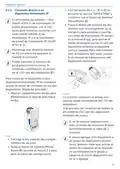




Configuration menu
• Select the month using the plus
and minus buttons and confirm
with the System/Menu/Boost but-
ton (E).
In this menu item, you can create a
heating schedule with six heating and
cooling phases (13 change settings)
according to your personal needs:
• Press and hold the System/Menu/
Boost button (E) for approx. 2 sec-
onds to open the configuration
menu.
• Select the day using the plus and
minus buttons and confirm with
the System/Menu/Boost button (E).
• Select the temperature using the
plus and minus buttons and con-
firm with the System/Menu/Boost
button (E).
• Select “RES” using the plus and
minus buttons (C + D) and confirm
with the System/Menu/Boost but-
ton (E).
• This calls up the start screen, on
which “ ECO” (Functional Mode)
is displayed.
• Use the plus or minus buttons
(C + D) to select the individual days
of the week, all working days, the
weekend or the entire week for
your heating profile and confirm
with the System/Menu/Boost but-
ton (E).
7.4 Offset temperature
As the temperature is measured on
the radiator thermostat, the tempera-
ture distribution can vary throughout a
room. To adjust for this, a temperature
offset of 3.5 °C can be set. If, for ex-
ample, 18 °C is measured instead of the
20 °C set, an offset of -2.0 °C must be
set. An offset temperature of 0.0 °C is
set in the factory settings. To adjust the
offset temperature, please proceed as
follows:
• Confirm the start time 00:00 with
the System/Menu/Boost button (E).
• Select the desired temperature for
the end time using the plus and mi-
nus buttons and confirm with the
System/Menu/Boost button (E).
• Select the desired temperature for
the next time period using the plus
and minus buttons and confirm
with the System/Menu/Boost but-
ton (E).
• Press and hold the System/Menu/
Boost button (E) for approx. 2 sec-
onds to open the configuration
menu.
• The next time is shown in the dis-
play. You can adjust this time using
the plus and minus buttons.
• Select menu item “OFFSET” using
the plus and minus buttons (C + D)
and confirm with the System/
• Repeat this procedure until tem-
peratures are stored for the entire
period between 0:00 and 23:59 h.
• This returns you to the start screen.
Menu/Boost button (E).
• Select the desired offset tempera-
ture using the plus and minus but-
tons and confirm with the System/
Menu/Boost button (E).
7.6 Time and date
• This returns you to the start screen.
To set the date and time, please pro-
7.5 Programming a heating schedule
39

| General | Details |
|---|---|
| Name | homematic IP HmIP-eTRV-F Radiator Thermostat Instruction Manual |
| Make | Homematic IP |
| Language | English |
| Filetype | PDF (Download) |
| File size | 14.49 MB |
 (1 votes, average: 5.00 out of 5)
 Loading...

homematic IP HmIP-eTRV-2 Radiator Thermostat Instruction Manual

homematic IP HmIP-BWTH-A Wall Thermostat Installation Guide

homematic IP HmIP-WTH-B-2 Wall Thermostat Installation Guide

homematic IP TRV-E-A Monday Radiator Thermostat Instruction Manual

homematic IP HAP Radiator Thermostat Instruction Manual

Homematic IP HmIP-WTH-B Wireless Wall Thermostat Instruction Manual

homematic IP HmIP-eTRV-E Series Radiator Thermostat Evo Installation Guide

Homematic IP BMOAONSUT Radiator Thermostat User Manual

homematic IP C-2 Radiator Thermostat Instruction Manual

homematic IP IP HmIP-eTRV-CL Radiator Thermostat Instruction Manual


BEOK CONTROLS TGT70 WIFI Fan Coil Thermostat Owner’s Manual

SALUS Wired Electronic Thermostat – Non-programmable HTR230 User Manual

Honeywell T874H Multistage Thermostat Instruction Manual

Danfoss TPOne-M Electronic Programmable Room Thermostat User Guide

Honeywell THR830T Homeexpert Room Thermostat Instruction Manual

SALUS CONTROLS IT800 WIFI Smart Thermostat Instruction Manual

sygonix 2997033 Wi-Fi Radiator Thermostat Instruction Manual

ESP ECSPST Fort Programmable Thermostat User Manual

Honeywell TH1100DH Non Programmable Thermostat Instruction Manual

Honeywell N100 Series Non Programmable Thermostat Installation Guide