Home > Homematic IP > homematic IP HmIP-eTRV-E Series Radiator Thermostat Evo Installation Guide

homematic IP HmIP-eTRV-E Series Radiator Thermostat Evo Installation Guide

Heizkörperthermostat – Evo  
Radiator Thermostat – Evo  
HmIP-eTRV-E | HmIP-eTRV-E-S | HmIP-eTRV-E-A  
Installations- und  
Bedienungsanleitung  
Manual de instalación  
y uso  
DE  
EN  
FR  
ES  
IT  
Installation and operating  
manual  
Istruzioni per l‘installazione  
e l‘uso  
Notice d‘installation et  
d‘emploi  
Installatie- en  
bedieningshandleiding  
NL  
GeneralDetails
Namehomematic IP HmIP-eTRV-E Series Radiator Thermostat Evo Installation Guide
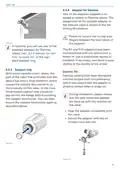
MakeHomematic IP
LanguageEnglish
FiletypePDF (Download)
File size3.96 MB
Download PDF
1 Star2 Stars3 Stars4 Stars5 Stars (1 votes, average: 5.00 out of 5)
Loading...
homematic IP HmIP-eTRV-2 Radiator Thermostat Instruction Manual
homematic IP HmIP-BWTH-A Wall Thermostat Installation Guide
homematic IP HmIP-WTH-B-2 Wall Thermostat Installation Guide
homematic IP TRV-E-A Monday Radiator Thermostat Instruction Manual
homematic IP HAP Radiator Thermostat Instruction Manual
homematic IP HmIP-eTRV-F Radiator Thermostat Instruction Manual
Homematic IP HmIP-WTH-B Wireless Wall Thermostat Instruction Manual
Homematic IP BMOAONSUT Radiator Thermostat User Manual
homematic IP C-2 Radiator Thermostat Instruction Manual
homematic IP IP HmIP-eTRV-CL Radiator Thermostat Instruction Manual

homematic IP HmIP-eTRV-E Series Radiator Thermostat Evo Installation Guide
Get the free PDF manual for the homematic IP HmIP-eTRV-E Series Radiator Thermostat Evo Installation Guide and access setup steps, usage instructions, and troubleshooting tips. 👉 View online or download now to keep your thermostat running smoothly!

homematic IP HmIP-eTRV-E Series Radiator Thermostat Evo Installation Guide Overview

Summary of Contents

  • Page 1: Heizkörperthermostat – Evo Radiator Thermostat – Evo Installations- und Bedienungsanleitung Manual de instalación y uso Installation and operating manual Istruzioni per l‘installazione e l‘uso Notice d‘installation et d‘emploi Installatie- en bedieningshandleiding
  • Page 2: Installations- und Bedienungsanleitung Inhaltsverzeichnis Lieferumfang Hinweise zur Anleitung Gefahrenhinweise Funktion und Geräteübersicht Allgemeine Systeminformationen Inbetriebnahme Bedienung Batterien wechseln Fehlerbehebung Wartung und Reinigung
  • Page 3: Lieferumfang 1x Heizkörperthermostat – Evo 1x Bedienungsanleitung Aus Sicherheits- und Zulassungsgründen (CE) ist das eigenmächtige Umbauen und/oder Verändern des Gerätes nicht gestattet. Hinweise zur Anleitung Lesen Sie diese Anleitung sorgfältig, bevor Sie Ihre Homematic IP Geräte in Betrieb nehmen. Bewahren Sie die Anleitung zum späteren Nachschlagen auf. Gefahrenhinweise Vorsicht! Explosionsgefahr bei unsachgemäßem Austausch der Batterien. Es besteht Explosionsgefahr! Bei Sach- oder Personenschäden, die durch unsachgemäße Handhabung oder Nichtbeachten der Gefahrenhinweise verursacht werden, übernehmen wir keine Haftung.
  • Page 4: Das Gerät ist nur für den Einsatz in wohnungsähnlichen Umgebungen geeignet. Der Heizkörperthermostat passt auf alle gängigen Heizkörperventile und ist einfach zu montieren. Jeder andere Einsatz, als der in dieser Bedienungsanleitung beschriebene, ist nicht bestimmungsgemäß und führt zu Gewährleistungs- und Garantieverlust. Mit dem Homematic IP Heizkörperthermostat können Sie die Raumtemperatur in Ihrem Smart Home über die Homematic IP Smartphone-App zeitgesteuert regulieren. Individuelle Temperaturverläufe können einfach per App erstellt werden – mit bis zu 3 einstellbaren Heizprofilen und 13 Änderungen pro Tag. Die zusätzliche Boost-Funktion ermöglicht ein schnelles, kurzzeitiges Aufheizen des Heizkörpers. Dank des drehbaren Displays und des modernen Gehäusedesigns fügt sich der Heizkörperthermostat perfekt ins Wohnumfeld ein. Geöffnete Fenster und Türen werden über die Fenster-auf-Erkennung erkannt. Die Heiztemperatur wird automatisch abgesenkt, um Energie zu sparen. Nach dem Schließen des Fensters wird die Wohlfühltemperatur sofort wiederhergestellt.
  • Page 5: Allgemeine Systeminformationen Dieses Gerät ist Teil des Homematic IP Smart-Home-Systems und kommuniziert über das Homematic IP Funkprotokoll. Alle Geräte des Systems können komfortabel und individuell per Smartphone über die Homematic IP App konfiguriert werden. Homematic IP Geräte können über die Zentrale CCU3 oder in Verbindung mit vielen Partnerlösungen betrieben werden. Der Heizkörperthermostat muss zunächst an den Homematic IP Access Point angelernt werden. Bitte lesen Sie diesen Abschnitt vollständig, bevor Sie mit dem Anlernen beginnen. Richten Sie zunächst Ihren Homematic IP Access Point über die Homematic IP App ein. Ziehen Sie den Isolierstreifen aus dem Batteriefach des Heizkörperthermostaten heraus. Der Anlernmodus ist für 3 Minuten aktiv. Ausführliche Informationen dazu finden Sie in der Bedienungsanleitung des Access Points. Alle technischen Dokumente und Updates finden Sie stets aktuell unter www.homematic-ip.com.
  • Page 6: Inbetriebnahme Warten Sie, bis der Anlernvorgang abgeschlossen ist. Zur Bestätigung eines erfolgreichen Anlernvorgangs leuchtet die LED grün. Das Gerät ist nun einsatzbereit. Leuchtet die LED rot, versuchen Sie es erneut. Sie können den Anlernmodus manuell für weitere 3 Minuten starten. Vergeben Sie in der App einen Namen für das Gerät und ordnen Sie es einem Raum zu. Das Gerät erscheint automatisch in der Homematic IP App. Zur Bestätigung geben Sie in der App die letzten vier Ziffern der Gerätenummer ein oder scannen Sie den QR-Code. Die Gerätenummer finden Sie auf dem Aufkleber im Lieferumfang oder direkt am Gerät.
  • Page 7: Inbetriebnahme Bitte lesen Sie diesen Abschnitt erst vollständig, bevor Sie mit der Montage beginnen. Die Montage des Homematic IP Heizkörperthermostats ist einfach und erfolgt ohne Ablassen von Heizungswasser oder Eingriff in das Heizsystem. Spezialwerkzeug oder ein Abschalten der Heizung sind nicht erforderlich. Die am Heizkörperthermostat angebrachte Metallmutter ist universell einsetzbar und ohne Zubehör passend für alle Ventile mit dem Gewindedmaß M30 x 1,5 mm. Die Fixierung des Thermostatkopfes kann unterschiedlich ausgeführt sein. Bei erkennbaren Schäden am vorhandenen Thermostat, am Ventil oder an den Heizungsrohren konsultieren Sie bitte einen Fachmann. Demontieren Sie den alten Thermostatkopf von Ihrem Heizkörperventil. Drehen Sie den Thermostatkopf auf den Maximalwert gegen den Uhrzeigersinn.
  • Page 8: Inbetriebnahme Heizkörperthermostat montieren Nach der Demontage des alten Thermostatkopfes können Sie den neuen Heizkörperthermostat auf dem Heizungsventil montieren. Setzen Sie den Heizkörperthermostat mit der Metallmutter auf das Heizungsventil. Bei Bedarf verwenden Sie einen der beiliegenden Adapter für Danfoss Ventile oder den beiliegenden Stützring. Stützring Bei den Ventilen einiger Hersteller weist der in das Gerät hineinragende Teil des Ventils nur einen geringen Durchmesser auf, was zu einem lockeren Sitz des Heizkörperthermostats führt. In diesem Fall sollte der beiliegende Stützring vor der Montage in den Flansch des Geräts eingelegt werden. Drehen Sie die Metallmutter auf dem Heizungsventil fest. Um die Montage zu erleichtern, können Sie die Batterien aus dem Batteriefach nehmen und dauerhaft auf die Taste im Batteriefach drücken. Durch das Drücken der Taste wird der Drehmechanismus des Heizkörperthermostats blockiert und die gewünschte Ausrichtung des Displays gelingt besser.
  • Page 9: Inbetriebnahme Adapter für Danfoss Zur Montage auf Ventile von Danfoss ist einer der beiliegenden Adapter erforderlich. Die Zuordnung des passenden Adapters zum entsprechenden Ventil entnehmen Sie den nachfolgenden Abbildungen. Achten Sie darauf, sich nicht die Finger zwischen den Adapterhälften einzuklemmen. Die Ventilkörper von Danfoss weisen umlaufend längliche Einkerbungen auf, die auch einen besseren Sitz des Adapters nach dem Aufrasten gewährleisten. Die Adapter RA und RAV wurden zugunsten eines besseren Sitzes mit Vorspannung produziert. Achten Sie bei der Montage darauf, dass die Zapfen im Inneren des Adapters eine deckungsgleiche Position zu den Einkerbungen am Ventil haben. Rasten Sie den Adapter vollständig am Ventil auf. Befestigen Sie den Adapter mit der beiliegenden Schraube und Mutter. Setzen Sie die Stößelverlängerung auf den Ventilstift.
  • Page 10: Inbetriebnahme Nach dem Einlegen der Batterien Die Ventilkörper von Danfoss weisen umlaufend längliche Einkerbungen auf. Achten Sie bei der Montage darauf, dass die Zapfen im Inneren des Adapters eine deckungsgleiche Position zu den Einkerbungen am Ventil haben. Wurde die Adaptierfahrt vor der Montage eingeleitet, drücken Sie die Systemtaste (D) und der Motor fährt zurück zur Position. Rasten Sie den Adapter vollständig am Ventil auf. Setzen Sie die Stößelverlängerung auf den Ventilstift. Der RAVL-Adapter muss nicht verschraubt werden. Wenn im Display „“ steht, drücken Sie die Systemtaste (D), um die Adaptierfahrt zu starten. Der Heizkörperthermostat führt die Adaptierfahrt durch. Nach erfolgreicher Adaptierfahrt wechselt das Display zur normalen Anzeige.
  • Page 11: Displayausrichtung ändern: Drücken Sie die Systemtaste und drehen Sie gleichzeitig den Temperaturregler in die Richtung, in die sich das Display drehen soll. Nach der Konfiguration stehen Ihnen einfache Bedienfunktionen direkt am Gerät zur Verfügung. Befindet sich der Heizkörperthermostat im Stand-by-Modus, müssen Sie vor der Bedienung einmal die Systemtaste drücken, um das Display zu aktivieren. Temperatur: Drehen Sie den Temperaturregler leicht nach rechts oder links, um die Temperatur des Heizkörpers zu verändern. Im Automatikbetrieb bleibt die manuell eingestellte Temperatur bis zum nächsten Schaltzeitpunkt bestehen. Boost-Funktion: Drücken Sie die Systemtaste kurz, um die Boost-Funktion für schnelles, kurzfristiges Aufheizen des Heizkörpers zu aktivieren. Die Bediensperre des Heizkörperthermostats kann über die Homematic IP App aktiviert bzw. deaktiviert werden. Tippen Sie auf das Menü-Symbol oben links im Bildschirm in der App und wählen den Menüpunkt „Geräteübersicht“ aus. Tippen Sie auf den entsprechenden Heizkörperthermostat, um die Bediensperre „AN“ oder „AUS“ zu schalten.
  • Page 12: Batterien wechseln Nach dem Einlegen der Batterien führt der Heizkörperthermostat zunächst für ca. 2 Sekunden einen Selbsttest durch. Erscheint das Symbol für leere Batterien im Display bzw. in der App, tauschen Sie die verbrauchten Batterien gegen zwei neue Batterien des Typs LR6/Mignon/AA aus. Beachten Sie dabei die richtige Polung der Batterien. Um die Batterien des Heizkörperthermostats zu wechseln, gehen Sie wie folgt vor: Öffnen Sie das Batteriefach, indem Sie den Batteriefachdeckel nach unten schieben. Entnehmen Sie die leeren Batterien. Legen Sie zwei neue 1,5 V LR6/Mignon/AA Batterien polungsrichtig gemäß Markierung in die Batteriefächer ein. Beim Umgang mit ausgelaufenen Batterien ist Haut- und Augenkontakt zu vermeiden. Beim Entfernen von ausgelaufenen Batterien sind geeignete Schutzhandschuhe zu tragen. Schieben Sie den Batteriefachdeckel wieder von unten nach oben auf.
  • Page 13: Fehlerbehebung Der Duty Cycle beschreibt eine gesetzlich geregelte Begrenzung der Sendezeit von Geräten im 868-MHz-Bereich. Das Ziel dieser Regelung ist es, die Funktion aller im 868-MHz-Bereich arbeitenden Geräte zu gewährleisten. In dem von uns genutzten Frequenzbereich 868 MHz beträgt die maximale Sendezeit eines jeden Gerätes 1 % einer Stunde (also 36 Sekunden in einer Stunde). Die Geräte dürfen bei Erreichen des 1-%-Limits nicht mehr senden, bis diese zeitliche Begrenzung vorüber ist. Gemäß dieser Richtlinie werden Homematic IP Geräte zu 100 % normenkonform entwickelt und produziert. Wenn es der Spannungswert zulässt, ist der Heizkörperthermostat auch bei niedriger Batteriespannung betriebsbereit. Eine Überschreitung des Duty-Cycle-Limits wird durch dreimal langes rotes Blinken der LED angezeigt. Nach kurzer Zeit (max. 1 Stunde) ist die Funktion des Gerätes wiederhergestellt. Bestätigt mindestens ein Empfänger einen Befehl nicht, leuchtet zum Abschluss der fehlerhaften Übertragung die LED rot auf. Die fehlerhafte Übertragung kann folgende Ursachen haben: Empfänger nicht erreichbar, Empfänger kann Befehl nicht ausführen oder Empfänger defekt.
  • Page 14: Fehlercodes und Blinkfolgen Blinkcode/Display-Anzeige Bedeutung Lösung Überprüfen Sie, ob der Stößel des Heizungsventils klemmt. Ventilantrieb schwergängig Überprüfen Sie die Befestigung des Heizkörperthermostats. Stellbereich zu groß Stellbereich zu klein Funkübertragung/Sendeversuch bzw. Übertragung von Konfigurationsdaten Warten Sie, bis die Übertragung beendet ist. Vorgang fehlgeschlagen Geben Sie die letzten vier Ziffern der Geräte-Seriennummer zur Bestätigung ein. Gerät defekt Tauschen Sie die Batterien aus. Batteriespannung gering
  • Page 15: Fehlerbehebung Tauschen Sie die Batterien. Ventilnotposition wurde des Geräts aus. Werden leere Batterien nicht ausgetauscht, fährt der Heizkörperthermostat in eine “Ventilnotposition”. Werksseitig ist eine Ventilnotposition von 15 % eingestellt. 1x oranges und 1x grünes Leuchten nach dem Einlegen der Batterien. Nachdem die Testanzeige erloschen ist, können Sie fortfahren. Langes und kurzes oranges Blinken (im Wechsel) zeigt die Aktualisierung der Gerätesoftware an. Warten Sie, bis das Update beendet ist.
  • Page 16: Wiederherstellung der Werkseinstellungen Drücken Sie die Systemtaste erneut für 4 s, bis die LED grün aufleuchtet. Die Werksteinstellungen des Gerätes können wiederhergestellt werden. Dabei gehen alle Einstellungen verloren. Um die Werkseinstellungen des Wandthermostats wiederherzustellen, gehen Sie wie folgt vor: Öffnen Sie das Batteriefach, indem Sie den Batteriefachdeckel nach unten schieben. Lassen Sie die Systemtaste wieder los, um das Wiederherstellen der Werkseinstellungen abzuschließen. Entnehmen Sie eine Batterie. Das Gerät führt einen Neustart durch. Wartung und Reinigung Das Gerät ist für Sie bis auf einen eventuell erforderlichen Batteriewechsel wartungsfrei. Überlassen Sie eine Wartung oder Reparatur einer Fachkraft. Reinigen Sie das Gerät mit einem weichen, sauberen, trockenen und fusselfreien Tuch. Verwenden Sie keine lösemittelhaltigen Reinigungsmittel, das Kunststoffgehäuse und die Beschriftung können dadurch angegriffen werden.
  • Page 17: Allgemeine Hinweise zum Funkbetrieb Die Funk-Übertragung wird auf einem nicht exklusiven Übertragungsweg realisiert, weshalb Störungen nicht ausgeschlossen werden können. Durch die getrennte Erfassung leisten Sie einen wertvollen Beitrag zur Wiederverwendung, zum Recycling und zu anderen Formen der Verwertung von Altgeräten und Altbatterien. Die Reichweite in Gebäuden kann stark von der im Freifeld abweichen. Sie sind verpflichtet, Altbatterien und Altakkumulatoren von Elektro- und Elektronik-Altgeräten, die nicht vom Altgerät umschlossen sind, vor der Abgabe zu trennen. Hiermit erklärt die eQ-3 AG, dass der Funkanlagentyp Homematic IP der Richtlinie 2014/53/EU entspricht. Sie sind eigenverantwortlich für die Löschung personenbezogener Daten auf dem zu entsorgenden Elektro- und Elektronik-Altgerät. Das CE-Zeichen ist ein Freiverkehrszeichen, das sich ausschließlich an die Behörden wendet. Dieses Zeichen bedeutet, dass das Gerät und die Batterien nicht mit dem Hausmüll entsorgt werden dürfen. Sie sind verpflichtet, zum Schutz der Gesundheit und der Umwelt das Produkt zur ordnungsgemäßen Entsorgung zu bringen.
  • Page 18: Technische Daten Geräte-Kurzbezeichnung: HmIP-eTRV-E, HmIP-eTRV-E-S, HmIP-eTRV-E-A Versorgungsspannung: 2x 1,5 V LR6/Mignon/AA Stromaufnahme: 500 mA Batterielebensdauer: Schutzart: IP20 Umgebungstemperatur: 0 bis 50 °C Abmessungen (B x H x T): 53 x 55 x 94 mm Gewicht: 190 g (inkl. Batterien) Funk-Frequenzband: 868,0-868,6 MHz, 869,4-869,65 MHz Maximale Funk-Sendeleistung: 10 dBm
  • Page 19: Installation and operating manual Package contents Information about this manual Hazard information Function and device overview General system information Start-up Operation Changing the batteries Troubleshooting Restoring factory settings
  • Page 20: Package contents include a radiator thermostat, Danfoss adapters, a spigot extension, a support ring, a nut, a cylinder head screw, batteries, and an operating manual. Use protective gloves when handling dead or damaged batteries to avoid skin irritation. Do not open the device as it contains no user-maintainable parts; consult an expert for errors. Unauthorized changes or modifications to the device are not permitted for safety and licensing reasons. The device should be operated in a dry, dust-free environment and protected from moisture, vibrations, and extreme temperatures. Read the manual carefully before operating the device and keep it for future reference. The device is not a toy and should not be accessible to children; dispose of packaging materials safely. Important symbols indicate hazards and additional information within the manual. Liability for damage or injury due to improper use or failure to heed warnings is not accepted, voiding warranty claims. There is a risk of explosion if batteries are not replaced correctly; only use equivalent types and do not recharge non-rechargeable batteries.
  • Page 21: Function and device overview Using the device for any purpose other than that described in this operating manual does not fall within the scope of intended use and will invalidate any warranty or liability. The Homematic IP Radiator Thermostat enables you to regulate the room temperature in your smart home based on the time of day using the Homematic IP smartphone app. Customised temperature schedules are easy to create using an app – with up to 3 adjustable heating schedules and 13 changes a day. You can set the temperature directly on the device fully intuitively. With the additional boost function, cool rooms can be heated within short by opening the heating valve. Any open windows and doors are detected via an open-window-detection function. Heating temperatures are automatically lowered so that no energy is wasted. Once the windows are closed, the temperature set for your comfort will be reached again straight away. The radiator thermostat fits perfectly into your home environment with its rotatable display and contemporary housing design. The radiator thermostat fits to all common radiator valves and is easy to install.
  • Page 22: General system information This device is part of the Homematic IP Smart Home system and communicates via the Homematic IP wireless protocol. All devices in the Homematic IP system can be configured easily and individually with a smartphone using the Homematic IP app. Alternatively, you have the option of operating Homematic IP devices via the CCU3 or in conjunction with many partner solutions. The available functions provided by the system in combination with other components are described in the Homematic IP User Guide. Proceed as follows to add the device: Open the Homematic IP app on your smartphone. Select “Pair device.” Open the battery compartment by sliding the battery compartment cover downwards. Remove the insulation strip from the battery compartment of the radiator thermostat. The pairing mode is active for 3 minutes. Please read this entire section before starting the pairing procedure. First set up your Homematic IP access point using the Homematic IP app so that you can use other Homematic IP devices in the system. You can manually start the pairing mode for another 3 minutes by briefly pressing the system button. If the display is off, simply press the system button briefly to activate the pairing mode. When shown in the display and you press the system button again, the adjustment run starts. For more information on pairing and setting up the wall thermostat using a CCU3, please refer to the WebUI manual.
  • Page 23: Start-up Please read this entire section before starting the installation. The Homematic IP Radiator Thermostat is easy to install and can be installed without draining heating water or intervening in the heating system. No special tools are required, nor does the heating have to be switched off. The metal nut attached to the radiator thermostat can be used universally for all valves with a thread size of M30 x 1.5 mm from the most popular manufacturers. Your device will automatically appear in the Homematic IP app. To confirm, enter the last four digits of the device number in your app, or scan the QR code. If pairing was successful, the LED lights up green. Using the adapters supplied, the device can also be installed on radiator valves of type Danfoss RA, Danfoss RAV, and Danfoss RAVL. In the app, give the device a name and allocate it to a room. In case of visible damage to the existing radiator, valve, or heating pipes, please consult a specialist.
  • Page 24: The thermostatic head may be held in place in various ways. Tighten the metal nut on the heating valve. Unscrew the union nut in an anticlockwise direction to remove the thermostat head. Thermostatic heads that are fastened with snap-on fastenings can be detached by turning the fastener/union nut anticlockwise. The thermostatic head is held in place by a mounting ring with a screw in compression fittings. Loosen the screw to remove the thermostatic head from the valve. To make installation easier, take the batteries out of the battery compartment and press and hold the button while tightening the metal nut. Pressing the button blocks the rotating mechanism in the radiator thermostat. Loosen the set screw to remove the thermostatic head in a threaded connection. After removing the old thermostatic head, mount the new radiator thermostat on the heating valve.
  • Page 25: Start-up Adapter for Danfoss One of the adapters supplied is required to attach to Danfoss valves. The assignment of the suitable adapter to the relevant valve is shown in the following illustrations. Please be careful not to trap your fingers between the two halves of the adapter. The RA and RAV adapters have been manufactured with pre-tension for a better fit. Use a screwdriver during installation if necessary, and bend it open slightly in the vicinity of the screw. With some manufacturers’ valves, the part of the valve that protrudes into the device has only a small diameter, which causes the radiator thermostat to sit more loosely on the valve. In this case, the provided support ring should be placed into the flange before installing the radiator thermostat. Danfoss valve bodies have elongated notches around their circumference, which ensure that the adapter is properly seated when it snaps on. During installation, please ensure that the pins inside the adapter are lined up with the notches on the valve. Snap the adapter completely onto the valve. Secure the adapter with the enclosed screw and nut.
  • Page 26: Start-up The RAVL adapter does not need to be screwed on. Danfoss valve bodies have elongated notches around their circumference, which ensure that the adapter is properly seated when it snaps on. During installation, ensure that the pins inside the adapter are lined up with the notches on the valve. Secure the adapter with the enclosed screw and nut. When the batteries are inserted, the motor retracts to simplify installation. If an error message is displayed, press the system button to reverse the motor to the position. An adjustment run must be performed to adjust the device to the valve. When the display shows a specific symbol, press the system button to start the adjustment run. If the display backlight is off, press the button a second time to start the adjustment run. Place the spigot extension on the valve pin.
  • Page 27: Operation of the radiator thermostat includes an adjustment run where the display rotates 180° and shows an activity symbol. After the adjustment run, normal operation resumes. Simple operations can be performed directly on the device after configuration. The operating lock can be activated or deactivated via the Homematic IP app. To activate the device from standby mode, press the system button once. Temperature can be adjusted by rotating the temperature regulator clockwise or anticlockwise. If the empty battery symbol appears, replace the batteries with two new LR6/Mignon/AA batteries, ensuring correct polarity. The boost function can be activated by briefly pressing the system button to quickly heat the radiator. To change the batteries, slide the battery compartment cover downwards, remove the used batteries, and insert new ones correctly. Changing the display orientation involves pressing the system button while rotating the temperature regulator.
  • Page 28: Troubleshooting Weak batteries The radiator thermostat will remain ready for operation even if the battery voltage is low. If the voltage drops too far during transmission, the empty battery symbol and the corresponding error code will be displayed on the device. Replace the empty batteries with two new ones. Once the batteries have been inserted, the radiator thermostat will perform a self-test for approximately 2 seconds. After this, the device performs an initialization and a test display. Command not confirmed If at least one receiver does not confirm a command, the LED lights up red at the end of the failed transmission process. The reason for the failed transmission may be radio interference. Possible causes for failed transmission include the receiver cannot be reached or is unable to execute the command. Caution! Avoid skin and eye contact when handling leaking batteries. Wear suitable protective gloves when removing leaking batteries and residues from a device.
  • Page 29: Troubleshooting The duty cycle is a legally regulated limit of the transmission time of devices in the 868 MHz range. The aim of this regulation is to safeguard the operation of all devices working in the 868 MHz range. In the 868 MHz frequency range, the maximum transmission time of any device is 1% of an hour (i.e. 36 seconds in an hour). Devices must cease transmission when they reach the 1% limit until this time restriction comes to an end. Homematic IP devices are designed and produced with 100% conformity to this regulation. During normal operation, the duty cycle is not usually reached. Repeated and radio-intensive pairing processes may lead to reaching the duty cycle in isolated instances during start-up or initial installation. If the duty cycle is exceeded, this is indicated by three slow flashes of the device LED. This may manifest itself in the device temporarily working incorrectly. The device starts working correctly again after a short period (max. 1 hour).
  • Page 30: Troubleshooting Error codes and flashing sequences Please check whether the valve pin is stuck. Valve drive sluggish. Check the radiator thermostat is mounted securely. Actuating range too wide. Adjustment range too small. Transmission confirmed. Pairing mode active. Device defective. Battery voltage low.
  • Page 31: Troubleshooting You can continue once the test display has stopped. Wait until the update is completed.
  • Page 32: Restoring factory settings The factory settings of the device can be restored. If you do this, you will lose all your settings. To restore the factory settings of the wall thermostat, please proceed as follows: Open the battery compartment by sliding the battery compartment cover downwards. Remove one battery. Release the system button to finish restoring the factory settings. The device will perform a restart. Maintenance and cleaning The device does not require you to carry out any maintenance other than replacing the battery when necessary. Leave any maintenance or repair to a specialist. Clean the device using a soft, clean, dry and lint-free cloth. You may dampen the cloth a little with lukewarm water to remove more stubborn marks. Do not use any detergents containing solvents, as they could corrode the plastic housing and label.
  • Page 33: General information about radio operation Radio transmission is performed on a non-exclusive transmission path, which means that there is a possibility of interference occurring. Interference can also be caused by switching operations, electrical motors or defective electrical devices. The transmission range within buildings can differ significantly from that available in open space. Environmental factors such as humidity and on-site structural/screening conditions play an important role in transmission. You must separate any old batteries and accumulators from old electrical and electronic devices before disposal. End users are responsible for deleting personal data on old electrical and electronic equipment before disposal. The radio equipment types are compliant with Directive 2014/53/EU. The CE mark is intended exclusively for authorities and does not imply assurance of properties. This symbol means that the device and the batteries or accumulators must not be disposed of with household waste. For technical support, please contact your retailer.
  • Page 34: Device short description: HmIP-eTRV-E, HmIP-eTRV-E-S, HmIP-eTRV-E-A. Supply voltage: 2x 1.5 V LR6/Mignon/AA. Current consumption: 500 mA. Battery life: Subject to modifications. Protection rating: IP20. Ambient temperature: 0 to 50°C. Dimensions (W x H x D): 53 x 55 x 94 mm. Weight: 190 g (including batteries). Radio frequency band: 868.0-868.6 MHz, 869.4-869.65 MHz. Maximum radiated power: 10 dBm.
  • Page 35: Notice d'installation et d'emploi Table des matières Contenu de la livraison Remarques sur le mode d'emploi Mises en garde Fonction et aperçu de l’appareil Informations générales sur le système Mise en service Utilisation Remplacement des piles Élimination des défauts Maintenance et nettoyage
  • Page 36: Contenu de la livraison 1x thermostat de radiateur – Evo Les piles usagées ou endommagées risquant de provoquer des brûlures au contact de la peau, portez des gants de protection le cas échéant. N’ouvrez pas l’appareil. Il ne contient aucune pièce requérant une maintenance par l’utilisateur. Lisez attentivement le présent mode d’emploi avant de mettre les appareils Homematic IP en service. Utilisez l’appareil uniquement dans un environnement sec et non poussiéreux. Ce symbole indique un danger. Cet appareil n’est pas un jouet ! Tenez-le hors de portée des enfants. Risque d’explosion en cas de remplacement inapproprié des piles. Ne remplacez les piles que par le même type ou un type de piles équivalent. Notre responsabilité ne saurait être engagée en cas de dommages matériels ou de dommages corporels dus au maniement inapproprié.
  • Page 37: Fonction et aperçu de l’appareil. Le système abaisse automatiquement la température de chauffage afin d’éviter toute déperdition d’énergie. Une fois la fenêtre refermée, la pièce revient automatiquement à sa température de confort. Cet appareil convient uniquement à une utilisation dans des environnements d’habitation. Le thermostat de radiateur programmable s’adapte à toutes les vannes de radiateurs courantes et se monte facilement. Toute application autre que celle décrite dans le présent mode d’emploi n’est pas conforme. Homematic IP vous permet de programmer le chauffage dans votre système Smart Home. L’utilisateur peut créer des courbes de température individuelles très facilement par le biais de l’application. La fonction Boost supplémentaire permet la mise en température rapide et courte du radiateur. La fonction de détection « fenêtre ouverte » permet d’identifier toute ouverture de fenêtre ou de porte.
  • Page 38: Informations générales sur le système Merci de lire attentivement cette section avant de procéder à l’apprentissage. Commencez par configurer le point d’accès Homematic IP à l’aide de l’application Homematic IP afin de pouvoir utiliser d’autres appareils Homematic IP dans votre système. Cet appareil fait partie du système Smart Home Homematic IP et communique par le biais du protocole radio Homematic IP. Tous les appareils du système peuvent être configurés facilement et individuellement avec un smartphone à l’aide de l’application Homematic IP. Vous avez également la possibilité d’utiliser les appareils Homematic IP par le biais de la centrale CCU3 ou en association avec de nombreuses solutions de partenaires. Pour pouvoir intégrer le thermostat de radiateur dans votre système et communiquer avec d’autres appareils Homematic IP, vous devez d’abord procéder à son apprentissage avec le point d’accès Homematic IP. Procédez comme suit pour l’apprentissage de l’appareil : ouvrez l’application Homematic IP sur votre smartphone. Sélectionnez l’option de menu « Procéder à l’apprentissage de l’appareil ».
  • Page 39: Mise en service Ouvrez le compartiment des piles en tirant son couvercle vers le bas. L’appareil apparaît automatiquement dans l’application Homematic IP. Pour confirmer, entrez les quatre derniers chiffres du numéro de l’appareil (SGTIN) dans l’application ou scannez le code QR. Retirez la bandelette isolante du compartiment des piles du thermostat de radiateur. Le mode d’apprentissage est actif pendant 3 minutes. Si la LED s’allume en vert, cela signifie que l’apprentissage a été correctement effectué. Vous pouvez lancer le mode d’apprentissage manuellement pendant 3 minutes de plus en appuyant brièvement sur la touche système. Donnez un nom à l’appareil dans l’application et attribuez-le à une pièce. Poussez à nouveau le couvercle du compartiment des piles du bas vers le haut. Pour de plus amples informations, voir « 1 Contenu de la livraison » à la page 36.
  • Page 40: Mise en service Démonter un thermostat En cas de dommage apparent sur le thermostat existant, la vanne ou les tuyaux de chauffage, merci de consulter un expert spécialisé. Démontez l’ancien régulateur thermostatique de la vanne de radiateur. Le thermostat de radiateur Homematic IP est facile à monter, sans qu’il soit nécessaire de vider l’eau de chauffage ni d’intervenir sur le système de chauffage. Les écrous en métal installés sur le thermostat de radiateur sont universels et s’adaptent sans accessoires à toutes les vannes avec filetage M30 x 1,5 mm. Le régulateur thermostatique peut être fixé de différentes manières. Écrou-chapeau : dévissez l’écrou-chapeau dans le sens inverse des aiguilles d’une montre. Fixations par encliquetage : vous pouvez détacher les têtes thermostatiques ainsi fixées en tournant légèrement la fermeture/l’écrou-chapeau dans le sens inverse des aiguilles d’une montre. Les adaptateurs joints à la livraison permettent également de monter l’appareil sur des vannes de radiateurs de types Danfoss RA, Danfoss RAV et Danfoss RAVL.
  • Page 41: Mise en service Raccords à bagues : Le régulateur thermostatique est maintenu par un anneau de serrage, fixé à l’aide d’une vis. Dévissez cette vis et retirez le régulateur thermostatique de la vanne. Pour vous faciliter le montage, vous pouvez retirer les piles de leur compartiment et appuyer en continu sur la touche qui se trouve à l’intérieur pendant que vous tournez l’écrou en métal sur la vanne de radiateur. La pression sur la touche bloque le mécanisme du thermostat de radiateur permettant ainsi d’orienter plus facilement l’écran selon les souhaits. Raccord fileté avec vis sans tête : Dévissez la vis sans tête et retirez le régulateur thermostatique. Monter le thermostat de radiateur Après le démontage de l’ancien régulateur thermostatique, vous pouvez monter le thermostat de radiateur sur la vanne de chauffage. Posez le thermostat de radiateur avec l’écrou en métal sur la vanne de chauffage. Si nécessaire, utilisez un des adaptateurs pour vannes Danfoss fournis ou la bague d’appui incluse. Serrez l’écrou en métal à fond sur la vanne de chauffage.
  • Page 42: Mise en service Pour les vannes de certains fabricants, la partie de la vanne engagée dans l’appareil présente un diamètre moins important, ce qui conduit à un maintien plus lâche du thermostat de radiateur. Insérez la bague d’appui jointe dans la bride de l’appareil avant le montage. Les corps de vanne de Danfoss présentent des encoches allongées sur la périphérie qui garantissent un meilleur positionnement de l’adaptateur après l’enclenchement. Lors du montage, veillez à ce que les broches à l’intérieur de l’adaptateur aient une position coïncidant avec les encoches de la vanne. L’un des adaptateurs joints est nécessaire pour le montage sur des vannes Danfoss. Les adaptateurs RA et RAV ont été fabriqués dans le but d’améliorer la fixation. Attention à ne pas vous coincer les doigts entre les deux moitiés de l’adaptateur. Pour le montage, utilisez le cas échéant un tournevis et relevez-le légèrement dans la zone de la vis.
  • Page 43: Mise en service Placez ensuite la rallonge-coulis-seau sur la tige de la vanne. Après l’insertion des piles, le moteur recule dans un premier temps pour faciliter le montage. Si la course d’adaptation a été initiée avant le montage ou si l’écran affiche un message d’erreur, appuyez sur la touche système pour remettre le moteur à la position initiale. Les corps de vanne de Danfoss présentent des encoches allongées sur la périphérie qui garantissent un meilleur positionnement de l’adaptateur après l’enclenchement. Lors du montage, veillez à ce que les broches à l’intérieur de l’adaptateur aient une position coïncidant avec les encoches de la vanne. Lorsque l’écran affiche un message, appuyez sur la touche système pour démarrer la course d’adaptation. Enclenchez entièrement l’adaptateur sur la vanne. Il n’est pas nécessaire de visser l’adaptateur RAVL. Une fois la course d’adaptation réussie, l’affichage passe en mode normal. Il est maintenant possible d’utiliser le thermostat du radiateur.
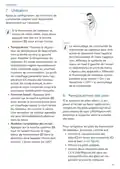
  • Page 44: Utilisation Après la configuration, les fonctions de commande simples sont disponibles directement sur l’appareil. Si le thermostat de radiateur se trouve en mode veille, vous devez appuyer une fois sur la touche système pour activer l’écran. Le verrouillage de commande du thermostat de radiateur peut être activé et désactivé dans l’application Homematic IP. Dans l’application, effleurez le symbole de menu en haut à gauche de l’écran et sélectionnez le point de menu « Aperçu des appareils ». Tournez le régulateur de température légèrement vers la droite ou vers la gauche pour modifier la température du radiateur. En mode automatique, la température réglée manuellement reste conservée jusqu’au prochain moment de commutation. Appuyez brièvement sur la touche système pour activer la fonction boost pour un chauffage rapide, à court terme du radiateur. Si le symbole de piles vides apparaît à l’écran ou dans l’application, remplacez les piles usagées par deux piles neuves de type LR6/Mignon/AA. Attention à respecter alors la polarité des piles. Pour remplacer les piles du thermostat de radiateur, ouvrez le compartiment des piles en tirant son couvercle vers le bas.
  • Page 45: Élimination des défauts Piles faibles Le thermostat de radiateur est opérationnel même avec une faible tension des piles. Si la tension chute à nouveau lors de l’envoi, le symbole de piles vides et le code d’erreur correspondant s’affichent sur l’appareil. Remplacez les piles usagées par deux piles neuves. Une fois les piles insérées, le thermostat de radiateur exécute un autotest pendant environ 2 secondes. Commande non confirmée Si au moins un récepteur ne confirme pas une commande, la LED de l’appareil s’allume en rouge à la fin de la transmission incorrecte. Une transmission défectueuse peut avoir plusieurs causes, y compris un récepteur non joignable. Évitez le contact avec la peau et les yeux lorsque vous manipulez des piles qui fuient. Portez des gants de protection appropriés lorsque vous retirez des piles qui fuient.
  • Page 46: Élimination des défauts Le Duty Cycle décrit une limitation réglementée par la loi du temps d’émission des appareils dans une bande de fréquences de 868 MHz. L’objectif de ce règlement est de garantir la fonction de tous les appareils fonctionnant dans la bande de fréquences de 868 MHz. Dans la bande de fréquences de 868 MHz, la durée d’émission maximum de chaque appareil s’élève à 1 % d’une heure (soit 36 secondes par heure). Les appareils ne peuvent plus émettre lorsque la limite de 1 % est atteinte, cet état est maintenu jusqu’à ce que cette limite temporelle soit dépassée. Conformément à cette directive, les appareils Homematic IP sont développés et produits à 100 % en conformité avec les normes. Lors du fonctionnement normal, le Duty Cycle n’est, en règle générale, pas atteint. Cela peut cependant être le cas lors de la mise en service ou de la première installation d’un système par des processus de programmation multiples sollicitant fort la radio. Le dépassement de la limite du Duty Cycle est indiqué par trois clignotements rouges lents de la LED de l’appareil. Le fonctionnement de l’appareil est restauré après un court délai (1 heure max.).
  • Page 47: Élimination des défauts Clignotement Code de clignotement/Affichage à l’écran Vérifiez si le poussoir de la vanne coince. Vérifiez que le thermostat de radiateur est correctement fixé. Attendez que la transmission soit terminée. Opération confirmée. Entrez les quatre derniers chiffres du numéro de série de l'appareil pour confirmation. Mode d’apprentissage actif. Changez les piles.
  • Page 48: Élimination des défauts Changez les piles de l’appareil. Avertissement des piles. La position d’urgence de la vanne a été atteinte. Si les piles vides ne sont pas remplacées, le thermostat de radiateur se met en position d’urgence de la vanne. La position de secours de la vanne est réglée en usine sur 15 %. Allumé 1x en orange et 1x en vert après l’insertion des piles. Vous pouvez poursuivre une fois que l’affichage du test s’est effacé. Test d'affichage.
  • Page 49: Restauration des réglages d’usine Les paramètres d’usine de l’appareil peuvent être restaurés. Tous les réglages seront alors perdus. Procédez comme suit pour rétablir les réglages d’usine du thermostat mural : Ouvrez le compartiment des piles en tirant son couvercle vers le bas. Retirez une pile. Maintenez la touche système enfoncée pendant 4 secondes tout en insérant en même temps la pile en respectant les repères de polarité. L’appareil effectue un redémarrage. Maintenance et nettoyage L’appareil ne requiert aucune maintenance, à l’exception du remplacement éventuel des piles. La maintenance et les réparations doivent être effectuées par un spécialiste.
  • Page 50: Remarques générales sur le fonctionnement radio La transmission radio est réalisée sur une voie de transmission non exclusive, c’est pourquoi des dysfonctionnements ne peuvent pas être exclus. D’autres perturbations peuvent être provoquées par des opérations de commutation, des électromoteurs ou des appareils électriques défectueux. La portée dans des bâtiments peut diverger fortement de celle dans un champ libre. Vous êtes tenu de séparer les piles et accumulateurs usagés des appareils électriques et électroniques. Vous êtes seul responsable de la suppression des données à caractère personnel contenues dans les appareils à éliminer. Ce symbole signifie que l’appareil et les piles ne doivent pas être jetés avec les ordures ménagères. Vous êtes tenu de remettre le produit à un centre de collecte communal pour un recyclage approprié. Les distributeurs d’appareils électriques et électroniques sont également dans l’obligation de reprendre gratuitement les appareils usagés. Grâce à cette collecte sélective, vous contribuez pleinement à la réutilisation et au recyclage des appareils usagés. L’équipement radioélectrique Homematic IP est conforme à la directive 2014/53/UE.
  • Page 51: Caractéristiques techniques Désignation abrégée de l’appareil : HmIP-eTRV-E, HmIP-eTRV-E-S, HmIP-eTRV-E-A Tension d’alimentation : 2x 1,5 V LR6/Mignon/AA Courant absorbé : 500 mA Durée de vie des piles : à déterminer Type de protection : IP20 Température ambiante : de 0 à 50 °C Dimensions (l x H x P) : 53 x 55 x 94 mm Poids : 190 g (piles comprises) Bande de fréquences radio : de 868,0 à 868,6 MHz et de 869,4 à 869,65 MHz Puissance d’émission radio maximale : 10 dBm
  • Page 52: Manual de instalación y uso Volumen de suministro Advertencias sobre estas instrucciones Advertencias de peligro Funciones y esquema del dispositivo Información general del sistema Puesta en servicio Manejo Cambio de pilas Mantenimiento y limpieza
  • Page 53: Volumen de suministro 1x Termostato de radiador – Evo Las pilas gastadas o dañadas pueden causar quemaduras en contacto con la piel. No abra el dispositivo. No contiene ninguna pieza que requiera mantenimiento por parte del usuario. Por razones de seguridad y de homologación (CE) no está permitido realizar ninguna transformación o cambio en el dispositivo por cuenta propia. Lea atentamente estas instrucciones antes de poner en servicio sus dispositivos. Utilice este dispositivo únicamente en entornos secos y sin polvo. ¡Este dispositivo no es un juguete! ¡Precaución! Peligro de explosión en caso de no realizar correctamente el cambio de pilas. Se declina toda responsabilidad por las lesiones o los daños materiales causados por un uso indebido o incumplimiento de las advertencias de peligro.
  • Page 54: Funciones y esquema del dispositivo El dispositivo solo es apto para entornos domésticos. Todo uso distinto del indicado en estas instrucciones se considera incorrecto y conlleva la anulación de la garantía y la responsabilidad. Con Homematic IP Termostato de radiador puede regular por horas la temperatura ambiente de su hogar inteligente en función de sus necesidades mediante la app Homematic IP para smartphone. En la app se puede configurar cómodamente las opciones de temperatura personalizadas, con hasta 3 perfiles de calefacción y 13 variaciones al día. Con la función adicional Boost se puede calentar el radiador de forma rápida en poco tiempo abriendo la válvula al máximo. Las puertas y ventanas abiertas se identifican con el detector de ventanas abiertas. La temperatura ambiente baja automáticamente para que no se malgaste energía. Al cerrar las ventanas, se restaura automáticamente la temperatura de confort. El termostato de radiador es compatible con todas las válvulas.
  • Page 55: Información general del sistema Este dispositivo forma parte del sistema Homematic IP Smart Home y se comunica mediante el protocolo inalámbrico Homematic IP. Todos los dispositivos del sistema pueden ser configurados de manera cómoda e individual desde el smartphone con la app Homematic IP. También es posible manejar los dispositivos Homematic IP desde la central CCU3 o con muchos otros sistemas de marcas asociadas. Para integrar el termostato de radiador en su sistema, es necesario conectarlo primero a Homematic IP Access Point. Modo de proceder para conectar el dispositivo: • Abra la app Homematic IP en su smartphone. • Seleccione el punto de menú «Conectar dispositivo». • Abra el compartimento de las pilas deslizando la tapa del mismo hacia abajo. Puesta en servicio Por favor, lea íntegramente este capítulo antes de realizar la conexión. En primer lugar tiene que configurar su Homematic IP Access Point desde la app Homematic IP para poder utilizar otros dispositivos Homematic IP en su sistema. Extraiga la tira aislante del compartimento de las pilas del termostato de radiador. El modo de conexión está activo durante 3 minutos.
  • Page 56: Puesta en servicio Tras retirar la tira aislante, el motor retrocede para facilitar el montaje. Durante este proceso se muestran en la pantalla y el símbolo de actividad. Como confirmación de que el proceso de conexión se ha ejecutado correctamente se enciende el LED verde. Ahora el dispositivo ya está preparado para funcionar. Si se enciende el LED rojo, inténtelo de nuevo. También se puede activar el modo de conexión durante 3 minutos manualmente con una pulsación breve del botón del sistema. Introduzca un nombre para el dispositivo en la app y asígnele una sala. El montaje del Homematic IP Termostato de radiador es muy sencillo, no es necesario vaciar el agua ni efectuar cambios en el sistema de calefacción. No se requieren herramientas especiales ni apagar la calefacción. Para confirmarlo, tiene que introducir en la app las cuatro últimas cifras del número de dispositivo o escanear el código QR.
  • Page 57: Puesta en servicio La tuerca de metal incorporada al termostato de radiador es universal y apta para todas las válvulas con rosca de M30 x 1,5 mm. Encontrará información detallada y una tabla de las marcas compatibles en www.homematic-ip.com. Existen varias formas de fijar el cabezal termostático. Con el adaptador incluido en el volumen de suministro, el dispositivo se puede montar en las válvulas de radiadores de tipo Danfoss RA, Danfoss RAV y Danfoss RAVL. Si detecta daños en el termostato instalado, consulte a un técnico especializado. Desmonte el antiguo cabezal termostático de la válvula de su radiador. Gire el cabezal termostático al valor máximo en sentido antihorario para facilitar el desmontaje. Una vez desmontado el cabezal termostático antiguo, ya puede montar el nuevo termostato de radiador en la válvula del radiador.
  • Page 58: Puesta en servicio Si es necesario, utilice uno de los adaptadores para válvulas Danfoss. Apriete la tuerca de metal sobre la válvula del radiador. El diámetro de la parte de la válvula que sobresale en el dispositivo es muy pequeño en algunas marcas. El termostato de radiador no asienta bien en algunos casos. Se debería colocar el anillo de apoyo suministrado en la brida del dispositivo antes del montaje. Para facilitar el montaje, puede retirar las pilas del compartimento de las pilas. Mantenga pulsado el botón del compartimiento de las pilas mientras aprieta la tuerca de metal. Al pulsar el botón, el mecanismo de giro del termostato de radiador se bloquea. Es más fácil orientar la pantalla como se desee.
  • Page 59: Puesta en servicio Adaptadores para Danfoss Para el montaje en las válvulas Danfoss es necesario utilizar uno de los adaptadores suministrados. Consulte cuál es el adaptador adecuado para cada válvula en las figuras siguientes. Los cuerpos de válvula de Danfoss presentan en todo el contorno entalladuras alargadas que garantizan un mejor asiento del adaptador tras el enclavamiento. Al realizar el montaje, procure que los tacos del interior del adaptador coincidan con las entalladuras de la válvula. Procure no pillarse los dedos entre las mitades del adaptador. Los adaptadores RA y RAV han sido desarrollados para mejorar el asiento con tensión previa. Para el montaje utilice un destornillador y dóblelos ligeramente en la zona del tornillo. Sujete el adaptador con el tornillo y la tuerca adjuntos. Coloque la extensión del vástago en el perno de la válvula.
  • Page 60: Manejo El adaptador RAVL no necesita ser atornillado. El termostato de radiador ejecuta un movimiento de adaptación. Durante este proceso se muestran en la pantalla el símbolo de actividad y el manejo está bloqueado. Tras la correcta ejecución del movimiento de adaptación, la pantalla cambia a la indicación normal. Una vez realizada la configuración, usted dispone de sencillas funciones de manejo directamente en el dispositivo. Tras colocar las pilas, el motor retrocede para facilitar el montaje. Si el termostato de radiador se encuentra en modo Stand-by, pulse una vez la rueda de ajuste para activar la pantalla. Gire ligeramente el regulador de temperatura hacia la derecha o la izquierda para modificar la temperatura del radiador. Es necesario ejecutar en primer lugar un movimiento de adaptación a la válvula. Con una pulsación breve del botón del sistema se activa la función de calentamiento rápido y breve del radiador.
  • Page 61: Cambio de pilas Para cambiar las pilas del termostato de radiador, proceda del siguiente modo: Abra el compartimento de las pilas deslizando la tapa del compartimento de las pilas hacia abajo. Extraiga las pilas vacías. Coloque dos pilas LR6/Mignon/AA 1,5 V nuevas en la posición correcta. El bloqueo de uso del termostato de radiador se puede activar o desactivar desde la app Homematic IP. Tras la colocación de las pilas, el termostato de radiador ejecuta en primer lugar una prueba automática durante unos 2 segundos. El símbolo de batería descargada en la pantalla o en la app indica que es necesario cambiar las pilas gastadas por dos pilas nuevas. Al cambiar las pilas observe la correcta colocación de los polos.
  • Page 62: Reparación de fallos Inicie de nuevo el movimiento de el receptor no puede ejecutar el comando (fallo de tensión, bloqueo mecánico, etc.) o adaptación pulsando brevemente el botón del sistema. ¡Precaución! ¡Al manipular pilas gastadas, evite el contacto con la piel y los ojos! ¡Utilice guantes apropiados para retirar las pilas gastadas y los restos de un dispositivo! Duty Cycle describe una limitación del tiempo de transmisión regulada por ley para dispositivos en la banda de 868 MHz. El tiempo de transmisión máximo de un dispositivo es del 1 % de una hora (es decir, 36 segundos en una hora). Cuando se alcanza ese límite del 1 %, los dispositivos no pueden seguir transmitiendo hasta que finaliza esa limitación temporal. Los dispositivos Homematic IP cumplen esa directiva al 100 % en su desarrollo y fabricación. Si la carga disponible lo permite, el termostato de radiador puede funcionar también con baja tensión de las pilas. Si falla de nuevo la tensión durante la transmisión, se muestra el símbolo de batería descargada y el código de error. Cuando se supera el límite de Duty Cycle, parpadea tres veces lentamente el LED rojo y puede fallar el funcionamiento del dispositivo de forma temporal. Si alguno de los receptores no confirma un comando, se enciende el LED rojo al final de la transmisión errónea.
  • Page 63: Reparación de fallos Códigos de errores y secuencias intermitentes Compruebe si está atascado el empujador de la válvula de la calefacción. Dureza en el actuador de la válvula. Intervalo de ajuste demasiado grande. Intervalo de ajuste demasiado pequeño. Transmisión inalámbrica. Modo de conexión activo. Dispositivo defectuoso. Batería descargada. Advertencia de batería.
  • Page 64: Reparación de fallos Si no se cambian las pilas, el termostato de radiador cambia a una posición de emergencia de la válvula para impedir que el dispositivo no pueda mantener la temperatura de la sala debido a la insuficiente capacidad de las pilas. En la configuración de fábrica está ajustada una posición de emergencia de la válvula de 15%. Indicación de prueba Cuando se apague la indicación de prueba, puede continuar. Actualización del software del dispositivo (OTAU) Espere hasta que finalice la actualización.
  • Page 65: Restablecimiento de la configuración de fábrica Se puede restablecer la configuración de fábrica del dispositivo. Al hacerlo se pierden todos los ajustes. Pasos para restablecer la configuración de fábrica del termostato de pared: Abra el compartimento de las pilas deslizando la tapa del compartimento de las pilas hacia abajo. Extraiga una pila. El dispositivo ejecuta un reinicio. Mantenimiento y limpieza Este dispositivo no requiere mantenimiento, a excepción de un eventual cambio de pilas. Limpie el dispositivo con un paño suave, limpio, seco y que no deje pelusa. No utilice productos de limpieza que contengan disolventes. Estas sustancias pueden estropear la carcasa de plástico y la rotulación.
  • Page 66: Indicaciones generales sobre el modo inalámbrico La transmisión inalámbrica se realiza por una vía de transmisión no exclusiva, por lo que pueden producirse fallos. El alcance en edificios puede diferir mucho del alcance en campo libre. Los efectos ambientales, como la humedad o los elementos constructivos del lugar, desempeñan un papel importante en la transmisión. Mediante la recogida por separado, se contribuye significativamente a la reutilización, el reciclado y otras formas de recuperación de dispositivos usados y pilas usadas. Está obligado a retirar del dispositivo usado las pilas usadas y acumuladores usados que no estén integrados en los dispositivos eléctricos y electrónicos. El tipo de instalación por radio Homematic IP cumple la Directiva 2014/53/UE. El distintivo CE es un símbolo de mercado libre dirigido exclusivamente a las autoridades. Este símbolo significa que el dispositivo y las pilas o acumuladores no deben desecharse con la basura doméstica. Le advertimos expresamente sobre el hecho de que usted, como usuario final, es responsable de eliminar los datos personales de los aparatos eléctricos y electrónicos usados que se van a desechar. Para consultas técnicas sobre el dispositivo, contacte con su proveedor.
  • Page 67: Datos técnicos Nombre abreviado del dispositivo: HmIP-eTRV-E, HmIP-eTRV-E-S, HmIP-eTRV-E-A Tensión de alimentación: 2 pilas de 1,5 V LR6/Mignon/AA Consumo de corriente: 500 mA Duración de las pilas: Tipo de protección: IP20 Temperatura ambiente: de 0 a 50 °C Dimensiones (A x H x P): 53 x 55 x 94 mm Peso: 190 g (incl. las pilas) Banda de radiofrecuencia: 868,0-868,6 MHz, 869,4-869,65 MHz Potencia de radioemisión máxima: 10 dBm
  • Page 68: Istruzioni per l'installazione e l'uso Fornitura Indicazioni su queste istruzioni Indicazioni di pericolo Funzioni e vista d’insieme dell’apparecchio Informazioni generali sul sistema Messa in funzione Modalità d’uso Sostituzione delle batterie Risoluzione dei guasti Manutenzione e pulizia
  • Page 69: Fornitura 1x Termostato per Radiatori – Evo 3x Batterie LR6/mignon/AA da 1,5 V Non aprire mai l’apparecchio. Questo apparecchio non contiene parti che possano essere riparate dall’utente. Leggere attentamente queste istruzioni prima di mettere in funzione i dispositivi Homematic IP. Utilizzare l’apparecchio solo in ambienti asciutti e privi di polvere. Attenzione! Nei punti con questo simbolo viene segnalato un pericolo. Questo apparecchio non è un giocattolo! Non consentire ai bambini di giocare con l’apparecchio. Rischio di esplosione se non si sostituiscono le batterie in modo appropriato.
  • Page 70: Funzioni e vista d’insieme dell’apparecchio. L’azienda declina qualsiasi responsabilità per danni a cose o persone causati da un utilizzo improprio. Il termostato per radiatori è adatto a tutte le valvole per caloriferi attualmente in uso. L’apparecchio è adatto solo all’impiego in ambienti a uso abitativo o analoghi. Qualsiasi impiego diverso da quello descritto comporta l’esclusione di responsabilità e la perdita dei diritti di garanzia. Il dispositivo Homematic IP Termostato per radiatori consente di regolare con temporizzatore la temperatura degli ambienti. I profili di temperatura personalizzati possono essere facilmente configurati tramite un’app. La funzione Boost consente di riscaldare rapidamente il radiatore per alcuni minuti. Grazie al display girevole e al design moderno, questo termostato si integra perfettamente negli ambienti della casa. Il sistema ripristina immediatamente la temperatura ottimale per il benessere una volta chiusa la finestra.
  • Page 71: Informazioni generali sul sistema Questo apparecchio fa parte del sistema Homematic IP Smart-Home e comunica tramite il protocollo radio Homematic IP. Tutti gli apparecchi del sistema possono essere configurati comodamente e singolarmente dallo smartphone tramite l'app Homematic IP. In alternativa, gli apparecchi Homematic IP possono essere gestiti tramite la centralina CCU3 oppure tramite un collegamento con numerosi sistemi di fornitori terzi. Per conoscere la gamma di funzioni che si può utilizzare all'interno del sistema Homematic IP abbinato ad altri componenti, consultare il Manuale dell'utente di Homematic IP. Tutta la documentazione tecnica e gli aggiornamenti sono sempre disponibili su www.homematic-ip.com. Per integrare il termostato per radiatori nel sistema e consentirne la comunicazione con altri apparecchi Homematic IP, occorre prima inizializzarlo sull'Access Point Homematic IP. Per l'accoppiamento del dispositivo procedere nel modo seguente: aprire l'app Homematic IP sullo smartphone. Nel menu selezionare la voce Inizializzazione dell'apparecchio. Leggere interamente questo paragrafo prima di iniziare la procedura di inizializzazione. Configurare l'Access Point Homematic IP tramite l'app Homematic IP in modo da poter utilizzare altri dispositivi Homematic IP nel sistema.
  • Page 72: Messa in funzione Aprire il vano batterie spingendo il coperchio verso il basso. L’apparecchio compare automaticamente nell’app Homematic IP. Estrarre la linguetta d’isolamento dal vano batterie del termostato a parete. La modalità Inizializzazione è attiva per 3 minuti. Per confermare, digitare nell’app le ultime quattro cifre del numero dell’apparecchio (SGTIN) oppure eseguire una scansione del codice QR. Dopo aver rimosso la linguetta d’isolamento, il motore si sposta indietro per facilitare il montaggio. Attendere che la procedura di inizializzazione sia conclusa. Una procedura di inizializzazione andata a buon fine viene confermata dall’accensione del LED verde. Nell’app assegnare un nome all’apparecchio e associarlo a un ambiente. La modalità Inizializzazione può essere avviata manualmente per altri 3 minuti premendo brevemente il tasto di sistema. Quando il display indica “”, premendo nuovamente il tasto di sistema, si avvia la corsa di adattamento.
  • Page 73: Messa in funzione Inserire di nuovo il coperchio del vano batterie dal basso verso l’alto. Smontaggio del termostato Qualora sul termostato installato, sulla valvola o sui tubi di riscaldamento siano riconoscibili eventuali danni consultare un tecnico specializzato. Smontare la vecchia testa del termostato dalla valvola del radiatore. Ruotare la testa del termostato sul valore massimo in senso antiorario. Il montaggio del termostato per radiatori Homematic IP è molto semplice e viene eseguito senza scaricare l’acqua o intervenire sul sistema di riscaldamento. Il dado di metallo montato sul termostato per radiatori è per uso universale, non richiede accessori ed è compatibile con tutte le valvole con filettatura di dimensioni M30 x 1,5 mm. Il fissaggio della testa del termostato può essere eseguito in vari modi. Con gli adattatori compresi nella fornitura l’apparecchio può inoltre essere montato su valvole per radiatori del tipo Danfoss RA, Danfoss RAV e Danfoss RAVL.
  • Page 74: Messa in funzione Allenta la vite e rimuovere la testa del termostato dalla valvola. Per semplificare il montaggio, è possibile rimuovere le batterie dal rispettivo vano. Tenere premuto a lungo il tasto nel vano batterie mentre il dado di metallo viene ruotato sulla valvola del radiatore. Premendo il tasto, il meccanismo di rotazione del termostato per radiatori viene bloccato. Dopo che è stata smontata la vecchia testa del termostato, si può montare il nuovo termostato sulla valvola del radiatore. Posizionare il termostato per radiatori con il dado di metallo sulla valvola del radiatore. All’occorrenza è possibile usare l’adattatore fornito per le valvole Danfoss. Avvitare il dado di metallo sulla valvola del radiatore e serrarlo. In alcuni marchi, il termostato per radiatore rimane allentato e poco stabile. Applicare l’anello di appoggio in dotazione nella flangia dell’apparecchio prima del montaggio.
  • Page 75: Messa in funzione Inserire l’adattatore fino in fondo sulla valvola fino a bloccarlo. Fissare l’adattatore con la vite e il dado forniti. Per il montaggio sulle valvole Danfoss è necessario uno degli adattatori forniti. Consultare le figure che seguono per abbinare l’adattatore giusto alla rispettiva valvola. I corpi delle valvole Danfoss presentano incisioni allungate per un migliore posizionamento dell’adattatore. Fare attenzione a non schiacciare le dita fra le due metà dell’adattatore. Durante il montaggio, assicurarsi che i perni all’interno dell’adattatore abbiano una posizione di uguale copertura rispetto alle incisioni sulla valvola. Gli adattatori RA e RAV sono stati prodotti per ottimizzare l’installazione con fissaggio preliminare. Utilizzare eventualmente un giravite e piegarlo leggermente nella zona della vite. Inserire sul perno della valvola la prolunga per punteria.
  • Page 76: Messa in funzione Danfoss RAVL Corsa di adattamento I corpi delle valvole Danfoss presentano incisioni allungate per un migliore posizionamento dell’adattatore. Dopo aver inserito le batterie, il motore si sposta indietro per facilitare il montaggio. Durante il montaggio, fare attenzione che i perni all’interno dell’adattatore abbiano una posizione di uguale copertura rispetto alle incisioni sulla valvola. Se la corsa di adattamento è stata avviata prima del montaggio o se compare un messaggio di errore, premere il tasto di sistema e il motore si sposta indietro. L’adattatore RAVL non deve essere avvitato. Dopo che il termostato per radiatori è stato montato correttamente, si deve eseguire una corsa di adattamento per regolarlo sulla valvola. Se sul display compare un messaggio, premere il tasto di sistema per avviare la corsa di adattamento. Il termostato per radiatori esegue una corsa di adattamento e in questo momento non si può utilizzare l’apparecchio. Completata la corsa di adattamento, il display torna alla visualizzazione normale e si può utilizzare il termostato.
  • Page 77: Modalità d’uso Dopo la configurazione saranno disponibili delle semplici funzioni di comando direttamente sull’apparecchio. Se il termostato per radiatori è in modalità stand-by, prima dell’utilizzo bisogna premere una volta il tasto di sistema per riattivarlo. Temperatura: Ruotare il regolatore di temperatura leggermente a destra o sinistra per modificare la temperatura del radiatore. Nel funzionamento automatico la temperatura impostata manualmente rimane invariata fino al successivo orario di commutazione. Il blocco comandi del termostato per radiatori può essere attivato o disattivato tramite l’app Homematic IP. Funzione Boost: Premere brevemente il tasto di sistema per attivare la funzione Boost che riscalda il radiatore rapidamente. Grazie a questa funzione nella stanza si raggiunge immediatamente una piacevole sensazione di calore. Modificare l’orientamento del display: Premere il tasto di sistema e contemporaneamente ruotare il regolatore della temperatura nella direzione desiderata.
  • Page 78: Sostituzione delle batterie Dopo aver inserito le batterie, il termostato per radiatori esegue un test autodiagnostico per ca. 2 secondi. Se sul display o nell’app compare l’icona per batterie scariche, sostituire le batterie esauste con due batterie nuove di tipo LR6/mignon/AA. Attenzione! Quando si maneggiano le batterie scariche evitare il contatto diretto con gli occhi e con la pelle. Per rimuovere le batterie scariche e pulire i residui all’interno di un apparecchio indossare gli appositi guanti protettivi. Inserire due batterie nuove LR6/mignon/AA da 1,5 V facendo attenzione a posizionare i poli correttamente. Inserire di nuovo il coperchio del vano batterie dal basso verso l’alto.
  • Page 79: Risoluzione dei guasti Il ciclo di lavoro descrive una limitazione regolamentata dalla legge del tempo di trasmissione degli apparecchi nella gamma di 868 MHz. Lo scopo di questa disciplina è garantire il funzionamento di tutti gli apparecchi nella gamma 868 MHz. Se il valore della tensione lo consente, il termostato del radiatore è pronto a funzionare anche se la tensione delle batterie è ridotta. Sull’apparecchio compaiono l’icona di batterie scariche e il codice d’errore. Nel campo di frequenza 868 MHz, il tempo massimo di trasmissione di ogni apparecchio ammonta all’1% di un’ora. Quando raggiungono il limite dell’1%, gli apparecchi non possono più trasmettere. Nel normale funzionamento di solito non si raggiunge il duty cycle. Un superamento del limite del ciclo di lavoro viene visualizzato mediante un lampeggio lungo del LED rosso. Se un comando non viene confermato da almeno un ricevitore, si accende la luce rossa del LED. La trasmissione difettosa può essere dovuta a un ricevitore non raggiungibile o difettoso.
  • Page 80: Risoluzione dei guasti Codici di errore e sequenze di spie lampeggianti Controllare se lo stelo della valvola del radiatore si è incastrato. Attuatore valvola poco scorrevole. Verificare il fissaggio del termostato per radiatore. Intervallo di impostazione troppo grande. Intervallo di impostazione troppo piccolo. Attendere che la trasmissione sia conclusa. Procedura confermata. Si può procedere all’uso. Digitare le ultime quattro cifre del numero di serie dell’apparecchio per confermare. Dispositivo difettoso. Batteria scarica.
  • Page 81: Risoluzione dei guasti Se le batterie scariche non vengono sostituite, il termostato per radiatori passa in una “posizione d’emergenza valvola”. La posizione di emergenza per la valvola è impostata in fabbrica al 15%. Luce arancione 1 volta e luce verde 1 volta (dopo l’inserimento delle batterie). Una volta che la visualizzazione di prova è spenta si può proseguire. Luce arancione che lampeggia a lungo e per breve tempo (alternate). Aggiornamento del software dell’apparecchio (OTAU). Attendere fino al termine dell’aggiornamento.
  • Page 82: Ripristino delle impostazioni di fabbrica Le impostazioni di fabbrica dell’apparecchio possono essere ripristinate. In questo caso tutte le impostazioni andranno perdute. Per ripristinare le impostazioni di fabbrica del termostato a parete, procedere nel modo seguente: Aprire il vano batterie spingendo il coperchio verso il basso. Togliere una batteria. Rilasciare di nuovo il tasto di sistema per concludere il ripristino delle impostazioni di fabbrica. L’apparecchio esegue un riavvio. Manutenzione e pulizia Fatta eccezione per un’eventuale sostituzione delle batterie, questo apparecchio non richiede manutenzione. Pulire l’apparecchio con un panno morbido, pulito, asciutto e privo di pelucchi. Non utilizzare detergenti a base di solventi poiché potrebbero danneggiare la scatola esterna di plastica.
  • Page 83: Informazioni generali sul funzionamento via radio La trasmissione radio avviene su un canale di trasmissione non esclusivo, quindi non è possibile escludere interferenze. L'utente è tenuto a separare le batterie e gli accumulatori esausti dagli apparecchi elettrici ed elettronici usati. La portata del segnale all'interno degli edifici può essere molto diversa da quella all'aria aperta. Fattori climatici come l'umidità dell'aria influenzano il segnale. La ditta eQ-3 AG dichiara che gli apparecchi radio sono conformi alla Direttiva 2014/53/UE. L'utente finale è responsabile della cancellazione dei dati personali sugli apparecchi da smaltire. Il marchio CE non rappresenta una garanzia delle caratteristiche del prodotto. Questo simbolo indica che l'apparecchio e le batterie non devono essere smaltiti con i rifiuti domestici. Per domande tecniche sull'apparecchio, rivolgersi al rivenditore specializzato.
  • Page 84: Dati tecnici Sigla dell’apparecchio: HmIP-eTRV-E, HmIP-eTRV-E-S, HmIP-eTRV-E-A Tensione di alimentazione: 230 V Corrente assorbita: 500 mA Durata batterie: 2 batterie LR6/mignon/AA da 1,5 V Grado di protezione: IP20 Temperatura ambiente: tra 0 e 50 °C Dimensioni (L x A x P): 53 x 55 x 94 mm Peso: 190 g (comprese batterie) Banda di frequenza radio: 868,0-868,6 MHz, 869,4-869,65 MHz Massima potenza di trasmissione radio: 10 dBm
  • Page 85: Installatie- en bedieningshandleiding Inhoudsopgave Leveringsomvang Instructies bij deze handleiding Gevarenaanduidingen Werking en overzicht van het apparaat Algemene systeeminformatie Inbedrijfstelling Bediening Batterijen vervangen Storingen oplossen Onderhoud en reiniging
  • Page 86: Leveringsomvang Uitgelopen of beschadigde batterijen kunnen bij aanraking met de huid brandwonden veroorzaken; gebruik daarom in dergelijk geval geschikte veiligheidshandschoenen. 1x Radiatorthermostaat – Evo 3x Adapter Danfoss (RA, RAV en RAVL) 1x Spilverlenging Danfoss RAV 1x Steunring 1x Moer M4 1x Cilinderkopschroef M4 x 12 mm 2x 1,5V-batterij LR6/mignon/AA 1x Bedieningshandleiding Open het apparaat niet. Het bevat geen onderdelen die door de gebruiker moeten worden onderhouden. In geval van een defect dient u het apparaat door een specialist te laten controleren. Instructies bij deze handleiding Om redenen van veiligheid en marking (CE) is het eigenmachtig verbouwen en/of veranderen van het apparaat niet toegestaan. Lees deze handleiding zorgvuldig door voordat u uw Homematic IP-apparaten in gebruik neemt. Bewaar de handleiding om deze ook later nog te kunnen raadplegen. Gebruik het apparaat uitsluitend in een droge en stofvrije omgeving, stel het niet bloot aan vocht, trillingen, langdurig zonlicht of andere warmtebronnen, koude en mechanische belastingen. Opgelet! Hier wordt op een risico attent gemaakt. Het apparaat is geen speelgoed! Laat kinderen er niet mee spelen. Bij materiële schade of lichamelijk letsel veroorzaakt door een onjuist gebruik of niet-naleving van de gevarenaanduidingen, kunnen we niet aansprakelijk worden gesteld. In dergelijke gevallen vervalt ieder garantierecht! Wij aanvaarden geen aansprakelijkheid voor gevolgschade. Let op! Explosiegevaar bij onjuiste vervanging van de batterijen.
  • Page 87: Werking en overzicht van het apparaat. Het apparaat is uitsluitend geschikt voor gebruik in woonruimten en soortgelijke omgevingen. Elk ander gebruik dan in deze handleiding beschreven, is oneigenlijk en leidt tot de uitsluiting van garantie en aansprakelijkheid. Met de Homematic IP-radiatorthermostaat kunt u de binnentemperatuur in uw smarthome tijdgestuurd regelen en aan uw individuele behoeften aanpassen. Individuele temperatuurcurves kunnen eenvoudig met de app worden ingesteld – met tot 3 instelbare verwarmingsprofielen en 13 wijzigingen per dag. De extra boostfunctie maakt het mogelijk de radiator snel tijdelijk te verwarmen door de kraan te openen. Geopende ramen en deuren worden gedetecteerd via de raam-open-detectie. De verwarmingstemperatuur wordt automatisch verlaagd, zodat geen energie wordt verspild. De radiatorthermostaat past op alle gangbare radiatorkranen. Ventielinformatie: initialisatie.
  • Page 88: Algemene systeeminformatie Om de radiatorthermostaat in uw systeem te integreren, moet u deze eerst inleren op het Homematic IP access point. Dit apparaat is onderdeel van het Homematic IP Smart Home Systeem en communiceert via het Homematic IP-zendprotocol. Alle apparaten van het systeem kunnen handig en afzonderlijk via een smartphone met de Homematic IP App worden geconfigureerd. U hebt ook de mogelijkheid om de Homematic IP apparaten via de centrale CCU3 of in combinatie met partneroplossingen te gebruiken. Welke functies binnen het systeem mogelijk zijn, vindt u in het Homematic IP gebruikershandboek. Ga als volgt te werk om het apparaat in te leren: Open de Homematic IP-app op uw smartphone en selecteer het menu-item ‘Apparaat inleren’. Lees dit hoofdstuk volledig door, voordat u met het inleren begint. Trek de isolatiestrip uit het batterijvak van de radiatorthermostaat. De inleermodus is 3 minuten actief. Configureer eerst uw Homematic IP Access Point via de Homematic IP-app om andere Homematic IP-apparaten in het systeem te kunnen gebruiken. Voor het inleren en installeren van de wandthermostaat met behulp van een CCU3 vindt u gedetailleerde informatie in de WebUI-handleiding.
  • Page 89: Inbedrijfstelling Druk op de systeemtoets om de inleermodus te activeren. De montage van de Homematic IP-radiatorthermostaat is eenvoudig en vereist geen speciaal gereedschap. Het apparaat verschijnt automatisch in de Homematic IP-app. Voer de laatste vier cijfers van het apparaatnummer in de app in of scan de QR-code ter bevestiging. De metalen moer is universeel toepasbaar op alle kranen met draadmaat M30 x 1,5 mm. Wacht tot het inleerproces voltooid is. Bij een succesvol inleerproces brandt het ledje groen. Geef het apparaat in de app een naam en wijs het toe aan een ruimte. Met de bijgeleverde adapters kan het apparaat op verschillende radiatorkranen worden gemonteerd.
  • Page 90: Inbedrijfstelling Thermostaat demonteren Bij zichtbare schade aan de thermostaat, de kraan of de verwarmingsbuizen dient u een vakman te raadplegen. Radiatorthermostaat monteren Na het verwijderen van de oude thermostaatkop, kunt u de nieuwe radiatorthermostaat op de verwarmingskraan monteren. Demonteer de oude thermostaatkop van uw radiatorkraan. Draai de thermostaatkop op de maximumwaarde linksom. Plaats de radiatorthermostaat met de metalen moer op de radiatorkraan. De bevestiging van de thermostaatkop kan op verschillende manieren zijn uitgevoerd. Wartelmoer: Draai de wartelmoer tegen de klok in los. Snelbevestiging: Bevestigde thermostaatkoppen kunt u gemakkelijk losmaken door de sluit-/wartelmoer iets tegen de klok in te draaien. Klemschroef: De thermostaatkop wordt vastgehouden door een bevestigingsring, die met een schroef wordt aangespannen.
  • Page 91: Inbedrijfstelling Om de montage te vergemakkelijken, kunt u de batterijen uit het batterijvak halen en permanent op de toets in het batterijvak drukken terwijl u de metalen moer op de radiatorkraan draait. Adapters voor Danfoss Voor de montage op kranen van Danfoss is een van de bijgeleverde adapters benodigd. Let erop dat u uw vingers niet tussen de adapterhelften klemt. Voor een betere zitting zijn de adapters RA en RAV met een voorspanning geproduceerd. Bij de montage kunt u eventueel een schroevendraaier gebruiken en de adapter in de buurt van de schroef iets openbuigen. Gebruik zo nodig een van de bijgeleverde adapters voor Danfoss-kranen of de bijgeleverde steunring. Steunring Danfoss RA Bij de kranen van bepaalde fabrikanten heeft het deel van de kraan dat in het apparaat zit, een kleine diameter, waardoor de radiatorthermostaat los op de kraan zit. In dit geval dient vóór de montage de bijgeleverde steunring in de flens van het apparaat te worden aangebracht. De kraanhuizen van Danfoss hebben omloop langwerpige inkervingen die ook een betere zitting van de adapter na het vastklikken garanderen. Let er bij de montage a.u.b. op dat de positie van de ribbels in de adapter precies overeenkomt met die van de inkervingen op de kraan.
  • Page 92: Inbedrijfstelling Let er bij de montage op dat de positie van de ribbels in de adapter precies overeenkomt met die van de inkervingen op de kraan. Klik de adapter volledig op de kraan vast. Breng de spilverlenging op de kraanstift aan. De RAVL-adapter hoeft niet te worden vastgeschroefd. De kraanhuizen van Danfoss hebben omloop langwerpige inkervingen die ook een betere zitting van de adapter na het vastklikken garanderen. Na het plaatsen van de batterijen beweegt de motor eerst terug om de montage te vereenvoudigen. Werd de adaptatie al voor de montage uitgevoerd of wordt een foutmelding weergegeven, druk dan op de systeemtoets en de motor loopt terug naar de positie. De adaptatie kan dan opnieuw worden gestart.
  • Page 93: Bediening Zodra de radiatorthermostaat succesvol gemonteerd is, moet in de volgende stap voor de aanpassing aan de na wordt het via de app ingestelde verwarmingsprofiel weer geactiveerd. In handmatig bedrijf blijft de temperatuur tot de volgende handmatige wijziging behouden. Boost-functie: druk kort op de systeemtoets om de boost-functie voor het snel, kortstondig verwarmen van de radiator te activeren. Als de achtergrondverlichting van het display uitgeschakeld is, moet u de toets nog een tweede keer indrukken om de adaptatie te starten. Display-uitlijning veranderen: druk op de systeemtoets en draai tegelijkertijd de temperatuurregelaar in de richting waarin het display moet draaien. De radiatorthermostaat voert de adaptatie uit. Hierbij verschijnen en het activiteitsymbool op het display. Na de succesvolle adaptatie verschijnt de normale weergave op het display. De radiatorthermostaat kan nu worden bediend. Na de configuratie staan direct op het apparaat eenvoudige bedieningsfuncties tot uw beschikking. De bedieningsvergrendeling van de radiatorthermostaat kan met de Homematic IP-app geactiveerd en gedeactiveerd worden. Als de radiatorthermostaat zich in de stand-bymodus bevindt, moet u de systeemtoets vóór de bediening eenmaal indrukken om het display te activeren.
  • Page 94: Batterijen vervangen Na het plaatsen van de batterijen voert de radiatorthermostaat eerst gedurende ca. 2 seconden een zelftest uit. Als het symbool voor lege batterijen op het display of in de app verschijnt, dient u de verbruikte batterijen te vervangen door twee nieuwe batterijen van het type LR6/mignon/AA. Let daarbij op de juiste polariteit van de batterijen. Bij de omgang met lekkende batterijen dient huid- en oogcontact te worden vermeden. Draag geschikte veiligheidshandschoenen als u lekkende batterijen en restanten uit een apparaat verwijdert. Open het batterijvak door het batterijvakdeksel om laag te schuiven. Verwijder de lege batterijen. Plaats twee nieuwe 1,5V-batterijen LR6/mignon/AA in het batterijvak. Schuif het batterijvakdeksel er weer van onderen naar boven op. Na het plaatsen van de batterijen voert de radiatorthermostaat eerst gedurende ca. 2 seconden een zelftest uit.
  • Page 95: Storingen oplossen De duty cycle beschrijft een wettelijk geregelde begrenzing van de zendtijd van apparaten in het 868MHz-bereik. Het doel van deze regeling is om de werking van alle in het 868MHz-bereik werkende apparaten te garanderen. In het door ons gebruikte frequentie-bereik van 868 MHz bedraagt de maximale zendtijd van elk apparaat 1% van een uur (dus 36 seconden per uur). De apparaten mogen bij het bereiken van de 1%-limiet niet meer zenden tot deze tijdelijke begrenzing weer voorbij is. Als de spanningswaarde dit toestaat, kan de radiatorthermostaat ook bij een lage batterijspanning worden gebruikt. Vervang in dat geval de lege batterijen door twee nieuwe. In het normale bedrijf wordt de duty cycle doorgaans niet bereikt. Een overschrijding van de duty-cycle-limiet wordt aangegeven door drie keer langzaam rood knipperen van het ledje. Indien ten minste één ontvanger een commando niet bevestigt, licht het ledje bij het afsluiten van de mislukte overdracht rood op. De mislukte overdracht kan verschillende oorzaken hebben, zoals de ontvanger is niet bereikbaar of de ontvanger is defect.
  • Page 96: Foutcodes en knipperreeksen Betekenis en oplossing van foutcodes. Controleer of de stoter van de radiatorkraan klemt. Kraanaandrijving stroef. Instelbereik te groot of te klein. Controleer de bevestiging van de radiatorthermostaat. Draadloze overdracht en zendpoging van configuratiegegevens. Proces bevestigd en mislukt. Inleermodus actief. Batterijen leeg of batterijspanning laag.
  • Page 97: Storingen oplossen Vervang de batterijen van de kraan. Het apparaat gaat in noodstand als lege batterijen niet worden vervangen. De radiatorthermostaat voorkomt dat de ingestelde temperatuur niet meer kan worden gehandhaafd. Af fabriek is een kraan-noodstand van 15% ingesteld. Testindicatie: 1x oranje en 1x groen licht na het plaatsen van de batterijen. Wacht tot de testindicatie weer is gedoofd voordat u doorgaat. Lang en kort oranje knipperen duidt op een actualisering van de apparaatssoftware. Wacht tot de update is beëindigd.
  • Page 98: Herstellen van de fabrieksinstellingen De fabrieksinstellingen van het apparaat kunnen worden hersteld. Hierbij gaan alle instellingen verloren. Ga als volgt te werk om de fabrieksinstellingen van de wandthermostaat te herstellen: Open het batterijvak door het batterijvakdeksel omlaag te schuiven. Verwijder een batterij. Laat de systeemtoets weer los om het herstel van de fabrieksinstellingen te voltooien. Het apparaat voert een herstart uit. Onderhoud en reiniging Het apparaat is onderhoudsvrij, afgezien van een eventuele vervanging van de batterij. Laat het onderhoud of reparaties over aan een vakman. Reinig het apparaat met een zachte, schone, droge en pluisvrije doek. Gebruik geen oplosmiddelhoudende reinigingsmiddelen.
  • Page 99: Algemene instructies voor de draadloze werking De draadloze communicatie wordt via een niet-exclusief communicatiekanaal gerealiseerd, zodat storingen niet kunnen worden uitgesloten. Door ze gescheiden in te zamelen, levert u een waardevolle bijdrage aan het hergebruik, de recycling en andere vormen van nuttige toepassing van afgedankte elektrische en elektronische apparaten en afgedankte batterijen. U bent verplicht om afgedankte batterijen en accu’s die niet tot de AEEA behoren, daarvan te scheiden voordat u ze inlevert bij een inzamelpunt. Het bereik in gebouwen kan sterk afwijken van het bereik in het vrije veld. Hierbij verklaart eQ-3 AG dat het draadloze apparaattype Homematic IP HmIP-eTRV-E, HmIP-eTRV-E-S in overeenstemming is met de richtlijn 2014/53/EU. Wij wijzen u er nadrukkelijk op dat u als eindgebruiker verantwoordelijk bent voor het verwijderen van persoonlijke gegevens uit de afgedankte elektrische en elektronische apparatuur. De CE-markering is een label voor het vrije verkeer van goederen binnen de Europese Unie en is uitsluitend bestemd voor de desbetreffende autoriteiten. Dit symbool betekent dat het apparaat en de batterijen of accu’s niet mogen worden weggegooid met het huisvuil. Om de gezondheid en het milieu te beschermen, bent u verplicht om het product, alle elektronische onderdelen die bij de levering zijn inbegrepen, op de juiste manier te verwijderen.
  • Page 100: Technische gegevens Apparaatcode: HmIP-eTRV-E, HmIP-eTRV-E-S, HmIP-eTRV-E-A Voedingsspanning: 2x 1,5 V LR6/mignon/AA Stroomopname: 500 mA Levensduur batterijen: 190 g (incl. batterijen) Beschermingsgraad: IP20 Omgevingstemperatuur: 0 tot 50 °C Afmetingen (b x h x d): 53 x 55 x 94 mm Zendfrequentieband: 868,0-868,6 MHz, 869,4-869,65 MHz Maximaal zendvermogen: 10 dBm Typisch bereik in het vrije veld: 230 m
  • Page 101: Free download of the Homematic IP app. Manufacturer’s authorised representative: eQ-3 AG.