Home > Danfoss > Danfoss TPOne-M Electronic Programmable Room Thermostat User Guide

Danfoss TPOne-M Electronic Programmable Room Thermostat User Guide
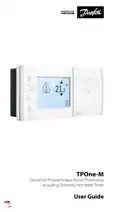
TPOne-M  
Electronic Programmable Room Thermostat  
including Domestic Hot Water Timer  
User Guide  
GeneralDetails
NameDanfoss TPOne-M Electronic Programmable Room Thermostat User Guide
MakeDanfoss
LanguageEnglish
FiletypePDF (Download)
File size0.38 MB
Download PDF
1 Star2 Stars3 Stars4 Stars5 Stars (1 votes, average: 5.00 out of 5)
Loading...
Danfoss RET-MD Electronic Intelligent Dial Setting Thermostat Installation Guide
Danfoss VICUQ24M Icon Programmable II Room Thermostat Installation Guide
Danfoss MBC 8000, MBC 8100 Heavy Duty Thermostat Installation Guide
Danfoss UT 72-UT 73 Universal Thermostat Installation Guide
Danfoss ECtemp 530 Electronic Thermostat Installation Guide
Danfoss 014G0251 Eco Radiator Thermostat User Guide
Danfoss 014G0013 Z Wave Radiator Thermostat Installation Guide
Danfoss RET230P Electronic Thermostat Instruction Manual
Danfoss TP7000 Range Electronic 7 Day Programmable Room Thermostat Installation Guide
Danfoss RET1000 Series Electronic Thermostat User Guide

Danfoss TPOne-M Electronic Programmable Room Thermostat User Guide
Get the free PDF manual for the Danfoss TPOne-M Electronic Programmable Room Thermostat User Guide and access setup steps, usage instructions, and troubleshooting tips. 👉 View online or download now to keep your thermostat running smoothly!

Danfoss TPOne-M Electronic Programmable Room Thermostat User Guide Overview

Summary of Contents

  • Page 1: Electronic programmable room thermostat Including domestic hot water timer User guide
  • Page 2: TPOne is an intelligent programmable heating control made easy. TPOne includes features designed to save energy. Look out for the leaf symbol throughout this guide for settings which can directly influence the energy saved.
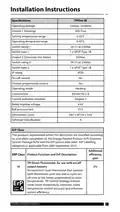
  • Page 3: Installation instructions Specifications Operating voltage Output 1 (Heating) Setting temperature range Operating temperature range Output 2 (Domestic Hot Water) ErP classification Product function and ErP description An electronic room thermostat that controls both thermostat cycle rate and in-cycle on/off ratio of the heater proportional to room temperature.
  • Page 4: Mounting Thermostat or remote room sensor positioning. This product should only be installed by a qualified electrician or competent heating installer and should be in accordance with the local wiring regulations.
  • Page 5: Wiring Channel 2 DHW 3A at 230Vac Channel 1 is a volt free relay A supply is required on COM to give an output on NO1 A supply link can be taken from L or another supply Domestic hot water, optional timed output only Remote sensor to be wired with 1mm 2 core double insulated cable only Cable length should not exceed 10 metres. Sensor cable should NOT be run parallel to mains cable.
  • Page 6: User interface Comfort modes Heating made easy: TPOne Comfort Modes simplify the way you plan your heating day to day. You define your comfort modes in the user schedule and manually override when you need. The Home, Away and Asleep comfort modes are linked to your defined comfort temperatures. The schedule follows the daily routine you have set or you just choose the comfort mode required. The TPOne Standby Mode allows you to switch your heating off when not required. TPOne has been designed with touch sensitive user interface buttons. To avoid accidental setting changes, the interface buttons stay in an idle state. The first button press needs to be made for 1 second to place the TPOne into an active setting state. While active, the TPOne will respond immediately to any valid key press. If no key presses are made for 30 seconds, the buttons will go back to an idle state.
  • Page 7: Comfort modes include Home Mode, Away Mode, Asleep Mode, and Standby Mode. Home Mode selects the home comfort temperature when the home is occupied during the day. Temperatures for Home mode are selectable in the Temperature setting. A separate Home AM and Home PM temperature can be chosen and set according to the time of day. In Home mode, pressing the home button again selects a heating boost of 1, 2, or 3 hours. Away Mode selects the away comfort temperature when the home is unoccupied during the day. Asleep Mode selects the nighttime comfort temperature set between the end of the last home period and the beginning of the first home period of the following day. The required temperature for Asleep mode is also selectable in the Temperature setting. Standby Mode places the TPOne in a state where it does not control the heating system, except to protect against frost damage. Standby can be canceled by pressing the Standby button again or selecting another comfort mode.
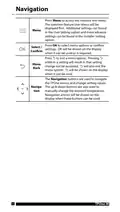
  • Page 8: Navigation allows access to the intuitive text menu. The common feature User Menu is displayed first. Additional settings can be found in the User Setting option. More advanced settings can be found in the Installer Setting option. Press OK to select menu options or confirm settings. OK will be shown on the display when it can be used or is required. Pressing the exit button will result in that setting change not being accepted. The navigation buttons are used to navigate the TPOne menus and change setting values. The up and down buttons are also used to manually change the required temperature. Navigation arrows will be shown on the display when these buttons can be used.
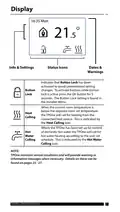
  • Page 9: Button lock has been activated to avoid unintentional setting changes. To activate buttons while button lock is active, press the OK button for 5 seconds. The button lock setting is found in the installer menu. When the current room temperature is below the required room set temperature, the TPOne will call for heating from the connected heat source. This is indicated by the heat calling icon. Where the TPOne has been set up for control of domestic hot water, it will call for hot water heating according to the user set schedule. This is indicated by the hot water calling icon. TPOne monitors several conditions and will provide warning or information messages when necessary. Details on these can be found on pages 25 - 27.
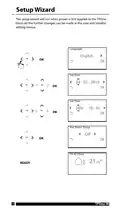
  • Page 10: Setup wizard will run when power is first applied to the TPOne. Further changes can be made in the user and installer setting menus. Language options include English. Set date to 04 - 02 - 2016. Set time to 24hr - 10:45. Hot water setup is currently off. Display shows 10:45 Thursday. Temperature reading is 21.5°C. Device status is ready. Model indicated is TPOne-M.
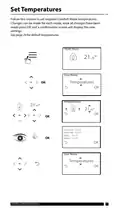
  • Page 11: Set temperatures for comfort mode. Changes can be made for each mode. Press OK to confirm new settings. See page 24 for default temperatures. Home AM temperature is 21.0°C. Home PM temperature is 22.0°C. Away temperature is 16.0°C. Asleep temperature is 12.5°C. User menu options are available. Danfoss Climate Solutions.
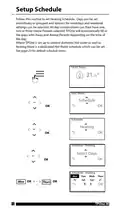
  • Page 12: Setup schedule allows for setting heating schedules. Days can be set individually or grouped for weekdays and weekends. Options for one, two, or three home periods can be selected for each day combination. TPOne automatically fills gaps with away and asleep periods based on the time of day. There is a dedicated hot water schedule if TPOne controls domestic hot water as well. Default schedule times can be found on page 23. User menu provides access to schedule settings. Heating schedule options include selecting days of the week. The interface allows for confirmation of selected settings. TPOne-M is referenced in the context of scheduling.
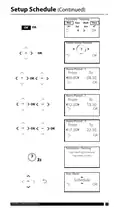
  • Page 13: Setup schedule for heating includes specific home periods for each day of the week. Home period 1 is set from 06:00 to 08:30. Home period 2 is set from 12:30 to 13:30. Home period 3 is set from 17:30 to 22:30. The heating schedule has been saved successfully. User menu options are available for further adjustments. The schedule allows for customization based on user preferences. Each day of the week has designated heating settings. The interface includes options to confirm or cancel settings. Danfoss Climate Solutions is mentioned as the provider.
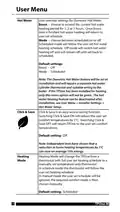
  • Page 14: User override settings for Domestic Hot Water allow for extending the current hot water heating period for 1, 2, or 3 hours. Once the boost time is finished, hot water heating will return to the user set schedule. The mode can be set to scheduled on or off, with off mode switching hot water heating off until set back to scheduled. Default settings for boost is off and mode is scheduled. The Domestic Hot Water feature requires a separate hot water cylinder thermostat and suitable wiring to the boiler. The hot water heating feature can be deactivated after installation through the user menu. Click & Save is an easy access saving function that reduces user set comfort temperatures by 1°C when switched on. Independent tests show that reducing home heating temperatures by 1°C can save on average 10% energy. Heating mode changes the thermostat from a full user set heating schedule to a manually set temperature only thermostat. In manual mode, the user set schedule will be ignored, and the required comfort mode is chosen manually.
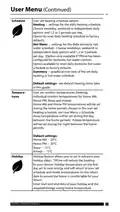
  • Page 15: User set heating schedule option includes settings for daily heating and hot water schedules. Users can choose between weekday, weekend, or independent daily options with multiple periods per day. There is an option to reset the daily heating and hot water schedules to factory defaults. The summary provides a graphical overview of the set daily heating or hot water schedule. Users can set individual comfort temperatures for Home AM, Home PM, Away, and Asleep. Home AM and Home PM temperatures are determined by the user set heating schedule. The Away temperature is set during the day between home periods, while the Asleep temperature is set during the night. The holiday feature allows users to set holiday dates in advance, reducing heating to a chosen temperature. TPOne will return to the set schedule and mode temperatures upon return from holiday. Default comfort temperatures are specified for Home AM, Home PM, Away, and Asleep.
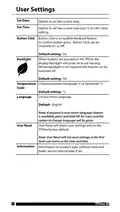
  • Page 16: User settings allow customization of the device. You can set the current date and time, with options for 12 or 24-hour clock settings. Button Click provides audible feedback to confirm button presses and can be switched on or off, with the default setting being on. The display backlight activates when buttons are pressed and can be turned off if not needed, with the default setting also being on. You can choose between centigrade or fahrenheit for temperature scale, with the default setting in centigrade. Menu language selection is available, with English as the default. A reset menu language feature is accessible by pressing and holding OK for 5 seconds. User Reset returns user settings to factory defaults but does not affect first-level user menu settings or date and time. Information on product type, software level, and boiler service interval date is provided.
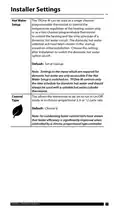
  • Page 17: Installer settings allow for configuration of the TPOne-M thermostat. The TPOne-M can function as a single or two channel programmable thermostat. It controls the heating system and the time schedule for domestic hot water. The domestic hot water selection is set during the startup wizard. Settings for domestic hot water are accessible only when the Hot Water Setup is enabled. The thermostat should be used with a suitable hot water cylinder thermostat. Control type can be set to On/Off mode or chrono-proportional with various cycle rates. The default control type is set to chrono 6. Boiler efficiency improves when controlled by a chrono-proportional type controller. Always ensure proper configuration for optimal performance.
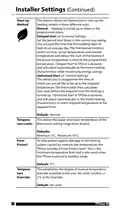
  • Page 18: Installer settings include start-up methods for the heating system. Normal mode allows heating adjustments at programmed times. Delayed start takes into account the time needed to heat the building and adjusts the heating start time accordingly. Optimised start calculates when to turn on heating to reach the desired temperature by the required time. Temperature limits can be set to define the upper and lower bounds of the thermostat's range. Frost protect helps prevent damage to the heating system from extreme low temperatures. The minimum frost protect level is set at 5°C. Temperature override options include no limit, limited +/- 2°C, or no override. The default settings for temperature limits are a minimum of 5°C and a maximum of 35°C. The default for temperature override is no limit.
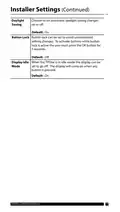
  • Page 19: Installer settings include options for daylight saving, button lock, and display idle mode. Daylight saving can be set to automatic changes on or off, with the default set to on. Button lock prevents unintentional setting changes and requires pressing the OK button for 5 seconds to activate buttons while locked, with the default set to off. Display idle mode allows the display to turn off when idle, turning back on when any button is pressed, with the default set to on.
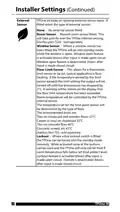
  • Page 20: Installer settings include options for external sensors. TPOne has an optional external sensor input. If fitted, select the type of external sensor: none, room sensor, window sensor, or floor limit sensor. Room sensor takes priority over the TPOne internal sensing. Window sensor puts TPOne in standby mode when the window is open. Floor limit sensor prevents overheating by turning off output if the temperature exceeds the limit. Recommended temperature limits vary by floor type, with specific limits for tiles, carpet, and concrete. Lockout feature allows remote standby mode activation via a key lockout switch. While in lockout mode, buttons are disabled, and TPOne only calls for heat if the temperature falls below the frost protect level. Activation and deactivation of features occur after specific time intervals following circuit input changes.
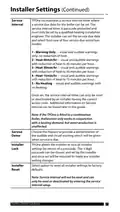
  • Page 21: Installer settings include a service interval timer for setting a service due date for the boiler. The timer is passcode protected and should only be set by a qualified heating installation engineer. The installer can select from four service due restriction modes: - Warning only: visual and audible warnings without heat reduction. - Heat 45min/hr: warnings with heat reduction to 45 minutes per hour. - Heat 30min/hr: warnings with heat reduction to 30 minutes per hour. - Heat 15min/hr: warnings with heat reduction to 15 minutes per hour. - No heating: warnings with no heating. The service interval timer can only be reset or deactivated by an installer with the correct access code. If the TPOne is fitted to a combination boiler, the function works only with a heating demand, and hot water production remains unaffected. The demo feature allows for a demonstration of the audible and visual warning for when service is due. TPOne allows the installer to lock all settings with a passcode, which must be entered for any changes. There is an option to reset all installer settings to factory defaults, but the service interval will not be reset and requires entering the service interval setup.
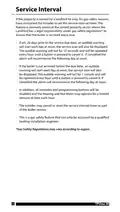
  • Page 22: Service interval Landlords may instruct installers to set the service interval timer for gas safety reasons. This feature is aimed at the rented property sector where landlords have a legal responsibility to ensure the boiler is serviced every year. An audible warning will start 28 days prior to the service due date, lasting for 10 seconds and repeated every hour until cancelled. If the boiler is not serviced before the due date, the audible warning will last for 1 minute and will also be repeated every hour until cancelled. If cancelled, the alarm will recommence the following day at noon. All overrides and programming buttons will be disabled if the boiler is not serviced. Heating and hot water may operate for a limited amount of time each hour if the service is overdue. The installer may cancel or reset the service interval timer as part of the boiler service. This gas safety feature can only be accessed by a qualified heating installation engineer. Gas safety regulations may vary according to region.
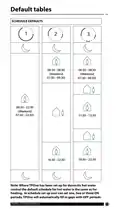
  • Page 23: Default tables Schedule defaults Note: Where TPOne has been set up for domestic hot water control, the default schedule for hot water is the same as for heating. In schedule setup, the user can set one, two, or three ON periods; TPOne will automatically fill in gaps with OFF periods.
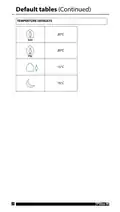
  • Page 24: Default tables include temperature defaults for various times. The default temperature in the morning is set to 20°C. The default temperature in the afternoon is also set to 20°C. Another default temperature is set to 15°C.
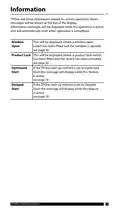
  • Page 25: Information messages will be displayed while the operation is active and will automatically reset when operation is completed. This will be displayed where a window open switch has been fitted and the window is opened. This will be displayed where a product lock switch has been fitted and the switch has been activated. If the TPOne start up method is set to Optimised Start this message will display while this feature is active. If the TPOne start up method is set to Delayed Start this message will display while this feature is active.
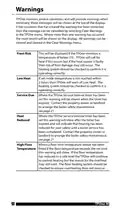
  • Page 26: Warnings are displayed at the top of the TPOne monitor when necessary. Messages can be cleared by selecting Clear Warnings in the TPOne menu. Frost risk is indicated when the temperature drops below 5°C, and the heating system should be checked. Low heat warnings occur if the set mode temperature is not reached within 2 hours, necessitating a check of the heating system. Service due warnings appear when the TPOne service interval timer has expired, prompting contact with the property owner for maintenance. Heat reduced warnings indicate that heating has been reduced for safety until a boiler service is completed. High floor temperature warnings are triggered if the floor temperature exceeds the set limit, requiring checks to prevent overheating. The TPOne monitors several conditions to ensure proper functioning and safety. All warnings can be viewed and cleared in the Clear Warnings menu. It is essential to ensure the heating system operates correctly to avoid risks.
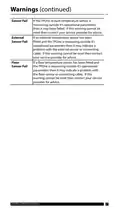
  • Page 27: Warnings Sensor fail may indicate a failure of the in-built temperature sensor if measuring outside operational parameters. If the warning cannot be reset, contact your service provider for advice. External sensor fail may indicate a problem with the external temperature sensor or connecting cable if measuring outside operational parameters. If this warning cannot be reset, contact your service provider for advice. Floor sensor fail may indicate a problem with the floor temperature sensor or connecting cable if measuring outside operational parameters. If this warning cannot be reset, contact your service provider for advice.
  • Page 28: Danfoss cannot accept any responsibility for possible errors in catalogues, brochures, videos and other material. Danfoss reserves the right to alter its products without notice. This also applies to products ordered but not delivered provided that such alterations can be made without changes to form, fit or function of the product. All trademarks in this material are property of Danfoss A/S or Danfoss group companies. Danfoss and the Danfoss logo are trademarks of Danfoss A/S. All rights reserved. © Danfoss Climate Solutions | 01.2023