
Home > Homematic IP > homematic IP HmIP-eTRV-F Radiator Thermostat Instruction Manual
homematic IP HmIP-eTRV-F Radiator Thermostat Instruction Manual


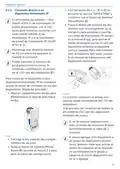




Configuration menu
7.1 Manual mode
menu.
• Select menu item “MODE” using
the plus and minus buttons (C + D)
and confirm with the System/
Menu/Boost button (E).
In manual mode, the temperature is
controlled using the plus or minus but-
tons (C + D). The temperature remains
stored until the next manual change.
To enable manual mode, proceed as
follows:
• Use the plus or minus buttons
(C + D) to select the menu item “
AUTO” (Functional Mode) and con-
firm with the System/Menu/Boost
button (E).
• Press and hold the System/Menu/
Boost button (E) for approx. 2 sec-
onds to open the configuration
menu.
• This calls up the start screen on
which the heating profile “
(Functional Mode) is displayed.
”
• Select menu item “MODE” using
the plus and minus buttons (C + D)
and confirm with the System/
Menu/Boost button.
7.3 Eco mode
Eco mode can be used to permanently
maintain a fixed temperature for a cer-
tain period (e.g. during your holidays or
during a party).
• Select menu item “MANU” using
the plus and minus buttons (C + D)
and confirm with the System/
Menu/Boost button (E).
To enable Eco mode, proceed as fol-
lows:
• This calls up the start screen on
which “ MANU” (Functional Mode)
or the temperature (Reduced
Mode) is displayed.
• Press and hold the System/Menu/
Boost button (E) for approx. 2 sec-
onds to open the configuration
menu.
7.2 Automatic mode
• Select menu item “MODE” using
the plus and minus buttons (C + D)
and confirm with the System/
Menu/Boost button.
To change the operating mode,
you first have to set the date and
time (see „7.6 Time and date“ on
page 39).
• Select menu item “PARTY” using
the plus and minus buttons (C + D)
and confirm with the System/
Menu/Boost button (E).
In automatic mode, the temperature is
controlled in accordance with the set
heating schedule. Manual changes are
enabled until the next point at which
the profile changes. Afterwards, the
defined heating schedule will be ena-
bled again. To enable automatic mode,
proceed as follows:
• Select the hours using the plus and
minus buttons and confirm with
the System/Menu/Boost button (E).
• Select the minutes using the plus
and minus buttons and confirm
with the System/Menu/Boost but-
ton (E).
• Press and hold the System/Menu/
Boost button (E) for approx. 2 sec-
onds to open the configuration
38

| General | Details |
|---|---|
| Name | homematic IP HmIP-eTRV-F Radiator Thermostat Instruction Manual |
| Make | Homematic IP |
| Language | English |
| Filetype | PDF (Download) |
| File size | 14.49 MB |
 (1 votes, average: 5.00 out of 5)
 Loading...

homematic IP HmIP-eTRV-2 Radiator Thermostat Instruction Manual

homematic IP HmIP-BWTH-A Wall Thermostat Installation Guide

homematic IP HmIP-WTH-B-2 Wall Thermostat Installation Guide

homematic IP TRV-E-A Monday Radiator Thermostat Instruction Manual

homematic IP HAP Radiator Thermostat Instruction Manual

Homematic IP HmIP-WTH-B Wireless Wall Thermostat Instruction Manual

homematic IP HmIP-eTRV-E Series Radiator Thermostat Evo Installation Guide

Homematic IP BMOAONSUT Radiator Thermostat User Manual

homematic IP C-2 Radiator Thermostat Instruction Manual

homematic IP IP HmIP-eTRV-CL Radiator Thermostat Instruction Manual


INTIEL Controllers DT 3.1 Programmable Differential Thermostat User Guide

GENERAL Life HT100S Digital Room Thermostat User Guide

ECSPST Fort Programmable Thermostat User Guide

EPH CONTROLS TM-S Room Thermostat Instruction Manual

RATE R8 Weekly Programmable Handwheel Thermostat Instruction Manual

HomePilot 13501001 Wireless Room Thermostat User Guide

tuya BHT-005 Wifi Heating Thermostat User Manual

AuVerte C501 Thermostat Installation Guide

MAGNUM FIRST M9-TS1 24 Volt Intelligent Thermostat Owner’s Manual

STELPRO SAT402ZB Smart Thermostat User Guide