
HEATIT Z-Temp3 is a Battery Operated Thermostat Instruction Manual





28.4 Thermostat Mode Command Class
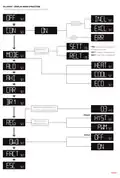
It is possible to change the operating mode of the thermostat
by sending a Thermostat Mode set command. The accessible
operating modes are:
SHORT
DESCRIPTION / COMMENT
DESCRIPTION
OF VALUE
NAME
Tempera-
ture report
interval
Set the time interval between
consecutive temperature
reports.
150 to 65535 seconds.
990s (16.5 min) (Default)
10
11
12
13
2
1
150
1
65535 990
0x00: OFF (Thermostat regulation and display are
deactivated).
Tempera-
ture report
hysteresis
Set the change in temperature
required to send a temperature
report based on change.
0.1°C to 10°C
10 (1°C) (Default)
100
10
0x01:
Heating Mode (Thermostat regulation is active).
Humidity
report
interval
Set the time interval between
consecutive temperature
reports
150 to 65535 seconds.
990s (16.5 min) (Default)
2
1
150
10
65535 990
0x02: Cooling Mode (Thermostat regulation is inverted).
0x0B: ECO Mode (Thermostat regulation is active with a
separate setpoint from Heating Mode).
Humidity
report
hysteresis
Change in humidity required to
send a report
10% to 100%.
25% (Default)
100
25
Heating
setpoint
5°C to 40°C.
21°C (Default)
14
15
16
2
2
2
Set setpoint for Heating mode
Set setpoint for Cooling mode
Set setpoint for ECO mode
50
50
50
400
400
400
210
250
180
Cooling
setpoint
5°C to 40°C.
25°C (Default)
28.5 Thermostat Operating State Command Class
The thermostat reports the operating state of the associated
device using this Command Class.
0x00 = Idle
ECO
setpoint
5°C to 40°C.
18°C (Default)
OFF
Thermostat will not
operate
0
Operating
Mode
(MODE)
17
18
1
1
Set the thermostat mode.
1
0x01 = Heating (used for Heating and ECO mode)
0x02 = Cooling
1
2
3
Heating mode (Default)
Cooling mode
ECO mode
Open window detection
disabled. (Default)
0
1
Open
window
detection
Choose to enable or disable
the Open windows detection.
0
28.6 Indicator Command Class
Open windows detection
enabled.
The device supports the Indicator Command Class. The
indicator Command Class will flash the backlight of the display.
28.COMMAND CLASSES
Additional information regarding Command Classes and their
functionality:
28.7 Battery Command Class
The device uses the battery Command Class to report its
current battery level.
28.1 Basic Command Class
A Basic command to the device will change the thermostat
mode. Uses the following values:
0x00 = OFF (0x00)
The battery level is reported in three instances: upon inclusion
into a Z-Wave network, when the battery level has changed by
more than 10%, and following a repower of the device.
0xFF = HEAT (0x01)
28.8 Binary Switch Command Class
Binary Switch commands are used to control external relays
associated with group 2.
If the thermostat is in ECO or COOL mode, 0x00 will still
change the mode to OFF. ECO or COOL cannot be enabled
with a Basic Set command.
Uses the following values:
0x00 = OFF
28.2 Protection Command Class
0xFF = ON
Protection Command Class allows you to disable local control
of the thermostat, this is separately from the Child Lock
function.
This Command Class is based on the operating state of the
thermostat.
To enable the Protection Command Class, either set
Parameter 1 (disable buttons) to value 1, enabling Local
Protection State 0x02, or send a Protection Set with Local
Protection State 0x01 or 0x02.
29.SUPPORTED COMMAND CLASSES
The following table lists all Command Classes supported by
the Z-Wave device. The device supports S0, S2 Authenticated
security and S2 Unauthenticated security.
During Protection State 0x01, the device is protected by a
button sequence and allows for no local operation until it is
unlocked. To unlock the thermostat while in Protection state
0x01, first press twice on the Left button, then press twice on
the Right button and then finally twice on the Center button.
This will unlock the thermostat until it goes back to standby,
requiring you to unlock it again.
INSECURE ON
SECURE INCLUSION
SECURE ON
SECURE INCLUSION
ASSOCIATION
VERSION
Association
v2
v3
v1
v1
v5
v3
v2
v3
v1
v1
v1
v1
v2
v3
v2
Yes
Yes
Yes
Yes
Yes
Yes
Yes
Yes
Yes
Association Group Information
Battery
Device Reset Locally Notification
Firmware Update MD
Indicator
Protection State to 0x02 means that no operation is possible
and the thermostat can only be unlocked by setting Parameter
1 to 0, or by holding the Center and Right buttons for 30
seconds.
Manufacturer Specific
Multi channel Association
Power level
Security
Yes
Yes
Yes
Yes
Security v2
28.3 Thermostat Setpoint Command Class
Thermostat Setpoint is implemented with 3 setpoints, Heating,
Cooling and ECO. Supported setpoints are from 5°C - 40°C
with 0.5°C increments.
Supervision
Transport Service
Version
Yes
Z-Wave Plus Information
Yes

| General | Details |
|---|---|
| Name | HEATIT Z-Temp3 is a Battery Operated Thermostat Instruction Manual |
| Make | HEATIT |
| Language | English |
| Filetype | PDF (Download) |
| File size | 0.53 MB |
 (1 votes, average: 5.00 out of 5)
 Loading...

heatit Z-TRM6 DC Z Wave Electronic Thermostat Instruction Manual

HEATIT Z-TRM3 Thermostat User Guide

Heatit Z-TEMP2 Thermostat Installation Guide

heatit Z-TRM3 WiFi Thermostat Instruction Manual

4512673 Heatit ZM Thermostat 16A User Guide

HEATIT Z-TRM6 Matt Z-Wave Thermostat User Guide

HEATIT 54 304 59 DIN Smart Thermostat Installation Guide

HEATIT 54 305 41 WiFi6 Thermostat Installation Guide

HEATIT Z-TEMP3 Thermostat User Guide

heatit ET-7AW Touchscreen Programmable Thermostat User Manual


Doit 474053 Low Voltage Thermostat Installation Guide

brennenstuhl HTCZ01 Zigbee Radiator Thermostat Instruction Manual

Comfortmaker ION Gray Smart Thermostat Instruction Manual

ENGO CONTROLS EASYBATB Wired Thermostat User Guide

GENERAL LIFE Mitra Series Smart Room Thermostat User Manual

NEOMITIS RTE7SD Mains Powered Digital 7 Day Programmable Room Thermostat Instruction Manual

bryant SYSTXBBECC01-C Evolution Connex Control Thermostat Owner’s Manual

GENERAL LIFE SENNA 300S RF Wireless Room Thermostat User Manual

Schluter Systems DITRA-HEAT-E-RS1 Floor Warming Thermostat User Guide

PRO1 T805 Non Programmable Thermostat Instruction Manual