
vaillant VR 92f/3 Wireless Additional Room Thermostat Instructions




















Danger!
3
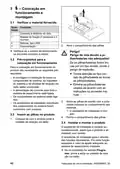
-- Start-up and set-up
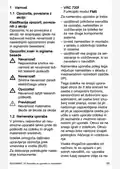
Risk of death caused by un-
suitable batteries!
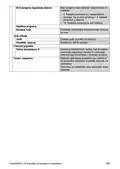
3.1 Checking the scope of delivery
Quant- Contents
ity
If batteries – whether re-
chargeable or non-re-
chargeable – are replaced with
the wrong type of battery, there
is a risk of explosion.
1
1
Radio remote control
Fixing material (2 screws and 2 wall
plugs)
4
1
Batteries, LR06
Documentation
▶ Ensure that you use the cor-
rect battery type when repla-
cing batteries.
▶ Dispose of used batteries in
accordance with the instruc-
tions in this manual.
▶ Check that the scope of delivery is com-
plete and intact.
3.2 Requirements for start-up
To start up the product, the following pre-
requisites are required:
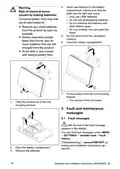
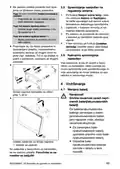
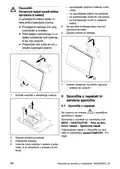
3. Insert the batteries in the battery com-
partment, making sure that the poles
are the right way round.
◁ The installation assistant starts.
4. Close the battery compartment.
– All of the system components, the sys-
tem control and the radio receiver unit
have been installed and set up.
– The power supply for the entire heating
installation is switched on.
– The system components are switched
on.
– The individual installation assistants for
the different system components have
been completed successfully.
3.4 Installing and setting up the
product
The installation assistant starts automatic-
ally as soon as the product is supplied with
voltage.
3.3 Inserting batteries into the
product
The installation assistant guides you
through the required functions. For each
function, you should choose the set
value that is best suited to the heating
installation being installed.
1. Stand next to the radio receiver unit
with the product.
▶ If Pair is shown in the display, press the
button on the radio receiver unit.
◁ The LED on the radio receiver unit
flashes green.
B
A
▶ To check the reception strength on the
chosen installation site, proceed as
follows:
▶ Take the remote control to the chosen
installation site for the product.
▶ Close all doors behind you on the way
to the installation site.
2. Open the battery compartment.
▶ If the display is off, press
on the
upper side of the product in order to
activate the display.
12
Operating and installation instructions 0020298957_02

| General | Details |
|---|---|
| Name | vaillant VR 92f/3 Wireless Additional Room Thermostat Instructions |
| Make | Vaillant |
| Language | English |
| Filetype | PDF (Download) |
| File size | 1.07 MB |
 (1 votes, average: 5.00 out of 5)
 Loading...

Vaillant VRC 700 Weather Compensating Thermostat Instruction Manual

Vaillant VRT15 Room Thermostat User Guide

Vaillant VRC 700 Programmable Weather Compensating Thermostat Owner’s Manual

Vaillant VRT 51f sensoROOM Wireless Room Thermostat Instruction Manual

Vaillant senso Comfort Thermostat Instructions


ELMEKO THRV 22 Double-Thermostat Owner’s Manual

Honeywell TH3110D1008 Non-Programmable Thermostat Instruction Manual

HYSEN HY608 Wi-Fi Digital Heating Thermostat User Manual

network thermostat NetX X5-CFA Universal Setback Thermostat Instruction Manual

GENERAL LIFE HT25 Smart Room Thermostat User Manual

Micro Air ETRV EasyTouch RV Thermostat Instruction Manual

EPH CONTROLS TRFPi2 COMBIPACK2 Programmable RF Thermostat Instruction Manual

Roth Basicline H 230V Room Thermostat Instructions

GENERAL LIFE MITRA 110S Digital Room Thermostat User Manual

PELICAN TC3 Commercial Connected Thermostat Installation Guide