
vaillant VR 92f/3 Wireless Additional Room Thermostat Instructions














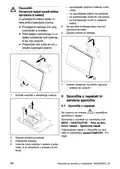






1
2
3
Time period 1
Time period 2
Desired temper-
ature
4
5
Set-back tem-
perature
Outside of the
time periods
2 Product description
2.1 Which nomenclature is used?
– Remote control: Instead of VR 92f
– System control: Instead of VRC 720f
– FM5 or FM5 functional module: Instead
of VR 71
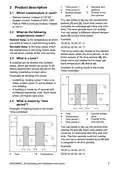
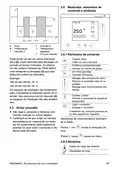
You can divide a day up into several time
periods (1) and (2). Each time period can
comprise an individual start time and end
time. The time periods must not overlap.
You can assign a different desired temper-
ature (3) to each time period.
2.2 What do the following
temperatures mean?
Example:
Desired temp. is the temperature to which
you want to heat or cool the living rooms.
16:30 to 18:00; 21 °C
20:00 to 22:30; 24 °C
Set-back temp. is the level below which
the temperature in the living rooms does
not fall when outside of the time periods.
The living rooms are heated to the desired
temperature within the time periods. In the
times outside of the time periods (5), the
living rooms are heated to the lower set-
back temperature (4) that is set.
2.3 What is a zone?
A building can be divided into multiple
areas, which are known as zones. A dif-
ferent requirement can be placed on the
heating installation in each zone.
Example of cooling mode in the mode:
Time-controlled
Examples for dividing into zones:
B
– Underfloor heating (zone 1) and a ra-
diator system (zone 2) are available in
one building.
24 °C
3
1
2
– A building is made up of several self-
contained residential units. Each resid-
ential unit has its own zone.
4
4
4
2.4 What is meant by "time
period"?
A
20:00
3
22:30
16:30 18:00
Example of heating mode in the mode:
Time-controlled
A
B
1
2
Time
Desired temper-
ature
Outside of the
time periods
Temperature
Time period 1
Time period 2
B
4
24 °C
3
21 °C
You can divide a day up into several time
periods (1) and (2). Each time period can
comprise an individual start time and end
time. The time periods must not overlap.
You can set a desired temperature (3) that
is assigned to all time periods.
1
2
16 °C
4
5
5
5
Example:
A
20:00
22:30
16:30 18:00
16:30 to 18:00; 24 °C
20:00 to 22:30; 24 °C
A
Time
B
Temperature
0020298957_02 Operating and installation instructions
7

| General | Details |
|---|---|
| Name | vaillant VR 92f/3 Wireless Additional Room Thermostat Instructions |
| Make | Vaillant |
| Language | English |
| Filetype | PDF (Download) |
| File size | 1.07 MB |
 (1 votes, average: 5.00 out of 5)
 Loading...

Vaillant VRC 700 Weather Compensating Thermostat Instruction Manual

Vaillant VRT15 Room Thermostat User Guide

Vaillant VRC 700 Programmable Weather Compensating Thermostat Owner’s Manual

Vaillant VRT 51f sensoROOM Wireless Room Thermostat Instruction Manual

Vaillant senso Comfort Thermostat Instructions


Honeywell Home DT4R 1 Channel Wireless Spare Room Thermostat Instruction Manual

expert4house BHT-003 Series Zigbee Thermostat User Guide

Beca BHT-8000 Heating Thermostat User Guide

HWTH Horizontal Hotwire Thermostat Instructions

Smart Temp SMT-850 Halo Thermostat User Guide

Honeywell TH8321U Touch Screen Programmable Thermostat Installation Guide

SALUS CONTROLS T105 Digital Programmable Thermostat User Guide

BEOK CONTROLS TS4-EP Series Thermostat Instruction Manual

GENERAL 261S RF Digital Room Thermostat Instruction Manual

COMAP L151002001 Smart Home Thermostat User Manual