
HYSEN HY608 Wi-Fi Digital Heating Thermostat User Manual
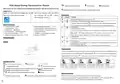


WIFI Digital Heating ThermostatUser Manual
Activate window function
Room temp
Setting temp
Many thanks for your selection of our products and services, and also for your trust and
support to us.
Cooling mode, the icon blinking means cooling mode output
Search for "Smart life" from google play or
App store to Download the Wifi App
Turn on the thermostat, press and hold the
Operation key
NO symbols represent
key combination “ ” and “
WIFI distribution network icon
”
Activate
Turn ON/OFF: short press to turn on/ turn off
1. Short press to switch automatic mode and manual mode
A
B
2. Turn on thermostat, long press for 3-5 seconds to enter into programmable setting
Product Specifications
3. Turn off thermostat, long press for 3-5 seconds to enter into advance option A
☆ Power: 90-240Vac 50/60Hz
☆ Range of temperature display::1~70°C
☆ Insulating condition: Normal environment
☆ Running program: Set per 1 week as a cycle
☆ Output: Switch relay
1. Confirm key
2. short pressit to set time
C
☆ Display accuracy::0.5°C
☆ Probe sensor::NTC(10k)1%
☆ Contact capacity::3A/(WW);16A/(WE)
☆ Limit temperature range::1~70°C
☆ Range of temperature adjustment::5~35°C
3. Turn on thermostat, long press it for 3-5seconds to holiday mode setting. Appear
OFF, press
or change to ON,then press
to confirm opening holiday mode
☆ Installation: recessed type (in the wall)
4. Turn off thermostat, long press it for 3-5s to enter into advanced option B
1. Decrease key
☆ Size(mm):86*86*10
D
E
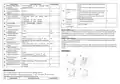
Wiring Diagram
2. Long press to lock /unlock
1. Increase key
2. Long press to inquire external sensor temperature ( only available for BN item select
N3 in the advance option B)
Displays
3. In the program model, press
or enter to temporary manual mode
Programmable
5+2 (factory default),6+1 and 7 models 6 times period setting for user choose. In the advanced options
choose model of you need, under power on state, long press for 3-5 seconds enter into programming
mode setting, then short press
choose: hour,minute, time period, and press
and
to adjust
data, finished setting, about 10 seconds will automatic save and exist.
Description of icon
Auto mode: run preset program
Programming mode
Manual mode
Clock
Wake up
Leave home Back home
Leave home Back home
Sleep
Temporary manual mode
11:30
13:30
17:00
22:00
6:00 20℃ 8:00 15℃
15℃
15℃
15℃
15℃
Holiday mode, Holiday days and temperature can be set to run in countdown mode
Heating,,icon disappears to stop heating
External NTC sensor
WIFI connection, flashing EZ distribution mode
Child lock
Advanced option A
Wifi status: Disconnection
Cloud icon: flashing AP distribution network mode
Power off state, long press
for 3-5 seconds to access advanced option A.
to choose the option, and adjust data by or , short press
switch next option.Remain about 5 seconds after finish setting will quit setting.
From A1 to AE, short press
to


| General | Details |
|---|---|
| Name | HYSEN HY608 Wi-Fi Digital Heating Thermostat User Manual |
| Make | HYSEN |
| Language | English |
| Filetype | PDF (Download) |
| File size | 0.22 MB |
 (1 votes, average: 5.00 out of 5)
 Loading...

HYSEN HY518WE WIFI Digital Heating Thermostat User Manual

HYSEN HY312 Wi-Fi Digital Heating Thermostat Instruction Manual

HYSEN HY510 WiFi Heating Thermostat Instruction Manual

HYSEN HY511 WiFi Heating Thermostat Owner’s Manual

HYSEN HY02B05RF Wireless Heating Thermostat User Manual

HYSEN HY09RF WI-FI Wireless Thermostat User Manual

HYSEN HY02DB-WIFI Wifi Plug In Thermostat User Manual

HYSEN HY608 Wi-Fi Digital Heating Thermostat User Manual Overview
Summary of Contents
- Page 1: WIFI Digital Heating Thermostat User Manual Activate window function Setting temperature Cooling mode, the icon blinking means cooling mode output Search for Smart life from Google Play or App Store to download the Wifi App Turn on the thermostat, press and hold the operation key Power: 90-240Vac 50/60Hz Range of temperature display: 1~70°C Installation: recessed type (in the wall) Programmable 5+2 (factory default), 6+1 and 7 models with 6 times period setting for user choice Holiday mode, holiday days and temperature can be set to run in countdown mode
- Page 2: Setting options include measuring temperature, calibration, and data setting functions. The internal sensor has high temperature protection settings. The external sensor also has high temperature protection settings. Control temperature settings include internal sensor control and external sensor limit temperature. Children lock settings can be adjusted for half or full lock. Descaling function can be enabled or disabled based on settings. Standby brightness can be adjusted to off, weakly bright, or brighter. Low temperature protection is activated when the temperature is set to 10°C. High temperature protection triggers when the temperature reaches 45°C. The warranty period is 24 months from the sales date, with charges for after-sale service if not quality-related.

EAE TECHNOLOGY KNX ORIA Thermostat Installation Guide

SALUS CONTROLS IT700 Smart Thermostat Instruction Manual

Klima C16 WiFi Floor Heating Thermostat User Guide

LATICRETE 0804-0402-TW Programmable LCD Thermostat Instruction Manual

Danfoss RET1000 Floor Heating Room Thermostat Installation Guide

GV S603R-3A Programmable Digital White Thermostat User Manual

legrand WZ3TSTATH Thermostat Instruction Manual

SALUS HTRS-RF30 Wireless Digital Thermostat Installation Guide

BlueLink 8205 Smart Wi-Fi Thermostat User Manual

hansgrohe AXOR CARLTON Thermostat Mixer Instruction Manual