
PRO1 T701 Digital Non Programmable Thermostat Instruction Manual



OPERATING MANUAL
This manual covers the following models:
•T701
Congratulationsonpurchasinga
newthermostat. This thermostat was
designed to the highest reliability and
ease of use standards. Thank you for
choosing Pro1.
Caution:
Equipmentdamagehazard
Do not operate the cooling
system if the outdoor
temperature is below 50˚ F
(10˚ C) to prevent possible
compressor damage.
TableofContents
Page
NeedHelp?
Thermostat Quick Reference
Thermostat Operation
Contact Us
2
3
4
4
For assistancewith thisproduct pleasevisit
http://www.pro1iaq.com or call Pro1
Customer Caretoll-freeat 888-Pro1iaq
(776-1427)during normal businesshours
(Mon-Fri 9 AM - 6 PM Eastern)
Warranty Registration
Una versión española de este
manual puede ser descargada
® U.S. Registered Trademark. Patents pending.
Copyright © 2006 Pro1 IAQ, Inc. All rights reserved.
Rev. 0850
1


| General | Details |
|---|---|
| Name | PRO1 T701 Digital Non Programmable Thermostat Instruction Manual |
| Make | PRO1 |
| Language | English |
| Filetype | PDF (Download) |
| File size | 0.13 MB |
 (1 votes, average: 5.00 out of 5)
 Loading...

PRO1 T751i Thermostat Installation Guide

PRO1 T731W Wireless PTAC Non-Programmable Thermostat Installation Guide

PRO1 T805 Non Programmable Thermostat Instruction Manual

PRO1 IAQ T721i Digital WIFI Programmable Thermostat User Manual

PRO1 R250W Wireless System Thermostat Owner’s Manual

PRO1 T725 Thermostat User Guide

PRO1 T755 Heat 2 Cool Dual Fuel Thermostat User Manual

PRO1 T771 Programmable Electronic Thermostat Instructions

PRO1 T701 Digital Non Programmable Thermostat Instruction Manual Overview
Summary of Contents
- Page 1: Operating manual This manual covers the following models: T701 Congratulations on purchasing a new thermostat. This thermostat was designed to the highest reliability and ease of use standards. Caution: Equipment damage hazard Do not operate the cooling system if the outdoor temperature is below 50˚ F (10˚ C) to prevent possible compressor damage. Table of contents Need help? Thermostat quick reference Thermostat operation Contact us
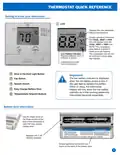
- Page 2: Thermostat quick reference Getting to know your thermostat Displays the user selectable setpoint temperature. System operation indicators: The COOL, HEAT or FAN icon will display when the COOL, HEAT or FAN is on. The compressor delay feature is active if these icons are flashing. Low battery indicator: Replace batteries when indicator is shown. Indicates the current room temperature. The low battery indicator is displayed when the AA battery power is low. If the user fails to replace the battery within 21 days, the thermostat display will only show the low battery indicator as a final warning before the thermostat becomes inoperable. Use the finger bevel on the lower portion of the side of the thermostat to open the easy access battery door. Replace with 2 AA Alkaline batteries.
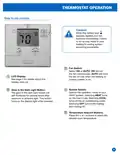
- Page 3: Thermostat operation Easy to use controls Caution: When the battery icon appears replace your AA batteries immediately. Failure to do so may result in your heating & cooling system becoming inoperable. Fan switch: Select ON or AUTO. ON will run the fan continuously. AUTO will cycle the fan on only when the heating or cooling system is on. LCD display: See page 2 for details about this display read out. System switch: Selects the operation mode of your HVAC system. Selecting HEAT turns on the heat mode. Selecting COOL turns on the air conditioning mode. Selecting OFF turns both heating and cooling off. Glow in the dark light button: This button will self illuminate for several hours after exposure to ambient light. This button turns on the display light when pressed. Temperature setpoint buttons: Press the + or - buttons to select the desired room temperature.
- Page 4: Contact us information Your new Pro1 thermostat has a 5 year limited warranty. You must register your warranty within 60 days of installation. You can register your new thermostat in 2 ways. Go to the website, select warranty registration and fill out a short registration form. Complete the form below and mail it to the address shown. Pro1 IAQ Warranty Registration. Complete form and mail to Pro1 IAQ Inc. Hours of operation: Monday - Friday 9 AM - 6 PM Eastern. Toll-free number: 1-888-Pro1iaq (776-1427).

velleman VM148 Programmable Thermostat Instruction Manual
MCOHome MH-5900 Z Wave Thermostat User Guide

Network Thermostat X7C-WIFI Smart Touchscreen Thermostat Instruction Manual
PRO1 T731W Wireless PTAC Non-Programmable Thermostat Installation Guide

tekmar U-T-562 WiFi Thermostat User Manual

nVent RAYCHEM RayStat-M2 Thermostat Instruction Manual

LUX TX9600TSA Smart Temp Universal 7 Day Programmable Touchscreen Thermostat Instruction Manual

ENGO CONTROLS E10-MBUSW, E10-MBUSB Wi-Fi MODBUS Thermostat User Guide

nVent RAYCHEM ETS-05 Electronic Thermostat Instruction Manual

Honeywell PRO 1000 Series Heat Pump Thermostat Instruction Manual