
PRO1 T701 Digital Non Programmable Thermostat Instruction Manual



THERMOSTAT QUICK REFERENCE
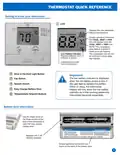
Gettingtoknowyourthermostat
LCD
1
2
1
Displays the user selectable
setpoint temperature.
6
System operation indicators:
The COOL,HEAT or FAN
icon will display when the
COOL,HEAT or FANis on.
NOTE: The compressor
delay feature is active if
these icons are flashing.
The compressor will not turn
on until the 5 minute delay
has elapsed.
3
4
LowBatteryIndicator:
Replace batteries when
indicator is shown.
5
Indicates the current
room temperature.
2
3
4
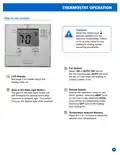
GlowintheDarkLightButton
FanSwitch
Important:
The low battery indicator is displayed
when the AA battery power is low. If
the user fails to replace the battery
within 21 days, the thermostat
SystemSwitch
EasyChangeBatteryDoor
TemperatureSetpointButtons
5
6
display will only show the low battery
indicator as a final warning before the
thermostat becomes inoperable.
Batterydoorinformation
Use the finger bevel on
the lower portion of the
side of the thermostat to
open the easy access
battery door.
Replace with 2 AA
Alkaline batteries.
Simple operating instructions are
found on the back of the battery door.
2

| General | Details |
|---|---|
| Name | PRO1 T701 Digital Non Programmable Thermostat Instruction Manual |
| Make | PRO1 |
| Language | English |
| Filetype | PDF (Download) |
| File size | 0.13 MB |
 (1 votes, average: 5.00 out of 5)
 Loading...


PRO1 T751i Thermostat Installation Guide

PRO1 T731W Wireless PTAC Non-Programmable Thermostat Installation Guide

PRO1 T805 Non Programmable Thermostat Instruction Manual

PRO1 IAQ T721i Digital WIFI Programmable Thermostat User Manual

PRO1 R250W Wireless System Thermostat Owner’s Manual

PRO1 T725 Thermostat User Guide

PRO1 T755 Heat 2 Cool Dual Fuel Thermostat User Manual

PRO1 T771 Programmable Electronic Thermostat Instructions


Klima 825200 Electric Underfloor Heating Thermostat User Manual
STELPRO UT202NP Series Non-Programmable Electric Thermostat Owner’s Manual

EMERSON 1F75H-21NP Non Programmable Heat Pump Thermostat Instruction Manual

TIOEVO0003 TEVO Wireless Thermostat User Manual

LUX PSP511A Series Programmable 5-2 Thermostat Instruction Manual

GENERAL HT250S Digital Room Thermostat User Manual

DEVI 140F1143 Electronic Intelligent Timer Thermostat Installation Guide

heatit Z-TRM6 DC Z Wave Electronic Thermostat Instruction Manual

GE APPLIANCES RAK190V 2 Way Energy Management Thermostat Instruction Manual

BEOK TGM50 Thermostat User Guide