
LG PREMTB10U Programmable Thermostat Instruction Manual








OPERATION INSTRUCTION
20
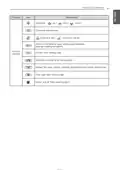
Standard Operation - Set back
Set back operation reverts to the last unoccupied schedule until Set back operation is canceled.
• It changes to ‘function setting - set back setting’ if Thermostat doesn’t have last unoccupied
schedule.
- Set back operation setting :
Auto operation mode / Set back setting temperature: Function setting – Set back temperature
Operate set back mode
Press
mode.
button, you can operate set back
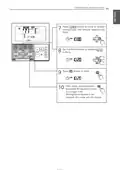
Cancel set back mode
Press
button in set back mode, you will
cancel set back operation.
- It reverts to the last weekly reservation schedule.
• You cannot change the setting in set back mode, except to cancel the set back mode.
- ‘HL’ lock is displayed on the window.
• It can be canceled if the Thermostat receives command from another controller.
• When the set back mode is deactivated, the following take place:
- The set points will go to the current occupied set points.
- The default occupied setting will be Auto with 86 °F (30 °C) for the cool set point and
60 °F (16 °C) for the heat set point.

| General | Details |
|---|---|
| Name | LG PREMTB10U Programmable Thermostat Instruction Manual |
| Make | LG |
| Language | English |
| Filetype | PDF (Download) |
| File size | 4.55 MB |
 (1 votes, average: 5.00 out of 5)
 Loading...

LG PREMTA200 Deluxe Thermostat User Guide


PECO T8168 Performance Pro Thermostat Installation Guide

NIBE RMU S40 Room Thermostat Instruction Manual

Danfoss RET1001M – V2 Room Thermostat Installation Guide

EVERBILT Electric Upper Thermostat Instructions

WHITE-RODGERS 1F90-71 5-Day 2-Day Electronic Digital Thermostat Instruction Manual

KETOTEK F0155 WiFi Thermostat Instruction Manual

GENERALLIFE MITRA 220 RF Wireless Room Thermostat User Manual

White Rodgers 1F95-1277 Big Blue Universal Thermostat Instruction Manual

GENERAL LIFE MITRA 250S Wired Room Thermostat User Manual

qunda QD-HVAC15 WIFI Touch-Screen Programmable Thermostat Instruction Manual