
×
- 1. Installation & Operation (Lg Programmable Thermostat)
- 2. Tips For Saving Energy (For Your Records)
- 3. Important Safety Instructions (Installation → In-use)
- 4. Important Safety Instructions (Caution → In-use)
- 5. Function Setting - Changing Current Time (Important Safety Instructions → Standard Operation - Cooling Mode → Ventilation Product - Ventilator Single Operation → Installation Method)
- 6. Installer Setting - E.s. P. Function (Installer Setting - Thermistor → Installer Setting Setting Temperature Range → Installer Setting - Static Pressure Step Setting → Installer Setting - Ceiling Height Selection)
- 7. Part Description (Name And Function Of Thermostat → Operation Indication Screen → Installation & Operation)
- 8. Part Description (Icon Description → Function → Operation Mode → Sub Function)
- 9. Part Description (Function → Fan Speed → Air Flow → Schedule Operation → Controller Mode)
- 10. Part Description (Function → Schedule → Turn On/off By Schedule → Display Weekly Schedule Occupied / Unoccupied State → Louver Angle Setting Step)
- 11. Part Description (Function → Description → Child Lock Setting Step → Current Time Setting Step → Schedule Override Timer Setting Step)
- 12. Standard Operation - Cooling Mode (Setting Temperature Range → What Is The Three-minute Delay Function?)
- 13. Standard Operation - Power Cooling (What Is Power Cooling?)
- 14. Standard Operation - Heating Mode (Setting Temperature Range)
- 15. Standard Operation - Dehumidification Mode
- 16. Standard Operation - Fan Mode
- 17. Standard Operation - Auto Operation Mode (Cooling Operation State → Heating Operation State)
- 18. Operation Instruction (Auto Heating Drive Only Operates On Cooling And Heating Models. → When Setting The Desired Cooling Temperature, The Indoor Unit Shuts Off On Condition That The Indoor Temperature Is Lower Than The Desired Temperature. → When Setting The Desired Heating Temperature, The Indoor Unit Shuts Off On Condition That The Indoor Temperature Is Higher Than The Desired Temperature. → If Indoor Unit Has 2set Point Function Selected, Unit Will Turn Off Thermal Once The Desired Set Point Is Achieved.)
- 19. Standard Operation - Timed Override (Operate Timed Override → Cancel Timed Override)
- 20. Standard Operation - Set Back (Operate Set Back Mode → Cancel Set Back Mode)
- 21. Standard Operation - Hold (Operate Hold Mode → Cancel Hold Mode)
- 22. Standard Operation Temperature Setting (Checking The Room Temperature → Room Temperature Display Range → Cooling Operation → Heating Operation)
- 23. Standard Operation - Airflow Setting (Fan Speed → Wind Direction → Airflow Setting Table)
- 24. Sub Function - Plasma Purification (The Method To Set Up Plasma Purification → Operate Or Cancel Plasma Purification Function)
- 25. Sub Function - Energy-saving Cooling Operation (Energy-saving Cooling Operation)
- 26. Sub Function - Automatic Drying (The Method To Setup Automatic Drying → Operate Or Cancel Automatic Drying Function)
- 27. Sub Function - Electric Heater (Heater Function Is Additional Function And It Might Not Be Available On All Indoor Units. → Exceptions: Error Codes 1, 3, 9, And 10)
- 28. Sub Function - Humidifier (Turn On/off Humidifier → Humidifier Function Availability)
- 29. Sub Function - Fan Auto (The Method To Set Up Fan Auto Function → Operate Or Cancel Fan Auto Function)
- 30. Function Setting - Vane Angle Control
- 31. Function Setting - Elevation Grill
- 32. Function Setting - Child Lock
- 33. Function Setting - Minimum Difference Between Heating And Cooling Set Points
- 34. Function Setting - Changing Current Time
- 35. Operation Instruction (Press Buttons To Move To 'minute' Setting Mode. → Set The Minute Value By Pressing Buttons. → After Setup, It Automatically Exits After 60 Seconds If There Is No Input.)
- 36. Function Setting - Override Set Time (Override Time Setting)
- 37. Function Setting - Set Back Temperature (Use)
- 38. Function Setting - Filter Sign Clear
- 39. Operation Instruction (Programming - Simple Reservation)
- 40. Programming - Sleep Reservation (Caution)
- 41. Programming - Weekly Reservation
- 42. Operation Instruction (Enter Am/pm Setting Mode → Select The Am Or Pm → Enter Hour Setting Mode → Select Desired Hour)
- 43. Operation Instruction (Enter Minute Setting Mode → Select Desired Minute → Enter On/off Setting Mode → Select On/off Condition Timer)
- 44. Operation Instruction (Enter Occupied/unoccupied Setting Mode → Select Occupied/unoccupied Condition Of Timer → Enter Operation Mode Setting Mode → Select Desired Operation Mode)
- 45. Enter Cooling Set Point Setting Mode (Enter Heating Set Point Setting Mode)
- 46. Operation Instruction (Fan Speed Setting Mode → Desired Fan Speed → Weekly Reservation Setup → Weekly Schedule)
- 47. Operation Instruction
- 48. Programming - Weekly Reservation Schedule Copy/paste
- 49. Programming - Holiday Reservation
- 50. Operation Instruction (Programming - Delete All Reservation)
- 51. Different Mode Drive (this Is Not A Us Feature.) (Note: Different Mode Drive Is Not Available For Cooling-only Models → While A Few Indoor Units Are Running → It Is The Indication That It Is Operating Heating Drive On A Heat Pump System. → By Pressing Button,)
- 52. Ventilation Product - Interlocked Air Conditioner And Ventilator (Control Using Thermostat → Single Operation → Interlocked Operation → General Ventilation)
- 53. Ventilation Product - Interlocked Operation With General Ventilator (Ventilation Interlinked Operation → Changing Back To Air Conditioner Mode)
- 54. Ventilation Product - Ventilator Single Operation (Ventilation Mode → Ventilation Product Function Settings)
- 55. Ventilation Product Reservations Settings (Sleep Reservation → Simple, Weekdays, And Holidays Reservations)
- 56. Troubleshooting Mode Self Diagnosis
- 57. Checkups Before Reporting Breakdown (Symptoms → Check-up → Management)
- 58. Installation Method
- 59. Installation Method (Connecting Order → Separating Order → Caution)
- 60. Installation Method (Caution → Thermostat Pcb Terminal Block Remark → Indoor Terminal Function Block)
- 61. Installation Method (Thermostat Installation)
- 62. Group Control
- 63. Installation Instructions (Installer Setting - How To Enter Installer Setting Mode → Function Code → Caution)
- 64. Installation Instructions (General Air-conditioner Product → Esp Value → Master Setting → Emergency → Use Refrigerant)
- 65. Installation Instructions (Function → Static Pressure → Guard Timer → Use Primary Heater Control)
- 66. Installation Instructions (General Ventilation Product → Function → Test Run → Address Setting)
- 67. Installation Instructions (Installer Setting - Test Run Mode → Function Code → Setup Figure 01 Blinks At The Lower Part Of Indication Window. → You Can Select Test Heating Operation Mode For Some Products.)
- 68. Installation Instructions (Installer Setting - Setting Address Of Central Control → Test Run Mode)
- 69. Installation Instructions (Installer Setting - E.s. → Function Code → Esp Value)
- 70. Installation Instructions (Esp Value → Esp Code → Function Code)
- 71. Installation Instructions (Installer Setting - Thermistor → Thermistor Setting → Temperature Sensor Selection)
- 72. Installation Instructions (Installer Setting - Ceiling Height Selection → Ceiling Height Selection Table)
- 73. Installation Instructions (Installer Setting - Static Pressure Setting → Static Pressure Setting Table)
- 74. Installation Instructions (Installer Setting - Override Master/slave Setting → Override Master/slave Selection Function)
- 75. Installation Instructions (Installer Setting - Dry Contact Mode Setting → What Is Dry Contact?)
- 76. Installation Instructions (Installer Setting - Fahrenheit / Celsius Switching)
- 77. Installation Instructions (Installer Setting - Emergency Heater Setting → Emergency Heater → Setting Function Sets Following Conditions: → Caution)
- 78. Installation Instructions (Move To Low Outdoor Ambient Heating → Emergency Heater Operation In Low Ambient Temperature → Fan Speed Setting During Emergency Heater Operation)
- 79. Installation Instructions (Installer Setting Function Setting In Group Control → Function Setting In Group Control)
- 80. Installation Instructions (Installer Setting - Option Function Setting → Setting Feature For Indoor Unit When Plasma Purification / Electric Heater / Humidifier / Elevation Grill / Ventilation Kit / Auxiliary Heater Is Newly Installed, Or Installed Unit Is Removed.)
- 81. Installation Instructions (Installer Setting Check Indoor Unit Address Number)
- 82. Installation Instructions (Installer Setting Use Refrigerant Leakage Sensor → Refrigerant Leakage Sensor Setting)
- 83. Installation Instructions (Installer Setting Setting Temperature Range → Setting Temperature Range Options → Situation Where Changes In The Setting Occur)
- 84. Installation Instructions (Installer Setting - Static Pressure Step Setting)
- 85. Installation Instructions (Installer Setting Guard Timer)
- 86. Installation Instructions (Installer Setting Set Point Range Lock → Set Point)
- 87. Installation Instructions (Set Point Upper Limit → Set Point Lower Limit → Indoor Unit Control → Cooling Set Point Range)
- 88. Installation Instructions (Installer Setting Fan Operation In The Cooling Mode And Thermal Off Conditions → Cooling Thermal Off Fan Operation)
- 89. Installation Instructions (Installer Setting Primary Heater Control Setting → Set Thermistor Value By Pressing Button. → Function Code → Pressing Button Will Exit Settings Mode.)
- 90. Installation Instructions (Installer Setting Hold Enable / Disable → Set Thermistor Value By Pressing Button. → Function Code → Pressing Button Will Exit Settings Mode.)
- 91. Installation Instructions (Installer Setting Air Conditioner Fan Operation Interlocked With Ventilation)
- 92. Installation Instructions (Installer Setting Indoor Unit Auto-start Setting → Set Thermistor Value By Pressing Button. → Function Code → Pressing Button Will Exit Settings Mode.)
- 93. Installation Instructions (Installer Setting Occupancy Duration Time Setting)
- 94.
×
LG PREMTB10U Programmable Thermostat Instruction Manual








OPERATION INSTRUCTION
36
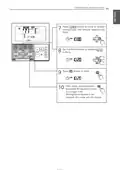
Function Setting - Override set time
This function is to set a schedule override operation time.
Use button to select
Override time setting.
1
If you press
button, you
will be able to select
Override time with the
icon,
and
icon will be blinking.
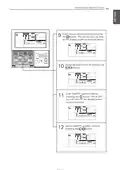
Using
buttons, you can set
2
Override time from 30 to 240 minutes
with an interval of 30 minutes.
• Default setting value: 60 minutes.
Press
the setting process.
button to complete
3
4
Press
button to exit.
After setup, it automatically exits
after 60 seconds if there is no
input. If the Setting/Cancel
button is not pressed, the mode
will not change.

| General | Details |
|---|---|
| Name | LG PREMTB10U Programmable Thermostat Instruction Manual |
| Make | LG |
| Language | English |
| Filetype | PDF (Download) |
| File size | 4.55 MB |
 (1 votes, average: 5.00 out of 5)
 Loading...

LG PREMTA200 Deluxe Thermostat User Guide


Danfoss Link Connect Thermostat User Guide

Ouellet Canada OTH24-AFR Programmable Low Voltage Electronic Thermostat User Guide

ENSTO ECO16TOUCH Combination Thermostat Instruction Manual

Honeywell L641 Surface Contact Thermostat Instructions

beca BAC-2000-ML Modulating Touch Button Thermostats User Guide

GENERAL LIFE NORA 270S RF Digital Room Thermostat User Manual

WATTS IOM-T-563 Tekmar WiFi Thermostat Installation Guide

Xetron STC-1000Pro Smart Digital Thermostat User Manual

Beca BAC-003 Smart ZigBee Thermostat User Guide

Google Nest Learning Thermostat (4th gen) Installation Guide
Table of Contents
- 1. Installation & Operation - Lg Programmable Thermostat →
- 2. Tips For Saving Energy - For Your Records →
- 3. Important Safety Instructions - Installation →
- 4. Important Safety Instructions - Caution →
- 5. Function Setting - Changing Current Time - Important Safety ... →
- 6. Installer Setting - E.s. P. Function - Installer Setting - T... →
- 7. Part Description - Name And Function Of Thermostat →
- 8. Part Description - Icon Description →
- 9. Part Description - Function →
- 10. Part Description - Function →
- 11. Part Description - Function →
- 12. Standard Operation - Cooling Mode - Setting Temperature Rang... →
- 13. Standard Operation - Power Cooling - What Is Power Cooling? →
- 14. Standard Operation - Heating Mode - Setting Temperature Rang... →
- 15. Standard Operation - Dehumidification Mode →
- 16. Standard Operation - Fan Mode →
- 17. Standard Operation - Auto Operation Mode - Cooling Operation... →
- 18. Operation Instruction - Auto Heating Drive Only Operates On ... →
- 19. Standard Operation - Timed Override - Operate Timed Override →
- 20. Standard Operation - Set Back - Operate Set Back Mode →
- 21. Standard Operation - Hold - Operate Hold Mode →
- 22. Standard Operation Temperature Setting - Checking The Room T... →
- 23. Standard Operation - Airflow Setting - Fan Speed →
- 24. Sub Function - Plasma Purification - The Method To Set Up Pl... →
- 25. Sub Function - Energy-saving Cooling Operation - Energy-savi... →
- 26. Sub Function - Automatic Drying - The Method To Setup Automa... →
- 27. Sub Function - Electric Heater - Heater Function Is Addition... →
- 28. Sub Function - Humidifier - Turn On/off Humidifier →
- 29. Sub Function - Fan Auto - The Method To Set Up Fan Auto Func... →
- 30. Function Setting - Vane Angle Control →
- 31. Function Setting - Elevation Grill →
- 32. Function Setting - Child Lock →
- 33. Function Setting - Minimum Difference Between Heating And Co... →
- 34. Function Setting - Changing Current Time →
- 35. Operation Instruction - Press Buttons To Move To 'minute' Se... →
- 36. Function Setting - Override Set Time - Override Time Setting →
- 37. Function Setting - Set Back Temperature - Use →
- 38. Function Setting - Filter Sign Clear →
- 39. Operation Instruction - Programming - Simple Reservation →
- 40. Programming - Sleep Reservation - Caution →
- 41. Programming - Weekly Reservation →
- 42. Operation Instruction - Enter Am/pm Setting Mode →
- 43. Operation Instruction - Enter Minute Setting Mode →
- 44. Operation Instruction - Enter Occupied/unoccupied Setting Mo... →
- 45. Enter Cooling Set Point Setting Mode - Enter Heating Set Poi... →
- 46. Operation Instruction - Fan Speed Setting Mode →
- 47. Operation Instruction →
- 48. Programming - Weekly Reservation Schedule Copy/paste →
- 49. Programming - Holiday Reservation →
- 50. Operation Instruction - Programming - Delete All Reservation →
- 51. Different Mode Drive (this Is Not A Us Feature.) - Note: Dif... →
- 52. Ventilation Product - Interlocked Air Conditioner And Ventil... →
- 53. Ventilation Product - Interlocked Operation With General Ven... →
- 54. Ventilation Product - Ventilator Single Operation - Ventilat... →
- 55. Ventilation Product Reservations Settings - Sleep Reservatio... →
- 56. Troubleshooting Mode Self Diagnosis →
- 57. Checkups Before Reporting Breakdown - Symptoms →
- 58. Installation Method →
- 59. Installation Method - Connecting Order →
- 60. Installation Method - Caution →
- 61. Installation Method - Thermostat Installation →
- 62. Group Control →
- 63. Installation Instructions - Installer Setting - How To Enter... →
- 64. Installation Instructions - General Air-conditioner Product →
- 65. Installation Instructions - Function →
- 66. Installation Instructions - General Ventilation Product →
- 67. Installation Instructions - Installer Setting - Test Run Mod... →
- 68. Installation Instructions - Installer Setting - Setting Addr... →
- 69. Installation Instructions - Installer Setting - E.s. →
- 70. Installation Instructions - Esp Value →
- 71. Installation Instructions - Installer Setting - Thermistor →
- 72. Installation Instructions - Installer Setting - Ceiling Heig... →
- 73. Installation Instructions - Installer Setting - Static Press... →
- 74. Installation Instructions - Installer Setting - Override Mas... →
- 75. Installation Instructions - Installer Setting - Dry Contact ... →
- 76. Installation Instructions - Installer Setting - Fahrenheit /... →
- 77. Installation Instructions - Installer Setting - Emergency He... →
- 78. Installation Instructions - Move To Low Outdoor Ambient Heat... →
- 79. Installation Instructions - Installer Setting Function Setti... →
- 80. Installation Instructions - Installer Setting - Option Funct... →
- 81. Installation Instructions - Installer Setting Check Indoor U... →
- 82. Installation Instructions - Installer Setting Use Refrigeran... →
- 83. Installation Instructions - Installer Setting Setting Temper... →
- 84. Installation Instructions - Installer Setting - Static Press... →
- 85. Installation Instructions - Installer Setting Guard Timer →
- 86. Installation Instructions - Installer Setting Set Point Rang... →
- 87. Installation Instructions - Set Point Upper Limit →
- 88. Installation Instructions - Installer Setting Fan Operation ... →
- 89. Installation Instructions - Installer Setting Primary Heater... →
- 90. Installation Instructions - Installer Setting Hold Enable / ... →
- 91. Installation Instructions - Installer Setting Air Conditione... →
- 92. Installation Instructions - Installer Setting Indoor Unit Au... →
- 93. Installation Instructions - Installer Setting Occupancy Dura... →
- 94. Page 94 →