LG PREMTA200 Deluxe Thermostat User Guide
STN Number:
59
August 17, 2023
Date Issued:
Action:
Service
Distribution:
Subject:
☒ LG Applied Representatives
☒ LG Distributors
☐ Contractor/Installers
PREMTA200 updates for improved temperature control
Affected Product(s):
Applicable Models:
Affected Date(s):
LG PREMTA200 deluxe thermostat
Firmware versions prior to 1.006
Manufactured before March 2023
Description:
When the LG PREMTA200 Controller is installed, there may be temporary or persistent discrepancies between the actual
room temperature and the temperature displayed.
Information:
During the operation of the LG PREMTA200 product manufactured before March 2023 with firmware versions
prior to 1.006, external influences can affect the temperature displayed on the installed remote controller.
Discrepancies between actual room temperature and displayed room temperature can occur if there is ingress
of air from an unconditioned space via the openings of the mounting plate of the PREMTA200 Controller. It is
important to seal the unused openings of the PREMTA200 backplate using the foam donut supplied with the
PREMTA200 or using field supplied insulating material. It is also recommended to upgrade the current
firmware version to 1.006 or above, as shown below.
If an electrical junction box is utilized for the controller mounting, be sure to use an alternate backplate adaptor,
not provided by LG, or other means to block off the junction box opening. Recommended IDU to Remote
Controller cable should be properly routed on the backplate of the PREMTA200 using the pathway and cable
guides in the backplate.
The procedure for updating firmware and functions:
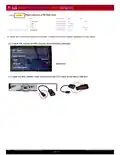
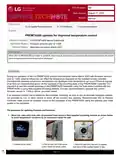
1. Block the cable entry hole with LG-provided foam donut or field supplied insulating material as shown below
to avoid temperature variations by air movement inside the wall.
1.1 Installed remote control.
1.2 Pull the lower part of the remote
control. Detach the remote control.
1.3 Block the cable entry hole with LG-supplied
foam donut or field supplied insulator or tape.
STN 59 59 - PREMTA200 updates for improved temperature control
©2023 LG Electronics U.S.A., Inc. All rights reserved.
Page 1 of 6
| General | Details |
|---|---|
| Name | LG PREMTA200 Deluxe Thermostat User Guide |
| Make | LG |
| Language | English |
| Filetype | PDF (Download) |
| File size | 0.49 MB |

LG PREMTB10U Programmable Thermostat Instruction Manual

LG PREMTA200 Deluxe Thermostat User Guide Overview
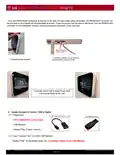
Summary of Contents
- Page 1: PREMTA200 updates for improved temperature control When the LG PREMTA200 Controller is installed, there may be temporary or persistent discrepancies between the actual room temperature and the temperature displayed. During the operation of the LG PREMTA200 product manufactured before March 2023 with firmware versions prior to 1.006, external influences can affect the temperature displayed on the installed remote controller. Discrepancies between actual room temperature and displayed room temperature can occur if there is ingress of air from an unconditioned space via the openings of the mounting plate of the PREMTA200 Controller. It is important to seal the unused openings of the PREMTA200 backplate using the foam donut supplied with the PREMTA200 or using field supplied insulating material. It is also recommended to upgrade the current firmware version to 1.006 or above. If an electrical junction box is utilized for the controller mounting, be sure to use an alternate backplate adaptor or other means to block off the junction box opening. Recommended IDU to Remote Controller cable should be properly routed on the backplate of the PREMTA200 using the pathway and cable guides in the backplate. Block the cable entry hole with LG-provided foam donut or field supplied insulating material to avoid temperature variations by air movement inside the wall.
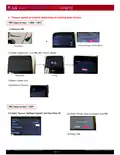
- Page 2: Once the PREMTA200 backplane is secured to the wall and associated cable terminated, the PREMTA200 controller can be mounted on and clipped into the backplate as shown. A securing screw may be used to effectively ‘lock’ the PREMTA200 controller into the backplate, thereby avoiding accidental dislocation of the controller. Remote controller can be locked to backplate with a screw as shown. Controller shown with a sealed back plate and mounted flush to the wall. Update firmware to version 1.006 or higher. Preparation: OTG Cable (USB to micro 5pin), USB Memory, Update Files (Target version). Copy “Update Files” into the USB Memory. “Update Files” to be added under the “rrcUpdate” folder of the USB Memory. PREMTA200 updates for improved temperature control.
- Page 3: To obtain the most current version of firmware, contact the LG Field Support Specialist for your region. Check SW version of RRC (Deluxe Wired Remote Controller). Open the RRC bottom cover and connect the OTG cable to the Micro USB port. PREMTA200 updates for improved temperature control.
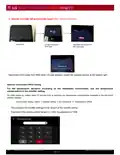
- Page 4: Choose update procedure depending on existing base version. PREMTA200 updates for improved temperature control.
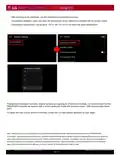
- Page 5: Remote controller will automatically restart after update completion. Disconnect OTG cable from RRC when LG logo appears, check the updated version at the bottom right. For the temperature deviation according to the installation environment, use the temperature compensation in the installer setting. On initial power up, please allow 10 minutes prior to applying any temperature compensation available in the advanced installer settings. How to enter setting: Menu -> Installer setting -> Air conditioner -> Temperature Offset. The password for installer settings is the version of the remote control. Example: If the remote-control version is 1.006, the password is 1006. PREMTA200 updates for improved temperature control.
- Page 6: After selecting an air conditioner, use the temperature compensation function. Temperature calibration works only when the temperature sensor reference is selected with the remote control. Temperature compensation can be set to -10F to 10F (-5℃ to 5℃) to match the space temperature. If temperature fluctuation continues, it is recommended that the PREMTA200 Controller be replaced with a current production model with firmware version 1.006 produced after March 2023. To obtain the most current version of firmware, contact the LG Field Support Specialist for your region. Always refer to the LG Installation and Operations Manual (IOM) for additional instructions prior to PREMTA200 Controller. Good installation practices are essential when installing wall mounted controllers/thermostats/sensors to properly sense and control temperature. Location, installation, and setup of room controllers is extremely important to occupant comfort and system performance. Room Controllers should be located in a central location away from doorways, windows, diffusers, or other sources of thermodynamic heat or cold.