
×
- 1. Installation & Operation (Lg Programmable Thermostat)
- 2. Tips For Saving Energy (For Your Records)
- 3. Important Safety Instructions (Installation → In-use)
- 4. Important Safety Instructions (Caution → In-use)
- 5. Function Setting - Changing Current Time (Important Safety Instructions → Standard Operation - Cooling Mode → Ventilation Product - Ventilator Single Operation → Installation Method)
- 6. Installer Setting - E.s. P. Function (Installer Setting - Thermistor → Installer Setting Setting Temperature Range → Installer Setting - Static Pressure Step Setting → Installer Setting - Ceiling Height Selection)
- 7. Part Description (Name And Function Of Thermostat → Operation Indication Screen → Installation & Operation)
- 8. Part Description (Icon Description → Function → Operation Mode → Sub Function)
- 9. Part Description (Function → Fan Speed → Air Flow → Schedule Operation → Controller Mode)
- 10. Part Description (Function → Schedule → Turn On/off By Schedule → Display Weekly Schedule Occupied / Unoccupied State → Louver Angle Setting Step)
- 11. Part Description (Function → Description → Child Lock Setting Step → Current Time Setting Step → Schedule Override Timer Setting Step)
- 12. Standard Operation - Cooling Mode (Setting Temperature Range → What Is The Three-minute Delay Function?)
- 13. Standard Operation - Power Cooling (What Is Power Cooling?)
- 14. Standard Operation - Heating Mode (Setting Temperature Range)
- 15. Standard Operation - Dehumidification Mode
- 16. Standard Operation - Fan Mode
- 17. Standard Operation - Auto Operation Mode (Cooling Operation State → Heating Operation State)
- 18. Operation Instruction (Auto Heating Drive Only Operates On Cooling And Heating Models. → When Setting The Desired Cooling Temperature, The Indoor Unit Shuts Off On Condition That The Indoor Temperature Is Lower Than The Desired Temperature. → When Setting The Desired Heating Temperature, The Indoor Unit Shuts Off On Condition That The Indoor Temperature Is Higher Than The Desired Temperature. → If Indoor Unit Has 2set Point Function Selected, Unit Will Turn Off Thermal Once The Desired Set Point Is Achieved.)
- 19. Standard Operation - Timed Override (Operate Timed Override → Cancel Timed Override)
- 20. Standard Operation - Set Back (Operate Set Back Mode → Cancel Set Back Mode)
- 21. Standard Operation - Hold (Operate Hold Mode → Cancel Hold Mode)
- 22. Standard Operation Temperature Setting (Checking The Room Temperature → Room Temperature Display Range → Cooling Operation → Heating Operation)
- 23. Standard Operation - Airflow Setting (Fan Speed → Wind Direction → Airflow Setting Table)
- 24. Sub Function - Plasma Purification (The Method To Set Up Plasma Purification → Operate Or Cancel Plasma Purification Function)
- 25. Sub Function - Energy-saving Cooling Operation (Energy-saving Cooling Operation)
- 26. Sub Function - Automatic Drying (The Method To Setup Automatic Drying → Operate Or Cancel Automatic Drying Function)
- 27. Sub Function - Electric Heater (Heater Function Is Additional Function And It Might Not Be Available On All Indoor Units. → Exceptions: Error Codes 1, 3, 9, And 10)
- 28. Sub Function - Humidifier (Turn On/off Humidifier → Humidifier Function Availability)
- 29. Sub Function - Fan Auto (The Method To Set Up Fan Auto Function → Operate Or Cancel Fan Auto Function)
- 30. Function Setting - Vane Angle Control
- 31. Function Setting - Elevation Grill
- 32. Function Setting - Child Lock
- 33. Function Setting - Minimum Difference Between Heating And Cooling Set Points
- 34. Function Setting - Changing Current Time
- 35. Operation Instruction (Press Buttons To Move To 'minute' Setting Mode. → Set The Minute Value By Pressing Buttons. → After Setup, It Automatically Exits After 60 Seconds If There Is No Input.)
- 36. Function Setting - Override Set Time (Override Time Setting)
- 37. Function Setting - Set Back Temperature (Use)
- 38. Function Setting - Filter Sign Clear
- 39. Operation Instruction (Programming - Simple Reservation)
- 40. Programming - Sleep Reservation (Caution)
- 41. Programming - Weekly Reservation
- 42. Operation Instruction (Enter Am/pm Setting Mode → Select The Am Or Pm → Enter Hour Setting Mode → Select Desired Hour)
- 43. Operation Instruction (Enter Minute Setting Mode → Select Desired Minute → Enter On/off Setting Mode → Select On/off Condition Timer)
- 44. Operation Instruction (Enter Occupied/unoccupied Setting Mode → Select Occupied/unoccupied Condition Of Timer → Enter Operation Mode Setting Mode → Select Desired Operation Mode)
- 45. Enter Cooling Set Point Setting Mode (Enter Heating Set Point Setting Mode)
- 46. Operation Instruction (Fan Speed Setting Mode → Desired Fan Speed → Weekly Reservation Setup → Weekly Schedule)
- 47. Operation Instruction
- 48. Programming - Weekly Reservation Schedule Copy/paste
- 49. Programming - Holiday Reservation
- 50. Operation Instruction (Programming - Delete All Reservation)
- 51. Different Mode Drive (this Is Not A Us Feature.) (Note: Different Mode Drive Is Not Available For Cooling-only Models → While A Few Indoor Units Are Running → It Is The Indication That It Is Operating Heating Drive On A Heat Pump System. → By Pressing Button,)
- 52. Ventilation Product - Interlocked Air Conditioner And Ventilator (Control Using Thermostat → Single Operation → Interlocked Operation → General Ventilation)
- 53. Ventilation Product - Interlocked Operation With General Ventilator (Ventilation Interlinked Operation → Changing Back To Air Conditioner Mode)
- 54. Ventilation Product - Ventilator Single Operation (Ventilation Mode → Ventilation Product Function Settings)
- 55. Ventilation Product Reservations Settings (Sleep Reservation → Simple, Weekdays, And Holidays Reservations)
- 56. Troubleshooting Mode Self Diagnosis
- 57. Checkups Before Reporting Breakdown (Symptoms → Check-up → Management)
- 58. Installation Method
- 59. Installation Method (Connecting Order → Separating Order → Caution)
- 60. Installation Method (Caution → Thermostat Pcb Terminal Block Remark → Indoor Terminal Function Block)
- 61. Installation Method (Thermostat Installation)
- 62. Group Control
- 63. Installation Instructions (Installer Setting - How To Enter Installer Setting Mode → Function Code → Caution)
- 64. Installation Instructions (General Air-conditioner Product → Esp Value → Master Setting → Emergency → Use Refrigerant)
- 65. Installation Instructions (Function → Static Pressure → Guard Timer → Use Primary Heater Control)
- 66. Installation Instructions (General Ventilation Product → Function → Test Run → Address Setting)
- 67. Installation Instructions (Installer Setting - Test Run Mode → Function Code → Setup Figure 01 Blinks At The Lower Part Of Indication Window. → You Can Select Test Heating Operation Mode For Some Products.)
- 68. Installation Instructions (Installer Setting - Setting Address Of Central Control → Test Run Mode)
- 69. Installation Instructions (Installer Setting - E.s. → Function Code → Esp Value)
- 70. Installation Instructions (Esp Value → Esp Code → Function Code)
- 71. Installation Instructions (Installer Setting - Thermistor → Thermistor Setting → Temperature Sensor Selection)
- 72. Installation Instructions (Installer Setting - Ceiling Height Selection → Ceiling Height Selection Table)
- 73. Installation Instructions (Installer Setting - Static Pressure Setting → Static Pressure Setting Table)
- 74. Installation Instructions (Installer Setting - Override Master/slave Setting → Override Master/slave Selection Function)
- 75. Installation Instructions (Installer Setting - Dry Contact Mode Setting → What Is Dry Contact?)
- 76. Installation Instructions (Installer Setting - Fahrenheit / Celsius Switching)
- 77. Installation Instructions (Installer Setting - Emergency Heater Setting → Emergency Heater → Setting Function Sets Following Conditions: → Caution)
- 78. Installation Instructions (Move To Low Outdoor Ambient Heating → Emergency Heater Operation In Low Ambient Temperature → Fan Speed Setting During Emergency Heater Operation)
- 79. Installation Instructions (Installer Setting Function Setting In Group Control → Function Setting In Group Control)
- 80. Installation Instructions (Installer Setting - Option Function Setting → Setting Feature For Indoor Unit When Plasma Purification / Electric Heater / Humidifier / Elevation Grill / Ventilation Kit / Auxiliary Heater Is Newly Installed, Or Installed Unit Is Removed.)
- 81. Installation Instructions (Installer Setting Check Indoor Unit Address Number)
- 82. Installation Instructions (Installer Setting Use Refrigerant Leakage Sensor → Refrigerant Leakage Sensor Setting)
- 83. Installation Instructions (Installer Setting Setting Temperature Range → Setting Temperature Range Options → Situation Where Changes In The Setting Occur)
- 84. Installation Instructions (Installer Setting - Static Pressure Step Setting)
- 85. Installation Instructions (Installer Setting Guard Timer)
- 86. Installation Instructions (Installer Setting Set Point Range Lock → Set Point)
- 87. Installation Instructions (Set Point Upper Limit → Set Point Lower Limit → Indoor Unit Control → Cooling Set Point Range)
- 88. Installation Instructions (Installer Setting Fan Operation In The Cooling Mode And Thermal Off Conditions → Cooling Thermal Off Fan Operation)
- 89. Installation Instructions (Installer Setting Primary Heater Control Setting → Set Thermistor Value By Pressing Button. → Function Code → Pressing Button Will Exit Settings Mode.)
- 90. Installation Instructions (Installer Setting Hold Enable / Disable → Set Thermistor Value By Pressing Button. → Function Code → Pressing Button Will Exit Settings Mode.)
- 91. Installation Instructions (Installer Setting Air Conditioner Fan Operation Interlocked With Ventilation)
- 92. Installation Instructions (Installer Setting Indoor Unit Auto-start Setting → Set Thermistor Value By Pressing Button. → Function Code → Pressing Button Will Exit Settings Mode.)
- 93. Installation Instructions (Installer Setting Occupancy Duration Time Setting)
- 94.
×
LG PREMTB10U Programmable Thermostat Instruction Manual








OPERATION INSTRUCTION
44
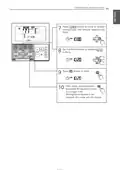
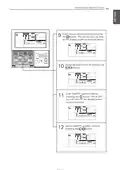
Enter OCCUPIED/UNOCCUPIED
setting mode by pressing the
button. OCCUPIED or UNOCCUPIED
icon will flash as pictured below.
13
Select OCCUPIED/UNOCCUPIED
condition of timer by pressing the
buttons.
14
15
Enter operation mode setting mode
by pressing the
button. Operation
mode icon will flash on the display
screen as pictured below.
Select desired operation mode by
pressing the
16
button.

| General | Details |
|---|---|
| Name | LG PREMTB10U Programmable Thermostat Instruction Manual |
| Make | LG |
| Language | English |
| Filetype | PDF (Download) |
| File size | 4.55 MB |
 (1 votes, average: 5.00 out of 5)
 Loading...

LG PREMTA200 Deluxe Thermostat User Guide


Honeywell TH2110U4004 Thermostat User Guide

oventrop Vindo TH Thermostat Instruction Manual

PREMTOOL BHT-009 GA ThermaHeat Smart Dial Wi-Fi Thermostat User Guide

miMonitor MI-TH02-HMO-V2 Wifi Smart Thermostat User Guide

HotWire R220 WiFi Thermostat Instruction Manual

GENERAL LIFE HT250S Digital Room Thermostat User Manual

Schneider Electric 2290B Programmable Room Thermostat Instruction Manual

SASWELL T11FHL Heated Floor Thermostat User Manual

Livn 147 Thermostat User Guide

ECOSTAR AC603H WIFI Thermostat User Guide
Table of Contents
- 1. Installation & Operation - Lg Programmable Thermostat →
- 2. Tips For Saving Energy - For Your Records →
- 3. Important Safety Instructions - Installation →
- 4. Important Safety Instructions - Caution →
- 5. Function Setting - Changing Current Time - Important Safety ... →
- 6. Installer Setting - E.s. P. Function - Installer Setting - T... →
- 7. Part Description - Name And Function Of Thermostat →
- 8. Part Description - Icon Description →
- 9. Part Description - Function →
- 10. Part Description - Function →
- 11. Part Description - Function →
- 12. Standard Operation - Cooling Mode - Setting Temperature Rang... →
- 13. Standard Operation - Power Cooling - What Is Power Cooling? →
- 14. Standard Operation - Heating Mode - Setting Temperature Rang... →
- 15. Standard Operation - Dehumidification Mode →
- 16. Standard Operation - Fan Mode →
- 17. Standard Operation - Auto Operation Mode - Cooling Operation... →
- 18. Operation Instruction - Auto Heating Drive Only Operates On ... →
- 19. Standard Operation - Timed Override - Operate Timed Override →
- 20. Standard Operation - Set Back - Operate Set Back Mode →
- 21. Standard Operation - Hold - Operate Hold Mode →
- 22. Standard Operation Temperature Setting - Checking The Room T... →
- 23. Standard Operation - Airflow Setting - Fan Speed →
- 24. Sub Function - Plasma Purification - The Method To Set Up Pl... →
- 25. Sub Function - Energy-saving Cooling Operation - Energy-savi... →
- 26. Sub Function - Automatic Drying - The Method To Setup Automa... →
- 27. Sub Function - Electric Heater - Heater Function Is Addition... →
- 28. Sub Function - Humidifier - Turn On/off Humidifier →
- 29. Sub Function - Fan Auto - The Method To Set Up Fan Auto Func... →
- 30. Function Setting - Vane Angle Control →
- 31. Function Setting - Elevation Grill →
- 32. Function Setting - Child Lock →
- 33. Function Setting - Minimum Difference Between Heating And Co... →
- 34. Function Setting - Changing Current Time →
- 35. Operation Instruction - Press Buttons To Move To 'minute' Se... →
- 36. Function Setting - Override Set Time - Override Time Setting →
- 37. Function Setting - Set Back Temperature - Use →
- 38. Function Setting - Filter Sign Clear →
- 39. Operation Instruction - Programming - Simple Reservation →
- 40. Programming - Sleep Reservation - Caution →
- 41. Programming - Weekly Reservation →
- 42. Operation Instruction - Enter Am/pm Setting Mode →
- 43. Operation Instruction - Enter Minute Setting Mode →
- 44. Operation Instruction - Enter Occupied/unoccupied Setting Mo... →
- 45. Enter Cooling Set Point Setting Mode - Enter Heating Set Poi... →
- 46. Operation Instruction - Fan Speed Setting Mode →
- 47. Operation Instruction →
- 48. Programming - Weekly Reservation Schedule Copy/paste →
- 49. Programming - Holiday Reservation →
- 50. Operation Instruction - Programming - Delete All Reservation →
- 51. Different Mode Drive (this Is Not A Us Feature.) - Note: Dif... →
- 52. Ventilation Product - Interlocked Air Conditioner And Ventil... →
- 53. Ventilation Product - Interlocked Operation With General Ven... →
- 54. Ventilation Product - Ventilator Single Operation - Ventilat... →
- 55. Ventilation Product Reservations Settings - Sleep Reservatio... →
- 56. Troubleshooting Mode Self Diagnosis →
- 57. Checkups Before Reporting Breakdown - Symptoms →
- 58. Installation Method →
- 59. Installation Method - Connecting Order →
- 60. Installation Method - Caution →
- 61. Installation Method - Thermostat Installation →
- 62. Group Control →
- 63. Installation Instructions - Installer Setting - How To Enter... →
- 64. Installation Instructions - General Air-conditioner Product →
- 65. Installation Instructions - Function →
- 66. Installation Instructions - General Ventilation Product →
- 67. Installation Instructions - Installer Setting - Test Run Mod... →
- 68. Installation Instructions - Installer Setting - Setting Addr... →
- 69. Installation Instructions - Installer Setting - E.s. →
- 70. Installation Instructions - Esp Value →
- 71. Installation Instructions - Installer Setting - Thermistor →
- 72. Installation Instructions - Installer Setting - Ceiling Heig... →
- 73. Installation Instructions - Installer Setting - Static Press... →
- 74. Installation Instructions - Installer Setting - Override Mas... →
- 75. Installation Instructions - Installer Setting - Dry Contact ... →
- 76. Installation Instructions - Installer Setting - Fahrenheit /... →
- 77. Installation Instructions - Installer Setting - Emergency He... →
- 78. Installation Instructions - Move To Low Outdoor Ambient Heat... →
- 79. Installation Instructions - Installer Setting Function Setti... →
- 80. Installation Instructions - Installer Setting - Option Funct... →
- 81. Installation Instructions - Installer Setting Check Indoor U... →
- 82. Installation Instructions - Installer Setting Use Refrigeran... →
- 83. Installation Instructions - Installer Setting Setting Temper... →
- 84. Installation Instructions - Installer Setting - Static Press... →
- 85. Installation Instructions - Installer Setting Guard Timer →
- 86. Installation Instructions - Installer Setting Set Point Rang... →
- 87. Installation Instructions - Set Point Upper Limit →
- 88. Installation Instructions - Installer Setting Fan Operation ... →
- 89. Installation Instructions - Installer Setting Primary Heater... →
- 90. Installation Instructions - Installer Setting Hold Enable / ... →
- 91. Installation Instructions - Installer Setting Air Conditione... →
- 92. Installation Instructions - Installer Setting Indoor Unit Au... →
- 93. Installation Instructions - Installer Setting Occupancy Dura... →
- 94. Page 94 →