
ECOSTAR AC603H WIFI Thermostat User Guide



AC603H WIFI THERMOSTAT
AC603H Series Intelligent Heating Temperature Controller with weekly programming function, it can be
set six period times & the corresponding setting temperature per day. You also can choose manual control
or temporary control mode of operation. With the unique far-way control function, simple operation,
energy saving and environmental protection, this thermostat can be suitable for electric heating
equipment control and water system heating electric drive valve control.
1. Parameter:
Voltage:
120VAC,60HZ
Current:
Imax16A
5℃~45℃
20~60℃
Power consumption:
<1W
Control range:
Limitation setting:
Default temp. deviation: 1℃(0.5~10℃ adjustable)
Accuracy:
±1℃
IP Grade: IP20
Sensor:
NTC
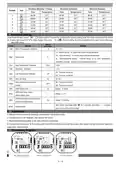
2. Panel display:
3. Function:
:Manual mode: Control the device by manual。
:Program mode: It can be controlled automatically by the set time& temperatures (with six different time & related
temperature),see below:
、
simultaneous display:For temporary control mode, press“ ”or“ ” will change to this mode, the device will comes out of
the temporarily current period time control, and come into the control of the manual mode, which also will automatically
return to the programming mode when the next period time comes.
:Lock, Press the key“ ”&“ ”together for more than 5 seconds, the device locked, and press them for another 5 seconds, it
will unlock again.
:Heating : Means for heating now.。
4. Button Functions
: Power, ON/OFF by short press.
: Mode, Short press for manual model& programmable mode change.
: Clock, Short press for time setting.:minute setting→ hour setting→ week setting. Press“ ”for next parameter setting,
the twinkled data means to be set, press“ ”or“ ”to setting and 10 seconds can be recorded after everything to be recorded.
: Up, for increase the related parameters or adjust working mode.
: Down, do decrease the related parameters or adjust the working mode.
Weekly Program: Under Power on mode, press“ and “ for 5 seconds enter weekly programmable setting mode, press“ ”or“ ”for data
change, then press “
Time(Period 1) →Temperature(Period 1) Monday to Friday →…→Time(Period 6) → Temperature(Period 6) Sunday
( see below attachment, each previous Period setting time can’t exceed the next Period time)
1 / 4


| General | Details |
|---|---|
| Name | ECOSTAR AC603H WIFI Thermostat User Guide |
| Make | ECOSTAR |
| Language | English |
| Filetype | PDF (Download) |
| File size | 0.35 MB |
 (1 votes, average: 5.00 out of 5)
 Loading...

ECOSTAR AC7300 WiFi Programmable Thermostat User Guide

ECOSTAR AC603H WIFI Thermostat User Guide Overview
Summary of Contents
- Page 1: AC603H Series Intelligent Heating Temperature Controller features weekly programming with six period times and corresponding temperatures per day. The thermostat offers manual control or temporary control modes. It includes a far-way control function, emphasizing simple operation, energy saving, and environmental protection. The voltage specification is 120 VAC, 60HZ, with a maximum current of 16A. The control range is between 5℃ to 45℃, with a power consumption of less than 1W. The device has an accuracy of ±1℃ and an environmental temperature range of -5 to 50℃. The panel display includes various functions such as manual mode and program mode for automatic control. Temporary control mode allows switching to manual mode, which reverts to programming mode at the next period. Locking the device requires pressing specific keys for more than 5 seconds. Button functions include power control, mode switching, time setting, and weekly programmable settings.
- Page 2: AC603H WiFi thermostat Weekday (Monday ~ Friday) Weekend (Saturday) Weekend (Sunday) Advanced setting: Under Power off status, press buttons simultaneously for 5 seconds to enter advanced setting mode. Room temperature calibration: Internal sensor for control and protection, external sensor for temperature protection. High temperature protection: Function can be turned on or off with a range of 15~60℃. Low temperature protection: Open window detect function can be turned on or off. OWD detect time range: 2~30 minutes. Installation steps: Release the front cover, connect wires, mount the backing plate, and connect power. WiFi connection & operation.
- Page 3: AC603H WiFi thermostat Scan the QR code or source the apps “Smart Life” or “TuyaSmart” at the App Store. Account registration is required; click “+” in the upper right corner to add a device. Select “Thermostat” in “Small Home Application.” Long press the thermostat button until the icon shows on the LCD and starts flashing. Click “Confirm” when the indicator is rapidly blinking. Enter the Wi-Fi password and click to continue. Wait a few seconds until the device confirms, then click “Continue” to pair. Click “Completed” to finish adding the device.
- Page 4: AC603H WiFi thermostat Click “Program” for more. Click “Week Program” to set time and temperature. Click “Setting icon” for weekly program setting. Device name can be changed here. Click “ON/OFF” to turn on/off device. Users could change any one of them as they want. Click on the top right corner to get device information.

Haswill Electronics AL8010H Thermostat User Guide

Honeywell Home FocusPRO S200 Smart Thermostat User Manual

sygonix 3026090 WiFi Thermostat Installation Guide

GENERAL 260S Wired Room Thermostat User Manual

Honeywell TH8000 Vertical Non Programmable Thermostat Installation Guide

expert4house BHT-006 Series Thermostat Instruction Manual

UNDERFLOOR HEATING WORLD UWi5 Wi-Fi Digital Heating Thermostat Instruction Manual

BROUWLAND Brew Monk Fermenter Digital Thermostat Instruction Manual

SunTouch 113901 SunStat ConnectPlus Thermostat User Manual

SALUS RT520 Programmable Thermostat User Guide