
Goodman GTST Connected Thermostat User Guide




Setting Away Setpoints
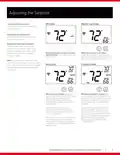
Setting away setpoints
The Away setpoints allow you to save energy by limiting heating and cooling when you are away from home. The Away setpoints are also
used when geofencing is enabled in the Goodman Home App, and can be more easily setup in the app.
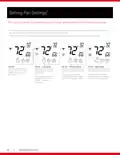
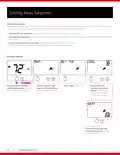
» Press the Warmer (up) button and cooler (down) buttons to enter the settings for Away mode.
» Press the the mode button to advance through the away mode settings, and use the warmer (up) and cooler (down) buttons to change
each setting.
» To exit to the home screen at any time, press and hold the mode button for 2 seconds.
The system will return to the home screen automatically after 2 minutes of inactivity.
Primary Display
MODE
FAN
MODE
FAN
MODE
FAN
MODE
FAN
1
2
Hold 2 sec
Press and hold the fan and
cooler (down) buttons to enter
the settings for Away mode.
Press the warmer (up)
and cooler (down) buttons
buttons to toggle away on
or off.
Press mode to advance.
Press the warmer
(up) and cooler (down)
buttons to adjust the
cooling setpoint. Press
the mode button again.
MODE
FAN
Press the warmer (up) and
cooler (down) buttons to adjust
the heating setpoint.
WWW.GOODMANMFG.COM
16

| General | Details |
|---|---|
| Name | Goodman GTST Connected Thermostat User Guide |
| Make | Goodman |
| Language | English |
| Filetype | PDF (Download) |
| File size | 0.98 MB |
 (1 votes, average: 5.00 out of 5)
 Loading...


SALUS RT510 Thermostat Instruction Manual

Vaillant VRT 51f sensoROOM Wireless Room Thermostat Instruction Manual

WTE WT-100 Zigbee Thermostat User Manual

ENSTO ECO16BT-EX Floor Heating Thermostat User Guide

neptronic ITO3-C Wall Thermostat Owner’s Manual

White Rodgers 1F78-151 Non Programmable Thermostat Instructions

GTS TR8100V WiFi Pairing Thermostat Instruction Manual

GENERAL LIFE HT330S RF Room Thermostat User Manual

ICM CONTROLS SC2010 N-L Non Programmable Electronic Thermostat Instruction Manual

Moes WIFI 002 Series Wi-Fi Thermostat Instruction Manual