
Goodman GTST Connected Thermostat User Guide

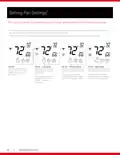
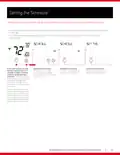



Setting the Schedule
(Continued)
MODE
FAN
MODE
FAN
MODE
FAN
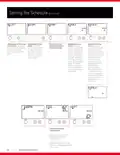
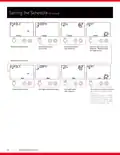
Press the warmer (up) or
cooler (down) buttons to
adjust the cool setpoint for
the morning schedule event.
Press the mode button to
advance to the next step.
Press the warmer (up)
or cooler (down) buttons
to adjust the morning
Press the warmer (up) or
cooler (down) buttons to
adjust the heat setpoint for
the morning schedule event.
Press the mode button to
advance to the next step.
schedule event start time
in 15 minute increments.
The day of the week being
scheduled appears below
the time selection, and the
name of the schedule event
(“morning” in this case)
also appears on the screen.
Press the mode button to
advance to the next step.
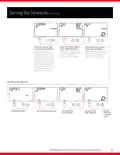
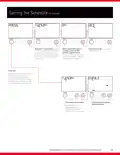
Repeat steps for day event.
MODE
FAN
MODE
FAN
MODE
FAN
MODE
FAN
Enable day event.
Set day event start time.
Set day event
cool setpoint.
Set day event
heat setpoint.
Repeat
steps for
“evening”
event.
GOODMAN BRAND GTST CONNECTED THERMOSTAT HOMEOWNER GUIDE
13

| General | Details |
|---|---|
| Name | Goodman GTST Connected Thermostat User Guide |
| Make | Goodman |
| Language | English |
| Filetype | PDF (Download) |
| File size | 0.98 MB |
 (1 votes, average: 5.00 out of 5)
 Loading...


THE HEATING COMPANY Slim and Compact WiFi Thermostat User Manual

ZigBee WiFi Series Water Heating Thermostat User Guide

GENERAL FH101S Underfloor Heating Thermostat User Manual

Gelia ip24 1.5m Cable With Stepless Thermostat Instruction Manual

Coleman 9420-381 Digital Wall Thermostat Instruction Manual

LUX TX9600TSA Smart Temp Universal 7 Day Programmable Touchscreen Thermostat Instruction Manual

BOSCH BCC110 Connected Control Wi-Fi Thermostat User Manual

WHITE-RODGERS 1F51N-619 Low Voltage Evaporative Cooler Thermostat Instruction Manual

Quality Heating Plug In Programmable WiFi Thermostat Instruction Manual

PROSELECT PSTSN11AWH Non Programmable Thermostat Installation Guide