
Goodman GTST Connected Thermostat User Guide

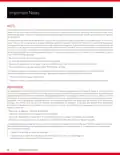




Setting the Schedule
(Continued)
MODE
FAN
MODE
FAN
MODE
FAN
MODE
FAN
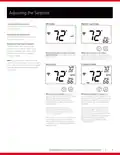
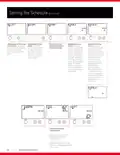
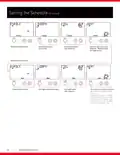
Press the mode button to copy
Monday’s schedule to Tuesday,
or use the warmer (up) and
cooler (down) buttons to select
another day to copy Monday’s
schedule to.
After copying Monday to
Tuesday, pressing the
warmer (up) button to
select another day to copy to,
or press the mode button to
program another day
Continue to copy to as many
days as wanted.
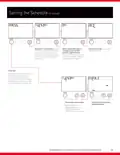
Copy day
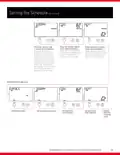
Press the mode button to return
to the screen for selecting
another day of the week to
schedule, or press the warmer
(up) button to copy the current
day’s schedule to another day.
MODE
FAN
MODE
FAN
Choose day of the week.
Continue programming
individual days.
Warmer (up) button
selects the next day,
cooler (down) button
selects the previous day.
GOODMAN BRAND GTST CONNECTED THERMOSTAT HOMEOWNER GUIDE
15

| General | Details |
|---|---|
| Name | Goodman GTST Connected Thermostat User Guide |
| Make | Goodman |
| Language | English |
| Filetype | PDF (Download) |
| File size | 0.98 MB |
 (1 votes, average: 5.00 out of 5)
 Loading...


Honeywell N100 Series Non Programmable Thermostat Installation Guide

olympia electronics BS-830 Digital Electronic Thermostat Instruction Manual

FRICO TAP16R Electronic Thermostat User Guide

CSA-IOT Co002 Connecte Smart Thermostat User Manual
Stelpro STE362RNP Electronic Thermostat User Guide

BUDDERFLY BTS-U1 Thermostat User Manual

Sygonix SY-6052180 Wi-Fi Thermostat Instruction Manual

Aprilaire S86N MUPR Multi Stage Universal Thermostat Owner’s Manual

Honeywell RTH7500 7-Day Programmable Thermostat Installation Guide

Honeywell DT4 Room Thermostat User Manual