×
- 1. Goodman Gtst (Connected Thermostat → Homeowner Guide)
- 2. Welcome! This Homeowner Guide Features An Overview Of Functions And/or Features Available Through The Goodman Gtst Connected Thermostat.
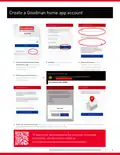
- 3. Create A Goodman Home App Account (To Learn More About Operating The Goodman Connected Thermostat, Visit Our How-to Videos At: Www.goodmanmfg.com/products/controls/gtst)
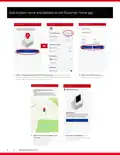
- 4. Add Location Name And Address To The Goodman Home App (After Creating A Goodman Gtst Home Account → Enter The Location Name And Address → Verify The Location Address On The Map → You Will Be Navigated To The 'my Home' Page)
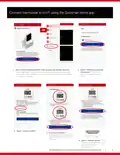
- 5. Connect Thermostat To Wi-fi Using The Goodman Home App (Add Device → Goodman Connected Thermostat → Connect To Wifi → Wireless Setup → Discover Device)
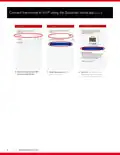
- 6. Connect Thermostat To Wi-fi Using The Goodman Home App
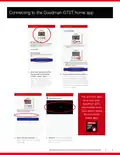
- 7. Connecting To The Goodman Gtst Home App (Accessing Your Goodman Gtst Thermostat → Wireless Setup Mode → Pairing Code Entry → Confirming Thermostat Addition)
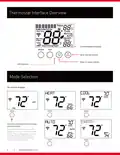
- 8. Thermostat Interface Overview (Mode Selection → On-screen Display)
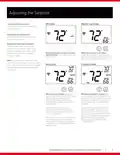
- 9. Adjusting The Setpoint (Increasing The Temperature → Off Mode → Heat Or Cool Mode → Decreasing The Temperature → Auto Mode → Schedule Mode)
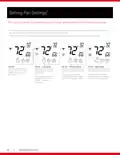
- 10. Setting Fan Settings (Fan Operation → Fan Speed Options)
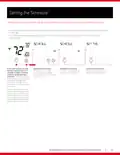
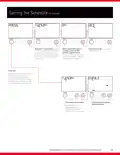
- 11. Setting The Schedule (Schedule Instructions)
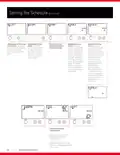
- 12. Setting The Schedule (Choose Day Of The Week → Enable Morning Event → Disable Morning Event → Set Morning Event Cool Setpoint)
- 13. Setting The Schedule (Enable Day Event → Set Day Event Start Time → Set Day Event Cool Setpoint → Set Day Event Heat Setpoint → Repeat Steps For 'evening' Event)
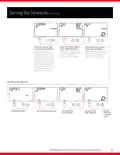
- 14. Setting The Schedule (Enable Evening Event. → Set Evening Event Start Time. → Set Evening Event Cool Setpoint. → Set Evening Event Heat Setpoint. → Enable Night Event. → Set Night Event Start Time. → Set Night Event Cool Setpoint.)
- 15. Setting The Schedule (Copy Day → Choose Day Of The Week)
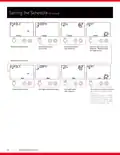
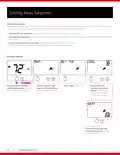
- 16. Setting Away Setpoints (Primary Display)
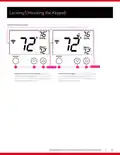
- 17. Locking/unlocking The Keypad (Setting The Daily Schedule)
- 18. Important Notes (Note: → This Device Complies With Part 15 Of The Fcc Rules. Operation Is Subject To The Following Two Conditions: (1) This Device May Not Cause Harmful Interference, And (2) This Device Must Accept Any Interference Received, Including Interference That May Cause Undesired Operation.)
- 19. Once You Choose The Goodman Brand (Goodman - A Daikin Brand → Additional Information)
×
Goodman GTST Connected Thermostat User Guide

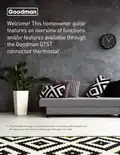
Welcome! This homeowner guide
features an overview of functions
and/or features available through
the Goodman GTST
connected thermostat*.
* The Goodman home app is the preferred means of accessing these features, but
the instructions that follow are helpful even if the app is not used.
WWW.GOODMANMFG.COM
2
| General | Details |
|---|---|
| Name | Goodman GTST Connected Thermostat User Guide |
| Make | Goodman |
| Language | English |
| Filetype | PDF (Download) |
| File size | 0.98 MB |


(1 votes, average: 5.00 out of 5)

GENERAL LIFE ARUNA 302S Digital Room Thermostat User Manual

SILVERCREST IAN 469312_2310 Digital Radiator Thermostat Instruction Manual

HEAT DECOR HD-T1000 WIFI Thermostat User Guide
ST76 Sensi Touch 2 Smart Thermostat Instruction Manual

Honeywell TL116A Thermostat Installation Guide

hager TX320 Room Thermostat User Manual

FantiniCosmi CH143E 230V Flush Mounting Weekly Programmable Thermostat User Manual

Netatmo NTH01-AMZ Energy Saving Smart and Connected Thermostat Instruction Manual

Klima 825200 Electric Underfloor Heating Thermostat User Manual
STELPRO UT202NP Series Non-Programmable Electric Thermostat Owner’s Manual
Table of Contents
- 1. Goodman Gtst - Connected Thermostat →
- 2. Welcome! This Homeowner Guide Features An Overview Of Functi... →
- 3. Create A Goodman Home App Account - To Learn More About Oper... →
- 4. Add Location Name And Address To The Goodman Home App - Afte... →
- 5. Connect Thermostat To Wi-fi Using The Goodman Home App - Add... →
- 6. Connect Thermostat To Wi-fi Using The Goodman Home App →
- 7. Connecting To The Goodman Gtst Home App - Accessing Your Goo... →
- 8. Thermostat Interface Overview - Mode Selection →
- 9. Adjusting The Setpoint - Increasing The Temperature →
- 10. Setting Fan Settings - Fan Operation →
- 11. Setting The Schedule - Schedule Instructions →
- 12. Setting The Schedule - Choose Day Of The Week →
- 13. Setting The Schedule - Enable Day Event →
- 14. Setting The Schedule - Enable Evening Event. →
- 15. Setting The Schedule - Copy Day →
- 16. Setting Away Setpoints - Primary Display →
- 17. Locking/unlocking The Keypad - Setting The Daily Schedule →
- 18. Important Notes - Note: →
- 19. Once You Choose The Goodman Brand - Goodman - A Daikin Brand →