
Goodman GTST Connected Thermostat User Guide


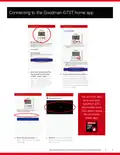
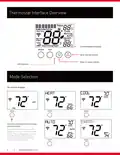
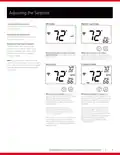
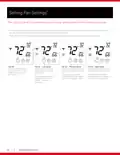
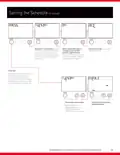




Setting the Schedule
(Continued)
MODE
FAN
MODE
FAN
MODE
FAN
MODE
FAN
MODE
FAN
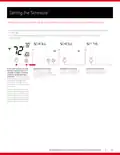
Choose day of the week Choose day of the
instructions. Press the week. Press the
mode button to advance warmer (up) button
Press the mode
button to advance
to the next step.
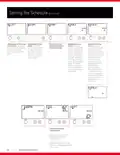
Enable Morning
event Press the
Disable morning
event Press the
warmer (up) or cooler
(down) buttons to
adjust the morning
schedule event start
time in 15 minute
increments. The
day of the week
being scheduled
appears below the
time selection,
and the name of
the schedule event
(“morning” in this
case) also appears
on the screen. Press
the mode button to
advance to the
warmer (up) button
or the cooler (down)
button to toggle the
morning schedule
event for this day on
and off.” With the
morning schedule
event on (enabled)
press the mode
button to proceed
to the next step for
selecting the event
start time.
to the next step for
selecting a day of the
week.
to select the next
day of the week, or
the cooler (down)
button to select the
previous day.
next step.
MODE
FAN
MODE
FAN
MODE
FAN
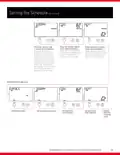
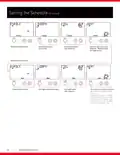
Set morning event
cool setpoint.
Warmer (up) and cooler
(down) buttons adjust
the setpoint.
The day of the week being
scheduled appears below the
“Cool” text.
WWW.GOODMANMFG.COM
12

| General | Details |
|---|---|
| Name | Goodman GTST Connected Thermostat User Guide |
| Make | Goodman |
| Language | English |
| Filetype | PDF (Download) |
| File size | 0.98 MB |
 (1 votes, average: 5.00 out of 5)
 Loading...


celect T30 Simple Plug In Thermostat Installation Guide

Honeywell Home FocusPRO 200 Series Programmable Thermostat Installation Guide

WARMZONE BR1015A07 WZ Touch Thermostat User Guide

TRU COMPONENTS TC-NTL-ExT6 Hazardous Area Thermostat Instructions

ENSTO ECO16BT-EX Floor Heating Thermostat User Guide

JUMO B 60.3070.0 Surface Mounting Thermostat Room Thermostat Instruction Manual

Honeywell TH4110U Thermostat Installation Guide

Thermafloor HT1 Thermostat White App Electric Mat Thermostat User Guide

TROLEX TX2010 Surface Thermostat Instruction Manual

HIVE 852031 Mini Wireless Heating Smart Thermostat Instructions