×
- 1. Goodman Gtst (Connected Thermostat → Homeowner Guide)
- 2. Welcome! This Homeowner Guide Features An Overview Of Functions And/or Features Available Through The Goodman Gtst Connected Thermostat.
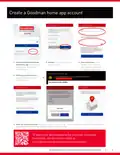
- 3. Create A Goodman Home App Account (To Learn More About Operating The Goodman Connected Thermostat, Visit Our How-to Videos At: Www.goodmanmfg.com/products/controls/gtst)
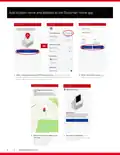
- 4. Add Location Name And Address To The Goodman Home App (After Creating A Goodman Gtst Home Account → Enter The Location Name And Address → Verify The Location Address On The Map → You Will Be Navigated To The 'my Home' Page)
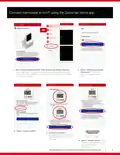
- 5. Connect Thermostat To Wi-fi Using The Goodman Home App (Add Device → Goodman Connected Thermostat → Connect To Wifi → Wireless Setup → Discover Device)
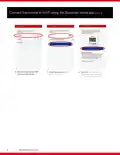
- 6. Connect Thermostat To Wi-fi Using The Goodman Home App
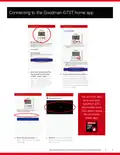
- 7. Connecting To The Goodman Gtst Home App (Accessing Your Goodman Gtst Thermostat → Wireless Setup Mode → Pairing Code Entry → Confirming Thermostat Addition)
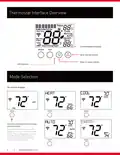
- 8. Thermostat Interface Overview (Mode Selection → On-screen Display)
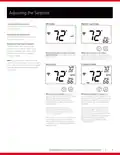
- 9. Adjusting The Setpoint (Increasing The Temperature → Off Mode → Heat Or Cool Mode → Decreasing The Temperature → Auto Mode → Schedule Mode)
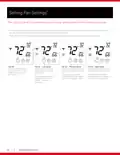
- 10. Setting Fan Settings (Fan Operation → Fan Speed Options)
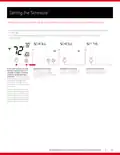
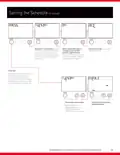
- 11. Setting The Schedule (Schedule Instructions)
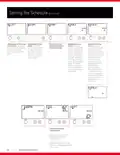
- 12. Setting The Schedule (Choose Day Of The Week → Enable Morning Event → Disable Morning Event → Set Morning Event Cool Setpoint)
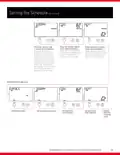
- 13. Setting The Schedule (Enable Day Event → Set Day Event Start Time → Set Day Event Cool Setpoint → Set Day Event Heat Setpoint → Repeat Steps For 'evening' Event)
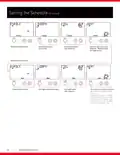
- 14. Setting The Schedule (Enable Evening Event. → Set Evening Event Start Time. → Set Evening Event Cool Setpoint. → Set Evening Event Heat Setpoint. → Enable Night Event. → Set Night Event Start Time. → Set Night Event Cool Setpoint.)
- 15. Setting The Schedule (Copy Day → Choose Day Of The Week)
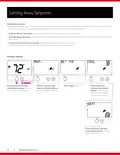
- 16. Setting Away Setpoints (Primary Display)
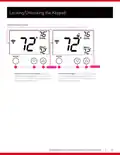
- 17. Locking/unlocking The Keypad (Setting The Daily Schedule)
- 18. Important Notes (Note: → This Device Complies With Part 15 Of The Fcc Rules. Operation Is Subject To The Following Two Conditions: (1) This Device May Not Cause Harmful Interference, And (2) This Device Must Accept Any Interference Received, Including Interference That May Cause Undesired Operation.)
- 19.
- 20. Once You Choose The Goodman Brand (Goodman - A Daikin Brand → Additional Information)
×
Goodman GTST Connected Thermostat User Guide

| General | Details |
|---|---|
| Name | Goodman GTST Connected Thermostat User Guide |
| Make | Goodman |
| Language | English |
| Filetype | PDF (Download) |
| File size | 0.98 MB |


OLIMPIA SPLENDID 9899 Thermostat User Manual

Danfoss 014G0013 Z Wave Radiator Thermostat Installation Guide

Danfoss RT 103 Thermostat Installation Guide

GENERAL LIFE ARUNA 302S Digital Room Thermostat User Manual

BEOK CONTROLS TGT79 Touch Screen Thermostat Instruction Manual

STELPRO ASMC402 Maestro Zigbee Smart Programmable Thermostat User Guide
Uponor ETN4 Ecoflex Supra Standard Thermostat Instruction Manual

LUX PSPH521 Series Programmable Heat Pump Thermostat Instruction Manual

Regulus TZT 63 Electronic Plug-In Thermostat User Guide

Honeywell Smart Color Touchscreen Programmable Thermostat RTH9590 User Manual
Table of Contents
- 1. Goodman Gtst - Connected Thermostat →
- 2. Welcome! This Homeowner Guide Features An Overview Of Functi... →
- 3. Create A Goodman Home App Account - To Learn More About Oper... →
- 4. Add Location Name And Address To The Goodman Home App - Afte... →
- 5. Connect Thermostat To Wi-fi Using The Goodman Home App - Add... →
- 6. Connect Thermostat To Wi-fi Using The Goodman Home App →
- 7. Connecting To The Goodman Gtst Home App - Accessing Your Goo... →
- 8. Thermostat Interface Overview - Mode Selection →
- 9. Adjusting The Setpoint - Increasing The Temperature →
- 10. Setting Fan Settings - Fan Operation →
- 11. Setting The Schedule - Schedule Instructions →
- 12. Setting The Schedule - Choose Day Of The Week →
- 13. Setting The Schedule - Enable Day Event →
- 14. Setting The Schedule - Enable Evening Event. →
- 15. Setting The Schedule - Copy Day →
- 16. Setting Away Setpoints - Primary Display →
- 17. Locking/unlocking The Keypad - Setting The Daily Schedule →
- 18. Important Notes - Note: →
- 19. Page 19 →
- 20. Once You Choose The Goodman Brand - Goodman - A Daikin Brand →