
Goodman GTST Connected Thermostat User Guide



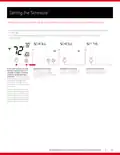




Setting the Schedule*
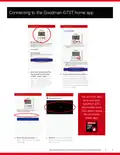
*Setting up a daily schedule can be accomplished more easily using the Goodman home app
» A schedule automatically uses different heat and/or cool setpoints for different days of the week and different periods
of each day.
» The schedule repeats each week, and can have up to 4 schedule events per day, each with its own heat and
cool setpoints.
MODE
FAN
MODE
FAN
MODE
FAN
MODE
FAN
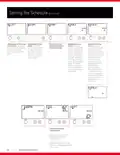
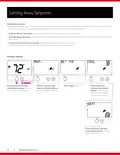
Press and hold the fan and
warmer (up) buttons for 2
seconds to enter schedule
mode for programming a
schedule. While in schedule
mode, press the mode button
to advance through each
setting for each day of the
week and each time period of
each day.
Schedule Instructions
Press the warmer (up)
button and cooler (down)
button to toggle the schedule
on and off.
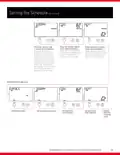
Schedule Instructions
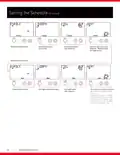
Press the mode button to
advance to the next step.
Schedule Instructions
Press the mode button to
advance to the next step.
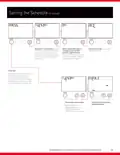
To exit schedule mode and
return to the home screen at
any time, press and hold the
mode button for 2 seconds.
The system will return to the
home screen automatically
after 2 minutes of inactivity.
GOODMAN BRAND GTST CONNECTED THERMOSTAT HOMEOWNER GUIDE
11

| General | Details |
|---|---|
| Name | Goodman GTST Connected Thermostat User Guide |
| Make | Goodman |
| Language | English |
| Filetype | PDF (Download) |
| File size | 0.98 MB |
 (1 votes, average: 5.00 out of 5)
 Loading...


Moes BHT-3000 Series Thermostat User Guide

Honywell UtilityPRO Series Thermostat User Manual

Honeywell RTH230B Programmable Electronic Thermostat User Guide

LG PREMTB10U Programmable Thermostat Instruction Manual

GENERAL LIFE Senna 270 Digital Room Thermostat User Manual

Honeywell RLV4305A1000 Programmable Thermostat Owner’s Manual

BEOK CONTROLS TGT70 WIFI Fan Coil Thermostat Owner’s Manual

DIGITEN DTC-101, DTC-151 Thermostat User Manual

BROUWLAND Brew Monk Fermenter Digital Thermostat Instruction Manual
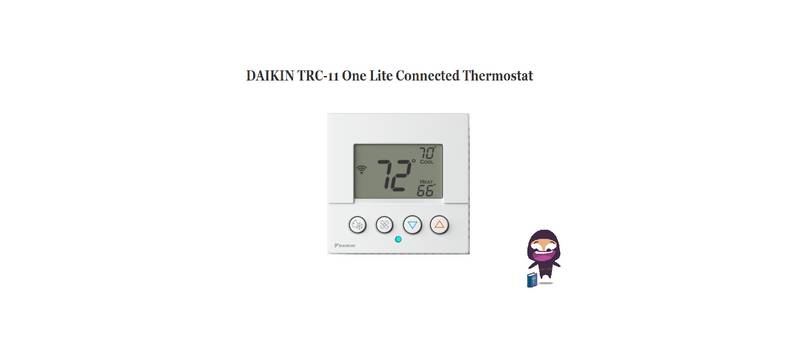
DAIKIN TRC-11 One Lite Connected Thermostat Instruction Manual