Home > StelPro > Stelpro STE362RNP Electronic Thermostat User Guide

Stelpro STE362RNP Electronic Thermostat User Guide

User’s guide  
“STE362RNP”  
Electronic thermostat  
For further information or to consult this guide online,  
please visit our Web site.  
INSSTE362RNP0711  
GeneralDetails
NameStelpro STE362RNP Electronic Thermostat User Guide
MakeStelPro
LanguageEnglish
FiletypePDF (Download)
File size0.33 MB
Download PDF
1 Star2 Stars3 Stars4 Stars5 Stars (1 votes, average: 5.00 out of 5)
Loading...
STELPRO STF362NP Floor Heating Thermostat Owner’s Manual
STELPRO ST302P Programmable Electronic Thermostat Owner’s Manual
STELPRO SAT402ZB Smart Thermostat User Guide
STELPRO ST252NPFF Non-Programmable Electronic Thermostat Owner’s Manual
STELPRO ST402PFF Programmable Electronic Thermostat Owner’s Manual
STELPRO ASMC402 Maestro Zigbee Smart Programmable Thermostat User Guide
STELPRO SIBTE12C Electronic Thermostat Owner’s Manual
STELPRO STZW402+ Electronic Thermostat for The Smart Home Owner’s Manual
STELPRO SIBTE13F Electronic Thermostat User Guide
STELPRO STCP MULTIPLE PROGRAMMING ELECTRONIC THERMOSTAT User Guide

Stelpro STE362RNP Electronic Thermostat User Guide
Get the free PDF manual for the Stelpro STE362RNP Electronic Thermostat User Guide and access setup steps, usage instructions, and troubleshooting tips. 👉 View online or download now to keep your thermostat running smoothly!

Stelpro STE362RNP Electronic Thermostat User Guide Overview

Summary of Contents

  • Page 1: User’s guide Electronic thermostat
  • Page 2: Before installing and operating this product, the owner and/or installer must read, understand and follow these instructions and keep them handy for future reference. If these instructions are not followed, the warranty will be considered null and void and the manufacturer deems no further responsibility for this product. The following instructions must be adhered to in order to avoid personal injuries or property damages, serious injuries and potentially fatal electric shocks. All electric connections must be made by a qualified electrician, according to the electric and building codes effective in your region. Do not connect this product to a supply source other than 120 VAC, 208 VAC or 240 VAC, and do not exceed the load limits specified. Protect the heating system with the appropriate circuit breaker or fuse. You must regularly clean dirt accumulations on the thermostat. Do not use fluid to clean thermostat air vent. Do not install thermostat in a wet place. When a part of the product specification must be changed to improve operability or other functions, priority is given to the product specification itself.
  • Page 3: Description The STE362RNP electronic thermostat can control electric heating units such as electric baseboards, convectors, or aeroconvectors. It maintains room temperature at the requested set point with high accuracy. This product is designed for installations with electrical current ranging from 2 A to 15 A (120/208/240 VAC). It features a user-friendly interface and allows for precise temperature control. This thermostat is not compatible with electrical current higher than 15 A or lower than 2 A with a resistive load, and it is not suitable for central heating systems. Parts supplied include one thermostat, two mounting screws, and two solderless connectors suitable for copper wires.
  • Page 4: Installation Selection of thermostat location The thermostat must be mounted on a connection box on a wall facing the heating unit, at around 1.5 m (5 feet) above the floor level, on a section of the wall exempt from pipes or air ducts. Do not install the thermostat in a location where temperature measurements could be altered. For example: - Close to a window, on an external wall, or close to a door leading outside. - Exposed directly to the light or heat of the Sun, a lamp, a fireplace or any other heat source. - Close or in front of an air outlet. - Close to concealed ducts or a chimney. - In a location with poor air flow or with frequent air drafts conditions.
  • Page 5: Thermostat mounting and connection Cut off power supply on lead wires at the electrical panel to avoid any risk of electric shock. Ensure that the air vents of the thermostat are clean and clear of any obstruction. Using a screwdriver, loosen the screw retaining the mounting base and front part of the thermostat. Remove the front part of the thermostat from the mounting base by tilting it upward. Align and secure the mounting base to the connection box using the two screws supplied.
  • Page 6: Take the wires from the wall through the hole at the base of the thermostat and connect them using the supplied solderless connectors. When making the connection with aluminum wire, make sure that you are using connectors identified CO/ALR. The thermostat wires do not have polarity. Reinstall the front part of the thermostat on the mounting base and tighten the screw at the bottom of the unit. Turn on the power. Set the thermostat to the desired setting.
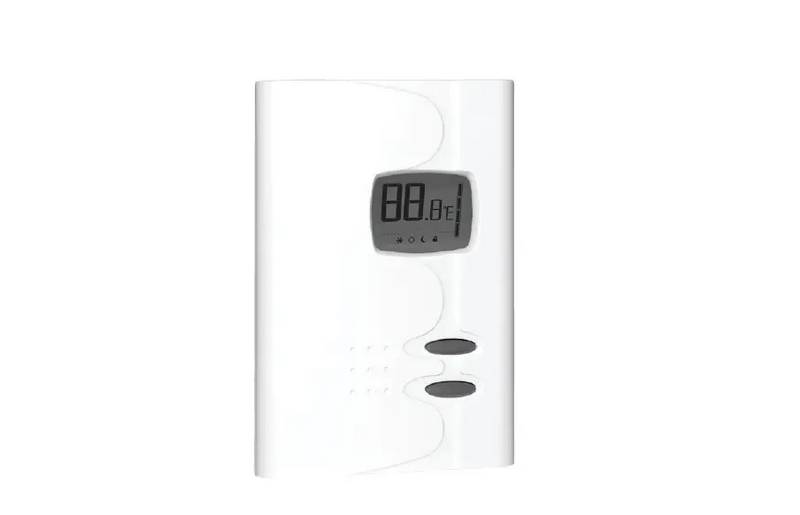
  • Page 7: Operation When powering on for the first time, the thermostat is initially set to ‘Day’ mode. The temperature is displayed in Celsius and is set at 21 degrees by default. The figures displayed above the pictogram indicate the temperature set point. It can be displayed in degrees Celsius or Fahrenheit. To adjust the set point, just press down the top button to increase the value, or the bottom button to decrease it. Set points can be adjusted by increments of 0.5°C or 1°F. The minimum set point is 3°C (37°F), and the maximum set point is 30°C (86°F). In Day mode, you can turn off the thermostat by lowering the set point below 3°C.
  • Page 8: The thermostat includes a Day mode and a Night mode, both of them having their own independently adjustable and recorded set point. The standard factory set point adjustment is 21°C (70°F) for the Day mode, and 18°C (64°F) for the Night mode. The current Day/Night mode selection is indicated on the display by the Sun or Moon icon. To manually switch from one mode to the other, simultaneously press down the two buttons and release them immediately. The Night mode features a timer that automatically returns to the Day mode after a selectable time period. The standard factory adjustment of the timer is 8 hours. The thermostat will automatically return to Day mode 8 hours after being switched to Night mode. Before bedtime, the Night mode temperature set point will be activated by switching manually to the Night mode. The thermostat will automatically return to the Day mode at the end of the night. The Day mode temperature set point, which is higher, will become effective at this time.
  • Page 9: Night mode timer adjustment procedure Adjust the Day/Night mode set points at the desired temperatures. Switch from one mode to the other by pressing down the two buttons simultaneously. From the Night mode, press down the two buttons for more than 3 seconds until the Moon icon blinks. Adjust the timer by pressing the top button to increase or the bottom button to decrease the value. The adjustment range is from 1 hour to 999 hours. Release the buttons and wait for 5 seconds to exit the adjustment function. The Night mode timer will be automatically reinitialized when switching from Day mode to Night mode. The timer is reinitialized when its value is adjusted. To automatically return to Night mode, the Smart mode must be selected. The Smart mode allows alternating between Day/Night modes over a 24-hour period.
  • Page 10: The mode timer is set at 8 hours, the thermostat will be operating in the Night mode for 8 hours at the night temperature set point. Then, it will return to the Day mode for 16 hours operating at the day temperature set point. At the end of the 24-hour cycle, the thermostat will return to the Night mode, and the cycle will start again. The 24-hour cycle starts with the Night mode as soon as the Smart mode is activated. The normal course of a cycle in the Smart mode includes Night mode and Day mode. Adjustment procedure of the Smart mode involves adjusting the Day/Night set point at desired temperatures. To switch modes, press down the two buttons simultaneously and release them immediately. The Night mode timer adjustment range is from 1 hour to 23 hours in the Smart mode. If you set the timer to any value exceeding 23 hours, it will be impossible to activate the Smart mode. Activate the Smart mode by simultaneously pressing down the two buttons for at least 3 seconds.
  • Page 11: When the adjustment is completed, release the buttons and wait for 5 seconds to exit the adjustment function. It is always possible to manually change the Day/Night mode during a 24-hour cycle. Any manual return to the Night mode will re-initialize the Night mode timer to the latest value recorded, which modifies the cycle in progress. At the end of the 24-hour cycle, the thermostat will return to the Night mode and start a new cycle. It is not necessary to readjust the Smart mode when a manual change is made to the Day/Night mode. When turning back on after being powered off, the automation of the Day/Night modes is deactivated. If previously activated, the icon will blink until a button is pressed. The thermostat can display the ambient temperature and the set point in degrees Celsius or Fahrenheit.
  • Page 12: Selection procedure for degree Celsius/Fahrenheit display. From the Day mode, simultaneously press down the two buttons for more than 3 seconds. Press down the top button to switch from degrees Celsius to degrees Fahrenheit, and conversely. The degree Celsius or Fahrenheit symbol will be displayed. When the adjustment is completed, release the buttons and wait for 5 seconds to exit the adjustment function. The thermostat controls the temperature of the ambient air with precision. When the heating comes on or shuts off, it is normal to hear a click. This noise is caused by the relay opening or closing, depending on the situation.
  • Page 13: Programmable heating cycle allows the length of a heating cycle to be adjusted. To activate this setting, the thermostat should be in Day mode and the user must press down on the two buttons for 20 seconds. The pictogram displaying the degrees will blink after three seconds and a Lock icon will appear or disappear depending on the setting. After 20 seconds, the LCD screen will display the number of minutes for a heating cycle, which can be adjusted between 8 and 15 minutes. The heating power indicator shows the level of power used to maintain the temperature as a percentage indicated by the number of bars in the thermometer. 4 bars indicate 75% to 100% power, 3 bars indicate 50% to 75%, 2 bars indicate 25% to 50%, 1 bar indicates 1% to 25%, and 0 bar indicates no heat. The frost-free warning is indicated by the Snowflake icon when the temperature set point is between 3°C (37°F) and 5°C (41°F). A minimum temperature will be maintained to ensure frost control.
  • Page 14: Security mode It is possible to impose a maximum temperature set point by activating this mode. Procedures to activate the Security mode To activate the Security mode, from the Day mode adjust the day setpoint to the desired maximum temperature. From the Day mode, simultaneously press down the two buttons for more than 13 seconds until the icon displays. Release the buttons. The thermostat is now locked. Procedures to deactivate the Security mode To deactivate Security mode, start by cutting thermostat power at circuit breaker and wait at least 20 seconds. Turn thermostat power back on and the icon will blink for a maximum of 5 minutes. Simultaneously press both buttons for 13 seconds. After 13 seconds, the icon will disappear indicating that the Security mode is deactivated.
  • Page 15: Fan mode activation is similar to Celsius/Fahrenheit adjustment. To activate or deactivate Fan mode, press both buttons simultaneously for at least 3 seconds in Day mode. Once the 3 seconds have passed, C or F will blink; release the buttons. Press the bottom button to activate or deactivate Fan mode, indicated by the fan pictogram turning on or off. When Fan mode is activated, the minimum heating time for a complete 15-minute cycle is established at 5 minutes. If the thermostat reaches a differential greater or less than the requested 2 degrees, it will shut off before the minimum heating time of 5 minutes ends. Deactivating Fan mode returns the thermostat to the previously programmed heating cycle. You can exit Fan mode by not pressing any buttons for 5 seconds. The thermostat saves parameters in non-volatile memory to recover them after being shut off. Saved parameters include Day/Night settings, Smart mode, Security mode state, Celsius/Fahrenheit mode, and heating cycle details.
  • Page 16: Smart mode is not automatically reactivated when the thermostat is turned on. The icon blinks to warn the user that the mode was previously activated but is no longer active. Day/Night mode is recovered only if Smart mode was previously deactivated. If Smart mode was active before power shut off, Day mode is automatically reactivated. Security mode is reactivated if it was activated before being shut off. The icon will blink for 5 minutes when Security mode is reactivated. It is possible to deactivate Security mode by pressing the top and bottom buttons simultaneously for 13 seconds. If Security mode is not deactivated, it will stay activated and the icon will stop blinking.
  • Page 17: Troubleshooting In normal operating conditions, the thermostat housing can reach nearly 40°C at maximum load. That is normal and will not affect the effective operation of the thermostat. Check if the thermostat is properly connected. Refer to the installation section. Heating is always on. Heating does not run even if the thermostat indicates it is on. Check the power supply at the electrical panel. Check if the heating unit has a switch. If so, ensure that this switch is turned on. The display does not come on. The thermal protection of the heating unit has opened due to overheating. Check if the heating unit is in good condition of operation. The load is lower than the minimum load. Install a heating unit that is within the load limits of the thermostat. Check the presence of an air stream or a heat source near the thermostat, and correct the situation. The displayed ambient temperature is incorrect.
  • Page 18: The display indicates E1 or E2. Faulty thermal sensor. Contact the customer service. Possibility of a bad contact. Check thermostat wirings. Refer to the installation section. Weak luminosity of the display. If you are unable to solve the problem after having verified these points, please communicate with our customer service.
  • Page 19: Technical specifications Supply voltage: 120/208/240 VAC, 50/60 Hz Maximum electrical current with a resistive load: 15 A 3600 W @ 240 VAC 3120 W @ 208 VAC 1800 W @ 120 VAC Temperature display range: 3°C to 40°C (37°F to 99.5°F) Temperature display resolution: 0.5°C (0.5°F) Temperature set point range: 3°C to 30°C (37°F to 86°F) Temperature set point increments: 0.5°C (1°F) Storage temperature: -40°C to 50°C (-104°F to 122°F)
  • Page 20: Limited warranty This unit has a 3-year warranty. If at any time during this period the unit becomes defective, it must be returned to its place of purchase with the invoice copy. The warranty is valid only if the unit has been installed and used according to instructions. If the installer or user modifies the unit, he will be held responsible for any damage resulting from this modification. The warranty is limited to factory repair or replacement of the unit. The warranty does not cover the cost of disconnection, transport, and installation.