
Wengart TP808 Low Voltage Thermostat User Guide


◆7days 4 time periods scheduling. Set the target heating
and cooling temperature respectively.
Low Voltage Thermostat
Model:TP808
User Guide
◆Both Vacation mold and hold duration mode available
for comfort and energy saving
◆Temperature display of Celsius or Fahrenheit scale
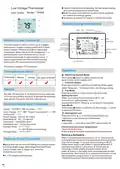
Home screen quick reference
Energy saving
Lock
Week
WIFI
Hold mode
Time
System Mode
About your new thermostat
Time Periods
Room Temp
This thermostat is used to control up to 3 stages
heating and 2 stages cooling system with 8 types
control system, EM heat activation, adjustable
compressor delay time and O/B changeover. It is
with tempered touch sensitive button, quick
connecting terminals to save installer’s time. 7
days programmable and four modes everyday
make users’ life convenient and comfortable.
Comfirm button
Running Mode
Reminder Symbols
Set Temp
Compressor delay
Fan
Fan mode display
Thermostat passed FCC standard.
Operation
Thermostat box you will find
:Switching System Mode
Thermostat
Manual
Screws
QC pass certificate
Short press button to select system mode:
HEAT,COOL,AUTO,EMER,OFF.
:Comfirm button
Press this button to comfirm your settings.Press again
select Schedule、Permanent Hold and Energy saving
:Fan Mode
Service
Press this button to select fan on,auto and cycle
Setting the time
When connecting the thermostat to Wi-Fi, the
time will sync automatically. If not
We offer the warranty of 18 months from the sales day.
If it is not the problem of quality or beyond the warranty
time, we will charge for the after-sale service.
connecting to Wi-Fi,Press
Auto Mode
to set second-hour-week
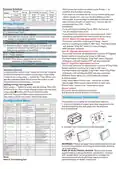
Technical Data of your thermostat
Short press
to enter AUTO mode
button to select Auto.Short press button
Sensor:NTC3977 10K Accuracy:±1℉
Temp. Range:41℉-95℉Power Consumption:<1.5W
Timing error:<1%
Power Supply:AC24V, 50 ~60Hz
Shell Material:PC (Fireproof)
Dimension:132x90x23.5mm
Installation box:US Standard box
Ambient Temp.:0 ℉~ 113℉,
5 ~ 95%RH(Non condensing)
Storage Temp:-41℉~ 140℉
:Setting the Lock
Press and hold
7seconds to lock/unlock your thermostat
WIFI reset
button at the same time over
Long press
seconds to reset WIFI when power off
Check external sensor temperature
(external sensor only)
Press and
to check external sensor temperature
Setting a Schedule
When connecting the thermostat to Wi-Fi, the schedule
is programmed based on time and temperature set points
from the Sensi app. If you are not connecting to Wi-Fi,
follow these steps to set a basic 7 day schedule with 4
Features of your thermostat
◆Apply with various kind of heating and cooling system.
Including Single stage, Multi-stage And Heat Pump
(Up to 3-stage heat, 2-stage cool, with Aux.
Or Emergency heat)
mandatory set points.Long press
7secends to enter weekly program funtion.Short
press button to set week-hour-cool temperature-heat
button above
temperature ,Short press
the parameters Long press
to return back.Press+/- to set
at the same time over
◆4’’ LCD display with backlight
7seconds to go back factory weekly program settings


| General | Details |
|---|---|
| Name | Wengart TP808 Low Voltage Thermostat User Guide |
| Make | WENGART |
| Language | English |
| Filetype | PDF (Download) |
| File size | 0.89 MB |
 (1 votes, average: 5.00 out of 5)
 Loading...

Wengart TP808-S-2 Low Voltage Thermostat User Guide

Wengart TP808-3 Heat Pump Thermostat User Guide

Wengart TP808-3 7 Day Programmable Thermostat User Manual

Wengart TP808 Wi-Fi Low Voltage Thermostat User Guide

Wengart WG603 Home Smart Thermostat User Guide

Wengart TP808 User Guide: Specifications
| Power supply | AC24V, 50 ~60Hz |
| Setpoint range | 41℉ / -95℉ |
| Sensor | NTC3977 10K Accuracy±1℉ |
| Operating temperature | 0 ℉~ 113℉ |
| Storage temperature | -41℉~ 140℉ |
| Dimensions | 132x90x23.5mm |
Wengart TP808 compared with other HVAC thermostats
| Specification | Wengart TP808 | Toupwell TP808 | Aube TH150 VAV | Dettson R02P033 |
|---|---|---|---|---|
| Power supply | AC24V, 50 ~60Hz | AC24V, 50 ~60Hz | 24 VAC | 24VAC 50/60Hz |
| Setpoint range | 41℉ / -95℉ | 41℉ / -95℉ | 10°C to 35°C (50°F to 95°F) | 5-37°C |
| Dimensions | 132x90x23.5mm | 86x86x13.3mm | 69 x 118 x 27 mm (2.7 x 4.6 x 1.0 in.) | 136 x 94 x 26mm |
Other Wengart TP808 manuals
More Wengart thermostat manuals

sinope TH1500ZB Smart Double Pole Thermostat Installation Guide

Danfoss RT 107 Series Thermostat Installation Guide

bticino SX Series Smart Thermostat Installation Guide

Coplax PH1001T Portable Electric Space Heater with Thermostat Instruction Manual

GENERAL SENNA 300 Smart Room Thermostat User Manual

LUX TX9600TSA Smart Temp Universal 7 Day Programmable Touchscreen Thermostat Instruction Manual
Haswill STC-8080A Thermostat User Guide

KETOTEK KTF0163 Series Smart Thermostat Instruction Manual

qunda QD-HVAC15 WIFI Touch-Screen Programmable Thermostat Instruction Manual

VICONICS VTR8350A5500B Fan Coil Unit Thermostat User Manual