
SALUS SQ610 Smart Thermostat User Guide
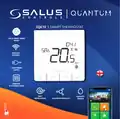


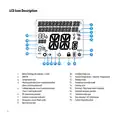
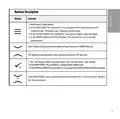
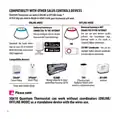
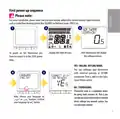


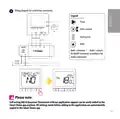



First power up sequence
Please note:
For easier installation, please make sure you have already added other devices to your ZigBee network,
such as Underfloor Heating Control Box (KL08RF) or Radiator heads (TRV’s) etc.
2
3
1
...then thermostat will display
the software version.
...display will show all icons...
To power on the Thermostat you
have to connect it to the 230V power
then...
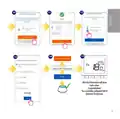
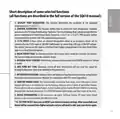
YES - ONLINE, OFFLINE MODE.
You can configure your thermostat
with universal gateway or CO10RF
coordinator. That is, add it to the Salus
Smart Home system.
4
5
NO - STANDALONE.
Thermostat work as a standalone device
for pump, boiler, receivers etc. That is, you
can directly connect thermostat to selected
device without any network system. You
can add it later anytime.
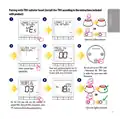
Now, choose your language by
” or „ ” buttons. Confirm
your language by button.
„
7

| General | Details |
|---|---|
| Name | SALUS SQ610 Smart Thermostat User Guide |
| Make | SALUS |
| Language | English |
| Filetype | PDF (Download) |
| File size | 1.12 MB |
 (1 votes, average: 5.00 out of 5)
 Loading...


SALUS IT800 WIFI Smart Thermostat Installation Guide

SALUS 091FLRF Wireless Room Thermostat User Guide

SALUS Thermostat and Smart Plug Installation Guide

SALUS Thermostat Sensor TS600 User Guide

SALUS Programmable Wired Thermostat VS30W/VS30B Installation Guide

SALUS Wired Thermostat Installation Guide

SALUS Wired Digital Thermostat – Non-programmable HTRS230 User Manual

SALUS RT520 Radiator Thermostat User Guide

SALUS RT310 Thermostat User Manual

SALUS Thermostat RT520 User Manual


Chytre Vypinace HC-T020-EWF Series Wireless Thermostat User Manual

MYSAir Roma Monochrome Backlit Touch Thermostat User Manual

Honeywell RCH9310 Lyric Round WiFi Thermostat User Guide

Roth Minishunt Plus Thermostat and Capillary Sensor Installation Guide

American Standard ACONT102 Non Programmable Thermostat User Guide

Honeywell TH3110D1008 Non Programmable Digital Thermostat Instruction Manual

EBECO EB-Therm 500 Floor Heating Thermostat Instruction Manual

Unisenza 230V-24V Stats Wired and Wireless Thermostat User Manual

tuya Mi-750 WiFi Smart Thermostat Instruction Manual

HIVE 81351 Thermostat Mini for Heating Installation Guide