Home > Unisenza > Unisenza 230V-24V Stats Wired and Wireless Thermostat User Manual

Unisenza 230V-24V Stats Wired and Wireless Thermostat User Manual

Installation  
and user manual  
Heating and  
Cooling  
Smart, app  
connectivity  
Geo location  
5 year  
guarantee  
Unisenza PLUS - UFH Thermostat 230V/24V  
EN  
GeneralDetails
NameUnisenza 230V-24V Stats Wired and Wireless Thermostat User Manual
MakeUnisenza
LanguageEnglish
FiletypePDF (Download)
File size12.79 MB
Download PDF
1 Star2 Stars3 Stars4 Stars5 Stars (1 votes, average: 5.00 out of 5)
Loading...
Unisenza Plus Stats Wired and Wireless Thermostat Instruction Manual

Unisenza 230V-24V Stats Wired and Wireless Thermostat User Manual
Get the free PDF manual for the Unisenza 230V-24V Stats Wired and Wireless Thermostat User Manual and access setup steps, usage instructions, and troubleshooting tips. 👉 View online or download now to keep your thermostat running smoothly!

Unisenza 230V-24V Stats Wired and Wireless Thermostat User Manual Overview

Summary of Contents

  • Page 1: Installation and user manual Heating and cooling Smart, app connectivity Geo location 5 year guarantee Unisenza PLUS - UFH thermostat 230V/24V
  • Page 2: Unisenza PLUS - UFH Thermostat 230V/24V Installation and user manual
  • Page 3: Safety warnings Pictograms used in this manual Purpose of the manual Intended use Safety regulations Technical data Dimensions Pack contents Overview Button usage
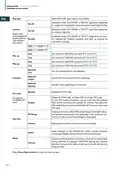
  • Page 4: Unisenza PLUS - UFH Thermostat 230V/24V Installation and user manual Safety warnings Pictograms used in this manual include hazard signs, prohibition signs, and mandatory signs to convey the importance of the information provided. Purpose of the manual is to guide the qualified installer in the installation, maintenance, and proper and safe use of the equipment. It is mandatory for all personnel involved in the installation, maintenance, and use of the equipment to read this manual. Contact the manufacturer if any points are unclear or difficult to understand. This manual contains information regarding technical specifications of the equipment and installation and connection instructions. UFH Thermostat 230V/24V are AC-powered room thermostats ideally for hydronic radiant heating/cooling systems. It has a built-in relay for a wired connection to the underfloor heating wiring centre for the control of thermal actuators. The thermostat communicates with an Unisenza Plus Gateway protocol to allow remote access from a mobile app. Features include a large negative LCD display with backlight and support for heating and heating/cooling control.
  • Page 5: Unisenza PLUS - UFH Thermostat 230V/24V Installation and user manual Built-in humidity sensor Operation modes include Schedule, Manual, Temporary override, Holiday and OFF with frost protection. 7-day, 5/2-day or single-day programming options. Optimum start/stop control strategies for energy efficiency. Selectable TPI or Span control algorithm. Safety regulations. Before proceeding with any installation or use, it is necessary to thoroughly inspect the product. All installation, assembly, electrical connections to the mains and maintenance must be performed only by qualified personnel. Disconnect the equipment from the mains before installing or maintaining it.
  • Page 6: Unisenza PLUS - UFH Thermostat 230V/24V Installation and user manual Technical data Temperature scale: °C or °F Temperature display range: 5 °C - 45 °C Temperature measurement accuracy: +/- 0.5 °C Humidity measurement accuracy: +/-5% @ 20%-80% RH Firmware update: Over the air firmware update capability Wireless communication: ZigBee 3.0, 2.4GHz Power supply: 230Vac +/-10% 50Hz Operating environment: Indoor, residential & commercial Ingress protection rating: IP30 Environmental requirement: RoHS compliance
  • Page 7: Unisenza PLUS - UFH Thermostat 230V/24V Installation and user manual Dimensions Pack contents Wall mount bracket UFH thermostat 230V/24V Plate fixing screw Fixing wall plug for plate fixing Bridge
  • Page 8: Unisenza PLUS - UFH Thermostat 230V/24V Installation and user manual Overview of UFH Thermostat 230V/24V LCD display Confirm button Button + Button - Menu / Back button Electric connections Button usage Function of buttons in main screen and menu.
  • Page 9: Unisenza PLUS - UFH Thermostat 230V/24V Installation and user manual Display icons Icon description Text bar (9 character) Time Humidity Weekday Schedule number Calendar Permanent hold External connection (via S1/S2 input) Setting Holiday mode Temperature display Heating Cooling Demand (heating or cooling) indication RF connection indicator Internet connection indicator Lock Frost protection (OFF mode) Battery status (not used)
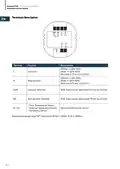
  • Page 10: Unisenza PLUS - UFH Thermostat 230V/24V Installation and user manual Terminals Description Live Input: Wire size 0.75 mm² to 2.5 mm² Neutral Input: Wire size 0.75 mm² to 2.5 mm² Common Terminal: 3(1)A, Free Contact, Wire size 0.75 mm² to 2.5 mm² Normal Open Terminal: 3(1)A, Free Contact, Wire size 0.75 mm² to 2.5 mm² Floor Temperature Sensor External Temperature Sensor: Wire size 0.75 mm² to 1.0 mm² Occupancy Sensor Temperature sensor type: NTC 10k Ohm B25/50 = 3950K, R25 = 10kOhm
  • Page 11: Unisenza PLUS - UFH Thermostat 230V/24V Installation and user manual The management of the UFH Thermostat 230V/24V is also possible through a dedicated app. The app allows configuration and management of paired devices. To download the app, connect to the store of your device. You can also access the installation page using QR codes. At the rear of the UFH Thermostat 230V/24V, there is a sticker indicating the device data.
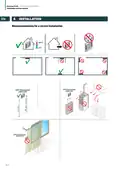
  • Page 12: Unisenza PLUS - UFH Thermostat 230V/24V Installation and user manual Recommendations for a correct installation
  • Page 13: Unisenza PLUS - UFH Thermostat 230V/24V Installation and user manual Fixing the bracket to the wall When fastening, be very careful not to use too much force when tightening the supplied screws.
  • Page 14: Unisenza PLUS - UFH Thermostat 230V/24V Installation and user manual Fixing the thermostat to the bracket
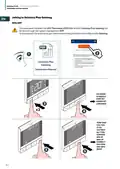
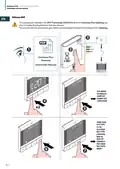
  • Page 15: Unisenza PLUS - UFH Thermostat 230V/24V Installation and user manual Main screen operation: The LCD backlight is off during standby in normal operation. Press any key to turn on the LCD backlight before performing other user operations. The LCD backlight will turn off automatically when no key press for 15 seconds. Power up: The ignition of the UFH Thermostat 230V/24V takes place by inserting it into the housing fixed to the wall. Display power up: Firmware, Language, ZigBee network (NO or YES). If YES was chosen at the CONNECT request, remember to activate the association mode in the Unisenza Plus Gateway. If NO has been chosen, it will be possible to pair the device at a later time by accessing the menu. It is also possible to associate the thermostat from the APP using the ADD NEW DEVICE function.
  • Page 16: Unisenza PLUS - UFH Thermostat 230V/24V installation and user manual. The association between the UFH Thermostat 230V/24V and the Unisenza Plus Gateway can be done through the system management app. To proceed with the association you need to have already installed and configured the Gateway. Unisenza Plus Gateway instruction manual includes various settings such as SYS MODE, SCHEDULE, USER SET, ADMIN SET, and LANGUAGE. Additional settings include TEMP DISP, SYS TYPE, VLV PROT, RLY TYPE, CONTROL, MIN SP, MAX SP, CONNECT, PIN CODE, DEV INFO, and RESET.
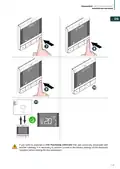
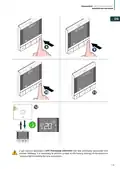
  • Page 17: Unisenza PLUS - UFH Thermostat 230V/24V Installation and user manual If you want to associate a UFH Thermostat 230V/24V that was previously associated with another Gateway, it is necessary to perform a reset to the factory settings of the electronic regulator before making the new association.
  • Page 18: Unisenza PLUS - UFH Thermostat 230V/24V Installation and user manual The association between the UFH Thermostat 230V/24V and the Unisenza Plus Gateway can also be made directly between the two devices. To proceed with the association you need to have already installed and configured the Gateway. Instruction Manual SYS MODE SCHEDULE USER SET ADMIN SET LANGUAGE TEMP DISP SYS TYPE
  • Page 19: Unisenza PLUS - UFH Thermostat 230V/24V Installation and user manual If you want to associate a UFH Thermostat 230V/24V that was previously associated with another Gateway, it is necessary to perform a reset to the factory settings of the electronic regulator before making the new association.

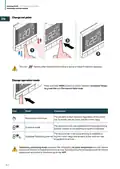
  • Page 20: Unisenza PLUS - UFH Thermostat 230V/24V Installation and user manual The icon flashes when Optimum Start/Stop is active or Valve Protection operates. Press and hold MENU button to switch between Schedule/Temporary override and Permanent Hold mode. The set point is kept constant regardless of the schedule. To modify the set point, use the + and - keys. Permanent Hold mode keeps the set point constant. Schedule mode indicates the set point established in the programming. The set point set in the programming is modified using the + and - keys. Temporary scheduling mode overrides the scheduling set point temperature. Temporary override will remain active until the next scheduling time slot arrives. Subsequently, the temperature will be established according to the planning on the APP.
  • Page 21: Unisenza PLUS - UFH Thermostat 230V/24V Installation and user manual Change system mode Cool mode is available only when SYS TYPE is HEAT+COOL. Press Menu/Back button to return to main screen.
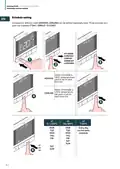
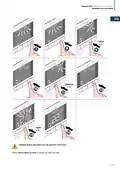
  • Page 22: Unisenza PLUS - UFH Thermostat 230V/24V Installation and user manual Schedule setting Schedule for different mode (heating, cooling) can be defined separately here. Three schedule programs are available (7 day / single / 5+2 day). When sys mode is heat, temperature set point is set for each time slot. When sys mode is cool, temperature set point is set for each time slot. 7 days, 5 + 2 days, single days. Every day run the same schedule.
  • Page 23: Unisenza PLUS - UFH Thermostat 230V/24V Installation and user manual Repeat above procedure to set up to 6th time slot. Press Menu/Back button to return to main screen.
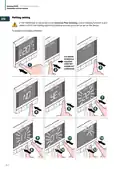
  • Page 24: Unisenza Plus - UFH Thermostat 230V/24V Installation and user manual Holiday setting If the thermostat is not joined to the Unisenza Plus Gateway, a local Holiday function is provided in which the holiday start/end schedule and set point can be set on the device. To enable the holiday schedule: SYS MODE SCHEDULE HOLIDAY USER SET ADMIN SET LANGUAGE
  • Page 25: Unisenza PLUS - UFH Thermostat 230V/24V Installation and user manual If current mode is HEAT, this setting is for heating set point; if current mode is COOL, this setting is for cooling set point. Press Menu/Back button to return to main screen.
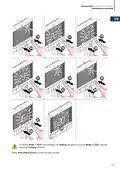
  • Page 26: Unisenza PLUS - UFH Thermostat 230V/24V Installation and user manual To disable the holiday schedule: During holiday mode, the thermostat controls using the holiday set point and the set point cannot be changed. The holiday mode will be stopped by holiday end schedule or by manual. To manually stop the holiday mode, press and hold MENU button and STOP HOLIDAY is displayed. Choose Yes to confirm ending holiday mode. After the holiday mode, the device returns to permanent hold mode if it was in permanent hold mode before entering holiday mode, otherwise it returns to schedule.
  • Page 27: Unisenza PLUS - UFH Thermostat 230V/24V Installation and user manual Key lock Lock the keypad Unlock the keypad
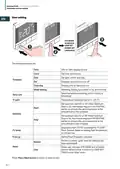
  • Page 28: Unisenza PLUS - UFH Thermostat 230V/24V Installation and user manual User setting Editable settings include time, date, and daylight saving time options. Temperature display unit can be set to Celsius or Fahrenheit. Temperature calibration can be adjusted up to +/- 2.5 °C. Optimum start feature allows the thermostat to turn on heating earlier. Optimum stop feature allows the thermostat to turn off heating earlier. Frost protection set point can be defined. A power cycle reset can be performed while keeping all settings unchanged. User settings, SYS MODE, and schedule can be reset to default values. Press Menu/Back button to return to the main screen.
  • Page 29: Unisenza PLUS - UFH Thermostat 230V/24V Installation and user manual Admin setting The editable settings are: Select temperature display interval at 0.5°C (1°F) or 0.1°C (0.2°F). Select HEAT ONLY or HEAT/COOL. Thermostat maintains temperature in the room and additionally prevents floor against overheating or overcooling. HIGH LMT (Floor high limit temperature for heating): Range from 11°C to 45°C. LOW LMT (Floor low limit temperature for heating): Range from 6°C to 40°C. PROT LMT (Floor protection limit temperature for cooling): Range from 6°C to 45°C. S1/S2 input can work in various configurations. When an external temperature sensor is connected, the thermostat will display temperature measured by this sensor. Select valve protection mode On or Off.
  • Page 30: Unisenza PLUS - UFH Thermostat 230V/24V Installation and user manual Select NO or NC type relay’s work mode Algorithm designed for underfloor heating Algorithm designed for radiator heating Set minimum HEATING set point (5°C to 34.5°C) Set maximum COOLING set point (5.5°C to 37°C) Join the thermostat to the gateway Enable the PIN code, and then SET a 4-digit PIN code Display the value of RSSI (Received Signal Strength Indicator) Reset everything back to the status same as the thermostat firstly unboxed
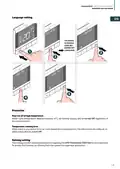
  • Page 31: Unisenza PLUS - UFH Thermostat 230V/24V Installation and user manual Language setting Heat cut off at high temperature: When room temperature exceeds 41°C, all heating outputs will be turned off. Temperature sensing error: The thermostat will notify all related output devices to turn off in case of a sensor error. Holiday setting: The holiday function allows the system to be suspended.
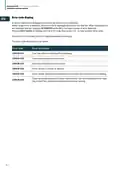
  • Page 32: Unisenza PLUS - UFH Thermostat 230V/24V Installation and user manual An error code will be displayed on the text bar when an error is detected. When a single error is detected, the error code is displayed directly on the text bar. When multiple errors are detected, the text bar displays XX ERRORS. Press the confirm button to display the first error code. The error code description is as below. Error 001: Lost link with the Unisenza Plus Gateway. Error 002: Internal temperature sensor error. Error 003: External temperature sensor error. Error 004: Floor sensor is broken or shorted.
  • Page 33: Unisenza PLUS - UFH Thermostat 230V/24V installation and user manual Over-the-air (OTA) software update operation. The UFH Thermostat 230V/24V upgrades its software automatically when there is a newer version available from the server. A valid connection to the gateway and the Internet is needed to allow the UFH Thermostat 230V/24V to download the new software image. All device functionality is maintained during the download and the update process, until the device restarts to activate the new software. When the thermostat is at low battery, the OTA process does not start. All settings and paired devices information are retained after the update. During power outage, the thermostat internal capacitor helps provide power to maintain the clock for a short period of time. Any type of maintenance must only be carried out by qualified personnel, trained and authorized by the Manufacturer. It is absolutely forbidden to open the device and try to repair it independently, this would result in a serious danger for the person as well as voiding any warranty. The manufacturer accepts no responsibility for any damage to property or people.
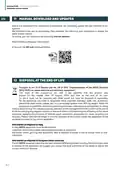
  • Page 34: Unisenza PLUS - UFH Thermostat 230V/24V Installation and user manual Due to the requirement for continuous improvement, we constantly update the user manuals of our systems. We invite you to periodically check whether the manual in your possession is always the latest written version. The mark of the crossed-out bin specifies that the product must be disposed of separately at the end of its useful life. All the appliances are made of recyclable metal materials in a percentage greater than 90% by weight. Make the equipment unusable for disposal by removing the power cable and any compartment or cavity closing device. It is necessary to pay attention to the management of this product at the end of its life by reducing any negative impacts on the environment. The illegal or incorrect disposal of the product entails the application of the penalties provided for by current legislation. In Italy, WEEE equipment must be delivered to collection centres or the dealer where you buy new equipment. The EU WEEE equipment directive has been adopted differently by each country.
  • Page 35: Unisenza PLUS UFH Thermostat 230V/24V Installation and user manual
  • Page 36: Every care has been taken in the creation of this document. No part of this document may be reproduced without the express written consent of Purmo Group. Purmo Group accepts no responsibility for any inaccuracies or consequences arising from the use or misuse of the information contained herein.