
Unisenza 230V-24V Stats Wired and Wireless Thermostat User Manual













Unisenza PLUS - UFH Thermostat 230V/24V
Installation and user manual
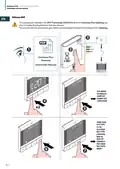
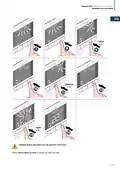
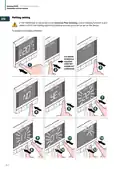
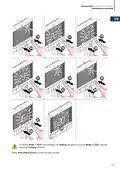
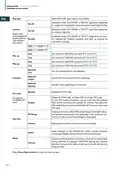
Admin setting
EN
SYS MODE
SCHEDULE
USER SET
3
ADMIN SET
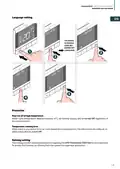
LANGUAGE
1
2
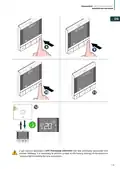
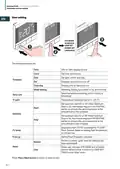
The editable settings are:
Select temperature display interval at 0.5°C (1°F) or 0.1°C
(0.2°F).
Temp disp
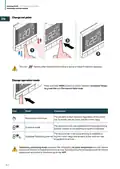
Sys type
Select HEAT ONLY or HEAT/COOL
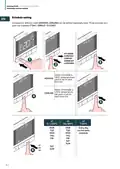
S1/S2 input is used for floor temperature sensor connec-
tion (eg. Temperature sensor with NTC 10k Ohm thermistor).
Thermostat maintains temperature in the room and addi-
tionally (by floor sensor) prevents floor against overheating
or overcooling which may cause discomfort or floor dam-
age. Below temperature limit can be set.
Floor
(Floor Sensor)
•
•
•
HIGH LMT (Floorhigh limit temperature forheating): Range
from 11°C to 45°C
LOW LMT (Floor low limit temperature for heating): Range
from 6°C to 40°C
PROT LMT (Floor protection limit temperature for cooling):
Range from 6°C to 45°C
S1/S2
Enable or dis-
able the use of
S1/S2 input for
connecting to
different sensors.
S1/S2 input can
work in various
configurations
S1/S2 input is used for external temperature sensor con-
nection (eg. Temperature sensor with NTC 10k Ohm ther-
mistor). When an external temperature sensor is connected,
the thermostat will display temperature measured by this
sensor and will ignore the internal built-in sensor. An ex-
ternal temperature sensor can be used when thermostat is
controlling room to which it doesn’t have access. If no ex-
ternal sensor is connected and S1/S2 input is enabled for
EXT SENSOR, the temperature will not be displayed.
External
(External sensor)
S1/S2 input is used for connecting an external volt-free
contact (e.g. hotel card, occupancy sensor). When S1/S2
contacts are closed, thermostat is maintained in current
operation model. When S1/S2 contacts are opened, ther-
mostat activates standby mode and Text Bar displays “UN-
OCCUPY”.
Occupancy
(Occupancy Sensor)
Select valve protection mode On or Off. If the relay is not
turned On for a week, the thermostat will turn On the heat-
ing to move the actuators for less than 3 minutes time, to
avoid the valve getting stuck or jamming.
Vlv prot
29

| General | Details |
|---|---|
| Name | Unisenza 230V-24V Stats Wired and Wireless Thermostat User Manual |
| Make | Unisenza |
| Language | English |
| Filetype | PDF (Download) |
| File size | 12.79 MB |
 (1 votes, average: 5.00 out of 5)
 Loading...

Unisenza Plus Stats Wired and Wireless Thermostat Instruction Manual


Honeywell Home DT4M Wired Room Thermostat User Manual

thermotouch 5235W Wi-Fi Programmable Thermostat Instructions

sinope Smart Low Voltage Thermostat TH1400WF Installation Guide

tado TRV3 Smart Radiator Thermostat User Guide

Danfoss RET230P Electronic Thermostat Instruction Manual

BEOK TDS23 Wi-Fi Fan Coil Thermostat Instruction Manual

Honeywell RLV3100 Digital Thermostat Installation Guide

ENGO CONTROLS E901 Wireless Programmable Smart Wifi Thermostat User Manual

MOES ZTRV-BY-100 Radiator Thermostat User Guide

EBECO EB-25 Regulator Thermostat Instruction Manual