
Unisenza 230V-24V Stats Wired and Wireless Thermostat User Manual













Unisenza PLUS - UFH Thermostat 230V/24V
Installation and user manual
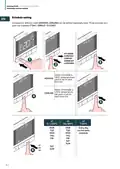
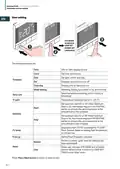
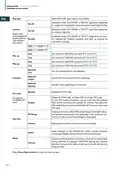
Rly type
Tpi ufh
Select NO or NC type relay’s work mode
EN
(available when SYS MODE is “HEAT”): algorithm designed
for underfloor heating (for heating systems with high inertia).
(available when SYS MODE is “HEAT”): algorithm designed
for radiator heating.
Control
Tpi rad
Select which
control algorithm
(available when SYS MODE is “HEAT”): algorithm for elec-
tric heating (for heating systems that heat up quickly an
cool down quickly).
mode is used for
room tempera-
ture control
Tpi elec
Span ¼° c (span ½° f)
Span ½° c (span 1° f)
Heat
Cool
Heat
Cool
Set minimum HEATING set point (5°C to 34,5°C).
Set minimum COOLING set point (5°C to 34,5°C).
Set maximum HEATING set point (5.5°C to 37°C).
Set maximum COOLING set point (5.5°C to 37°C).
Min sp
Max sp
Network
Join
Join the thermostat to the gateway.
Unjoin the thermostat from the gateway.
Identify which gateway is connected.
Disable the PIN code.
Network
Unjoin
Connect
Network
Identify
Disable
Pin code
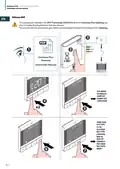
Enable the PIN code, and then SET a 4-digit PIN code.
In case PIN code is forgotten, power reset the thermostat.
Then within 2minutes from power on, use the manufacturer
PIN code 0682 to access the ADMIN SET menu to set a new
PIN code.
for access to
the ADMIN SET
menu
Enable
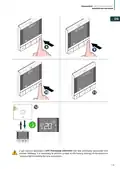
Display the value of RSSI (Received Signal Strength Indica-
tor) between thermostat and gateway. If the wireless con-
nection is lost, a lost link message is displayed.
RF Range
Version
Admin
Dev info
Reset
Display the software version of this thermostat
Reset settings in the ADMIN SET menu (Joined network
and paired ZigBee device information is maintained).
Reset everything back to the status same as the thermostat
firstly unboxed. It displays “WAITING” during the process
and then reboots with default settings to finish the factory
reset process.
Factory
Press Menu/Back button to return to main screen.
30

| General | Details |
|---|---|
| Name | Unisenza 230V-24V Stats Wired and Wireless Thermostat User Manual |
| Make | Unisenza |
| Language | English |
| Filetype | PDF (Download) |
| File size | 12.79 MB |
 (1 votes, average: 5.00 out of 5)
 Loading...

Unisenza Plus Stats Wired and Wireless Thermostat Instruction Manual


nest B08K2M13NY Thermostat E Smart Thermostat Installation Guide

SALUS Thermostat Sensor TS600 User Guide

DIGITEN WTC100 Wireless Programmable Thermostat User Manual

Thermogroup Thermotouch 4.3dC Dual Control Thermostat Installation Guide

tecnoswitch Raffaello 230 TE215VU Electronic Recessed Thermostat User Guide

ENSTO ECO16BT-J Floor Heating Thermostat User Guide

PREMTOOL BHT-009 GA ThermaHeat Smart Dial Wi-Fi Thermostat User Guide

SMT-2W5 Smart Temp Wifi Thermostat Instruction Manual

FantiniCosmi CH143E 230V Flush Mounting Weekly Programmable Thermostat User Manual

bryant Smart Thermostat User Guide