
Unisenza 230V-24V Stats Wired and Wireless Thermostat User Manual













Unisenza PLUS - UFH Thermostat 230V/24V
Installation and user manual
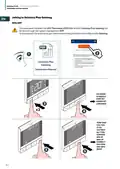
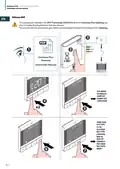
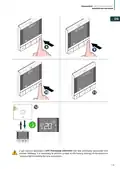
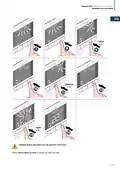
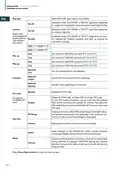
Change set point
EN
2
1
3
The icon
flashes when Optimum Start/Stop is active or Valve Protection operates.
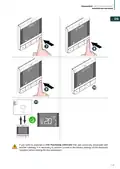
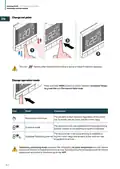
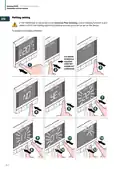
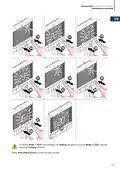
Change operation mode
Press and hold MENU button to switch between Schedule/Tempo-
rary override and Permanent Hold mode.
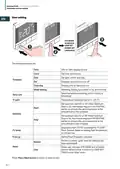
Icon
Mode
Explanation
The set point is kept constant regardless of the sched-
ule. To modify the set point, use the + and - keys.
Permanent Hold mode
Schedule mode
The set point is the one established in the programming
and the number of the planning program is indicated.
The set point set in the programming is modified us-
Schedule/Temporary override ing the + and - keys and remains active until the next
programming arrives.
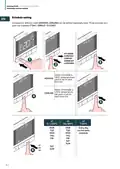
Temporary scheduling mode overrides the scheduling set point temperature and will remain
active until the next scheduling time slot arrives. Subsequently the temperature will be the one
established according to the planning on the APP.
20

| General | Details |
|---|---|
| Name | Unisenza 230V-24V Stats Wired and Wireless Thermostat User Manual |
| Make | Unisenza |
| Language | English |
| Filetype | PDF (Download) |
| File size | 12.79 MB |
 (1 votes, average: 5.00 out of 5)
 Loading...

Unisenza Plus Stats Wired and Wireless Thermostat Instruction Manual


Braebur 1230 Non Programmable Thermostat Instruction Manual

Danfoss ATF Clamp-On Pipe Mounting Frost Thermostat Installation Guide

GROHE 266962431 QuickFix Vitalio Comfort 250 Shower System with Thermostat Instruction Manual

KALOR TECH 603H Thermostat Instruction Manual

network thermostat X X7-WIFI Smart Touchscreen Thermostat Instructions

DEVI 140F1161 Intelligent Electronic Timer Controlled Thermostat Installation Guide

LENNOX L40 Smart Thermostat Owner’s Manual

OUIETwarmth UTN4-4999 Nonprogrammable Thermostat Instruction Manual

DEVIreg 610 Electronic Thermostat Installation Guide

GENERAL LIFE HT220S RF Digital Room Thermostat User Manual